

Plugin info
Maintenance & Compatibility
Maintenance score
Possibly abandoned • Last updated 3358 days ago • 1 reviews
Is Social Photo Gallery abandoned?
Possibly abandoned (last update 3358 days ago).
Compatibility
Similar & Alternatives
Explore plugins with similar tags, and compare key metrics like downloads, ratings, updates, support, and WP/PHP compatibility.
Description
This is a Polaroid image gallery plugins with the following features:
* Create sub folders and upload photos to subfolder. Each subfolder represents a separate photo album
* Must be possible to upload a cover photo for each album
* Must be possible to add a date, title, and description for each album
* Facility to add watermark to the images – watermark image must be able to be uploaded to the server. Must be possible to have a unique watermark for each album
* Must be possible to add a caption for each image
* On the front end, the cover photo for each album should be displayed on the main gallery page, like a set of polaroids, at different angles
* Users should be able to view each album by clicking on the cover photo
* Photos within albums should also be displayed like polaroids (i.e. like holiday snaps, not just in a straight line)
* Photos can be enlarged by clicking on them
* an icon or set of icons on each photo that allows you to share that photo on facebook and other social media sites or email it to someone
It would be ideal if this photo gallery worked in a similar way to Yootheme’s WordPress widgetkit Gallery http://www.yootheme.com/demo/themes/wordpress/2012/sync/?page_id=112 (see polaroid example)
Installation
Settings
After activation of plugins it will create a menu items on admin end named : Social Photo Gallery and this section contains for sub-menus
i. Show Albums: This section is used to show the listing of all albums with show, edit, delete actions
ii. Add album: This section is used to create new album by adding following information
a. Album title
b. Album description
c. Cover photo
d. Watermark
e. Date
iii. Add images: This section is used to add images to album either single or bulk.
iv. Gallery settings: This section is used to manage gallery settings with some of options as follows
a. Image per page
b. Social Media
c. Watermark transparency
d. Description class
e. Previous link text
f. Next link text
g. Back to list of albums
h. Back to gallery
i. Link class
Frequently Asked Questions
Installation Instructions
Settings
After activation of plugins it will create a menu items on admin end named : Social Photo Gallery and this section contains for sub-menus
i. Show Albums: This section is used to show the listing of all albums with show, edit, delete actions
ii. Add album: This section is used to create new album by adding following information
a. Album title
b. Album description
c. Cover photo
d. Watermark
e. Date
iii. Add images: This section is used to add images to album either single or bulk.
iv. Gallery settings: This section is used to manage gallery settings with some of options as follows
a. Image per page
b. Social Media
c. Watermark transparency
d. Description class
e. Previous link text
f. Next link text
g. Back to list of albums
h. Back to gallery
i. Link class
Is it woo commerce supported?
Yes. It is a woo commerce plugin.
Do I need to install woocommerce plugin?
Yes, you should install woocommerce plugin first.
Review feed
Screenshots
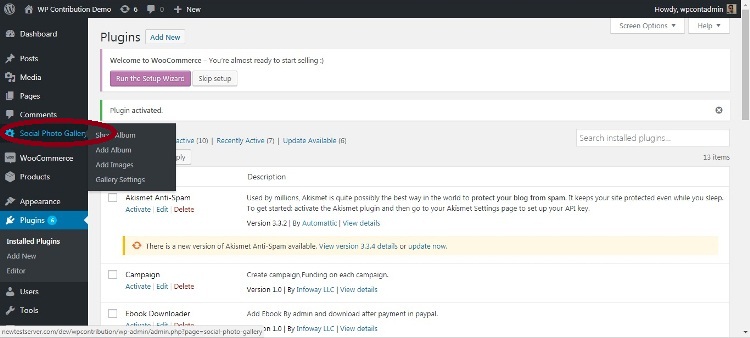
Social Photo Gallery
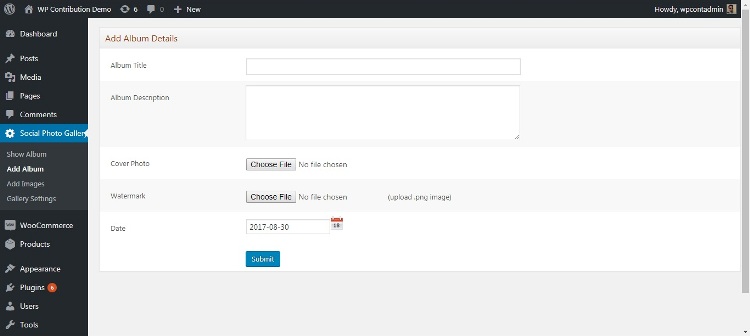
Add Album.
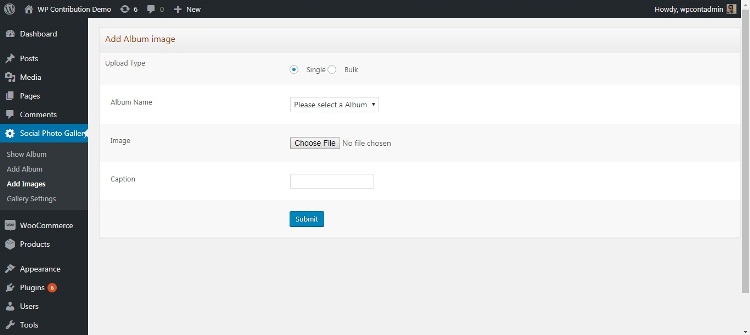
Add Images.
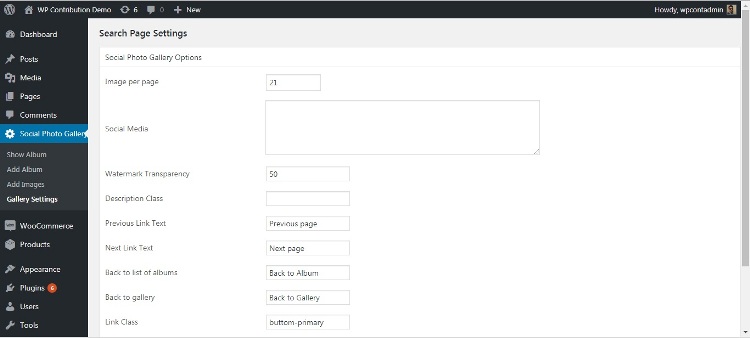
Gallery Setting.
Changelog
1
- Initial release.