

Project Management, Bug and Issue Tracking Plugin – Software Issue Manager
Best issue tracking, bug tracking and project management plugin. Easily manage tasks, stay organized, and track progress in WordPress.
Plugin info
Maintenance & Compatibility
Maintenance score
Stale • Last updated 238 days ago • 12 reviews
Is Project Management, Bug and Issue Tracking Plugin – Software Issue Manager abandoned?
Likely maintained (last update 238 days ago).
Compatibility
Similar & Alternatives
Explore plugins with similar tags, and compare key metrics like downloads, ratings, updates, support, and WP/PHP compatibility.
Description
LIVE DEMO SITE
Software Issue Manager Starter Demo Site
Powerful | Easy to use | Beautiful
Software Issue Manager(SIM) is a project based bug, issue, task and product feature request tracking system with extensive built-in and custom reporting capabilities. Premium editions are available.
If you need customer support ticketing system, try our WP Ticket plugin.
Why we developed this plugin
We, Emarket Design, believe that one of the most important factors affecting production of quality products is having a strong requirement management and analysis process. Most projects fail because organizations do not spend enough time on this stage of the project life cycle.
By developing a family of products primarily designed for software issue management, we wanted to meet the needs of like-minded organizations as well as ours and do our share of promoting importance of requirement management and analysis process.
SIM Concepts
Issues are the items you would like to track in your projects. Issues could be tasks, feature requests, bugs or pretty much any thing you need related to your projects.
SIM Projects are identified by a name and a version number. Projects may have unlimited number of issues. Issues can be shared by multiple projects. You can create manual issues from the admin backend by setting the author.
All Software Issue Manager editions support open, closed or mixed projects/issues. Frontend login and registration forms are available.
The SIM Starter edition uses built-in role based access:
* Admins can access all
* Editor as a project manager
* Author as team member
* Contributor as client
Introduction videos to get you started
Software Issue Manager – Enterprise Playlist
Software Issue Manager – Professional Playlist
RELATED PLUGINS YOU MAY LIKE
- WP Ticket Starter Powerful customer support and helpdesk ticketing system.
- Request a quote Starter The Best Sales Quoting software for WordPress.
- WP Easy Contact Starter Complete contact management solution to start, develop and grow your customer relationships.
- Employee Directory Starter The most complete employee directory software to power up your business.
- Employee Spotlight Starter Everything you need to display and manage staff profiles.
- Campus Directory Starter The Best Campus Directory for Higher Education Institutions.
Software Issue Manager – Enterprise Ready Software Project and Requirements Management
- Seamless Connectivity Anywhere
- Automated and streamlined project management – Premium feature (Included in Ent only)
- Eliminate Errors, Free Up Time – Premium feature (Included in Ent only)
- Secure Your Data: Tailor Access by Field with Software Issue Manager – Premium feature (Included in Ent only)
- Increased User Engagement with Powerful Frontend Editing – Premium feature (Included in Ent only)
- Enhanced Team Collaboration – Premium feature (included both Pro and Ent)
- Optimize your project management with Software Issue Manager – Premium feature
- Empower Tracking for Enhanced Project Management – Premium feature (Included in Ent only)
- Data-Driven Decisions, Delivered: Powerful Insights – Premium feature (Included in Ent only)
- Effortless Search, Powerful Results – Premium feature
- Enhanced Efficiency with customizable entry forms – Premium feature (included both Pro and Ent)
- Addressing Bottlenecks and Driving Project Success – Premium feature
- Instant access to recent issues, projects, and team members – Premium feature
- Empowering Teams with Software Issue Manager – Premium feature
- Swift Issue Resolution and Budget Control – Premium feature
- Harnessing Custom Fields in Software Issue Manager – Premium feature (included both Pro and Ent)
- Tailor Your Workflow: Effortless Customization with Software Issue Manager – Premium feature (included both Pro and Ent)
- Tailored Reporting: Unlock Custom Insights with Software Issue Manager – Premium feature (included both Pro and Ent)
- Effortless Collaboration: Software Issue Manager’s Commenting System – Premium feature
- Empowering Task Focus: Role-Based Content Access in Software Issue Manager – Premium feature
- Instant Notifications with Software Issue Manager – Premium feature
- Streamlined Visibility with Software Issue Manager’s Summary Views – Premium feature (included both Pro and Ent)
- Instant Project Insight: Software Issue Manager’s Dashboard – Premium feature
- Seamless Sync: Automate User Management with Active Directory Integration – Add-on
- Optimized Data Exploration: Leveraging Smart Search and Columns Addon – Add-on (included both Pro and Ent)
- Smooth Sailing with WooCommerce – Add-on
- Master Data Management with Software Issue Manager’s Import/Export Addon – Add-on (included both Pro and Ent)
- Powerful Issue Tracking for Your Digital Products – Add-on
- Streamlining Issue Reporting with Incoming Email Addon – Add-on (Included in Ent only)
PLUGIN LINKS
* Software Issue Manager Starter Demo Site
* Software Issue Manager Starter Documentation
* Software Issue Manager Professional Demo Site
* Software Issue Manager Professional Documentation
* Software Issue Manager Professional Changes
* Software Issue Manager Enterprise Demo Site
* Software Issue Manager Enterprise Documentation
* Software Issue Manager Enterprise Changes
This plugin’s code was generated by WP App Studio Professional WordPress Design and Development Platform based on the plugin’s design. You can develop a plugin like Software Issue Manager using WP App Studio plugin and sell its designs by becoming a SellDev author
Installation
The simplest way to install is to click on ‘Plugins’ then ‘Add’ and type ‘Software Issue Manager’ in the search field.
Manual Installation Type 1
- Login to your website and go to the Plugins section of your admin panel.
- Click the Add New button.
- Under Install Plugins, click the Upload link.
- Select the plugin zip file from your computer then click the Install Now button.
- You should see a message stating that the plugin was installed successfully.
- Click the Activate Plugin link.
Manual Installation Type 2
- You should have access to the server where WordPress is installed. If you don’t, see your system administrator.
- Copy the plugin zip file up to your server and unzip it somewhere on the file system.
- Copy the “software-issue-manager” folder into the /wp-content/plugins directory of your WordPress installation.
- Login to your website and go to the Plugins section of your admin panel.
- Look for “Software Issue Manager” and click Activate.
Frequently Asked Questions
Review feed
Screenshots
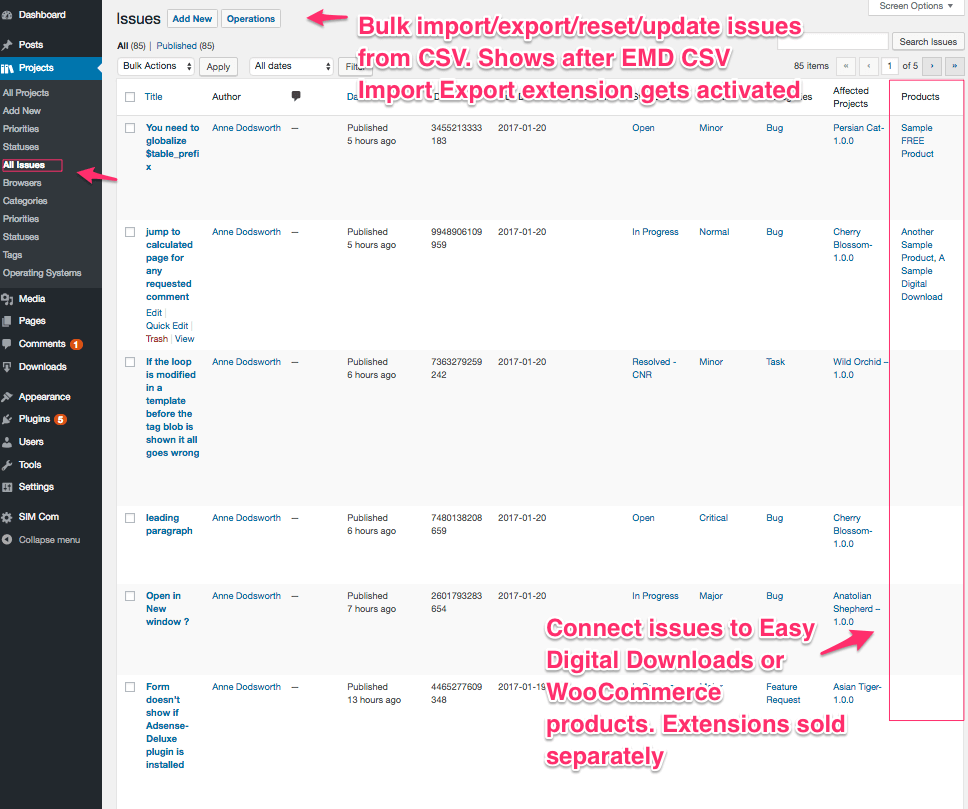
Issue List in admin area
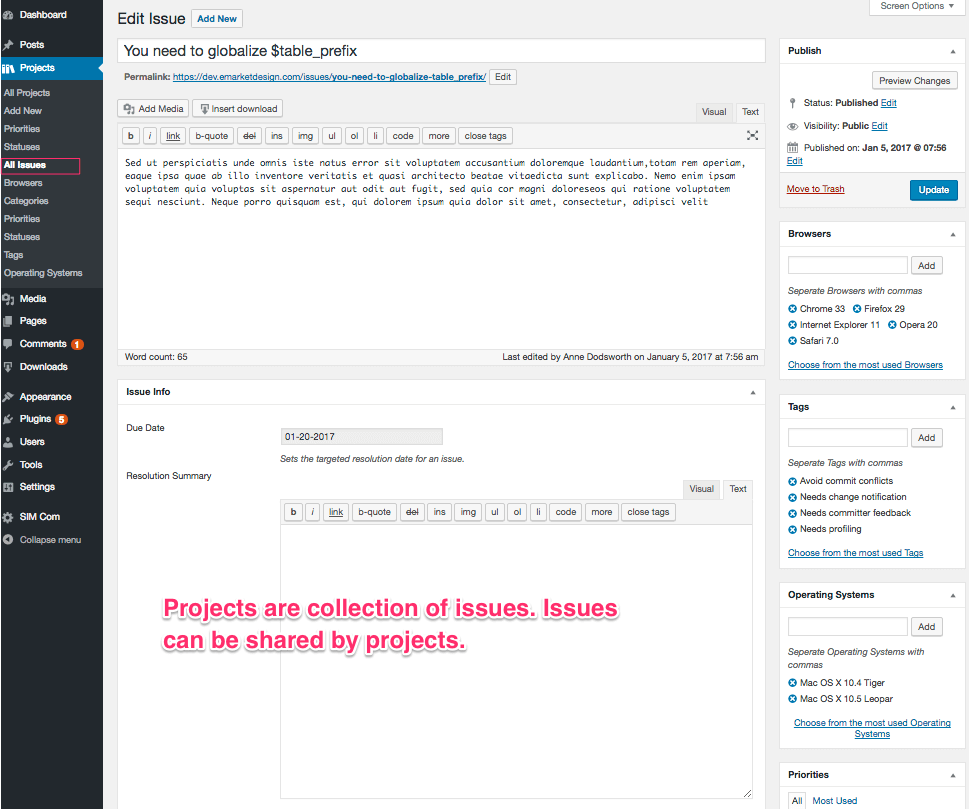
Easy to use Issue Edit screen in admin area
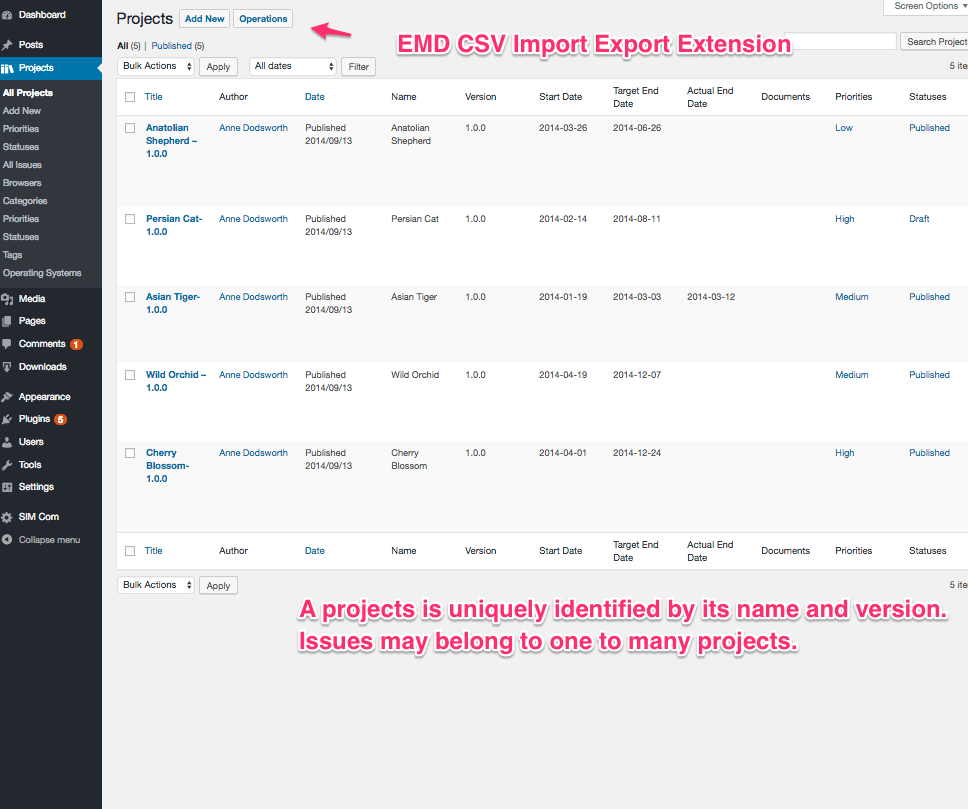
Project List in admin area
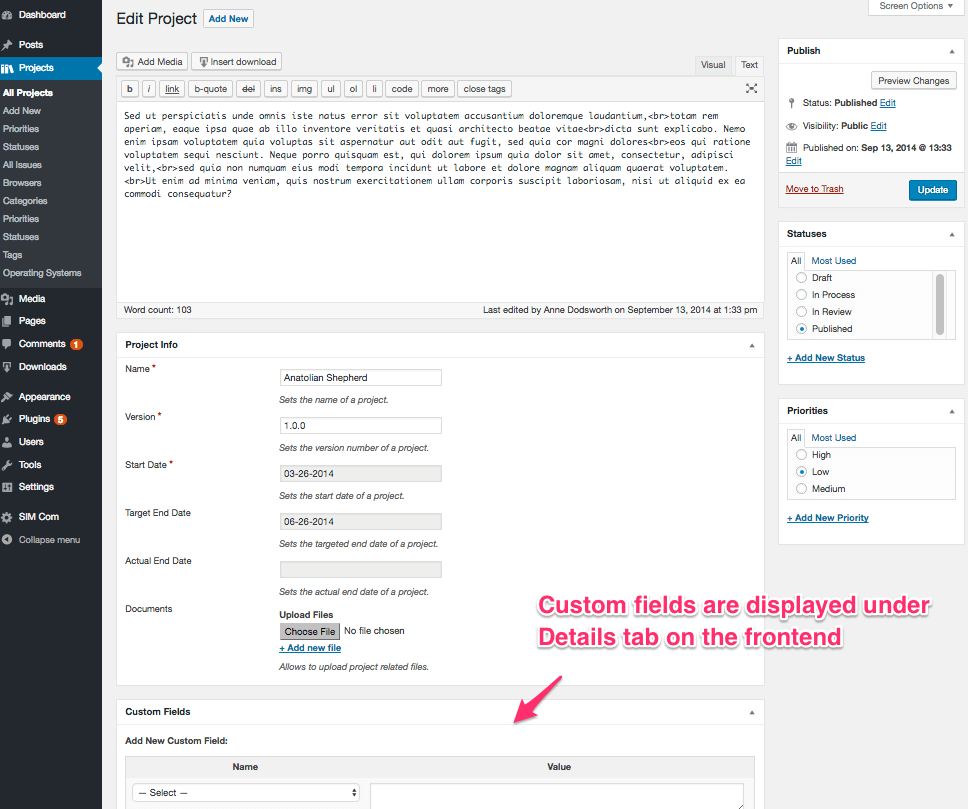
Easy to use Project Edit screen in admin area
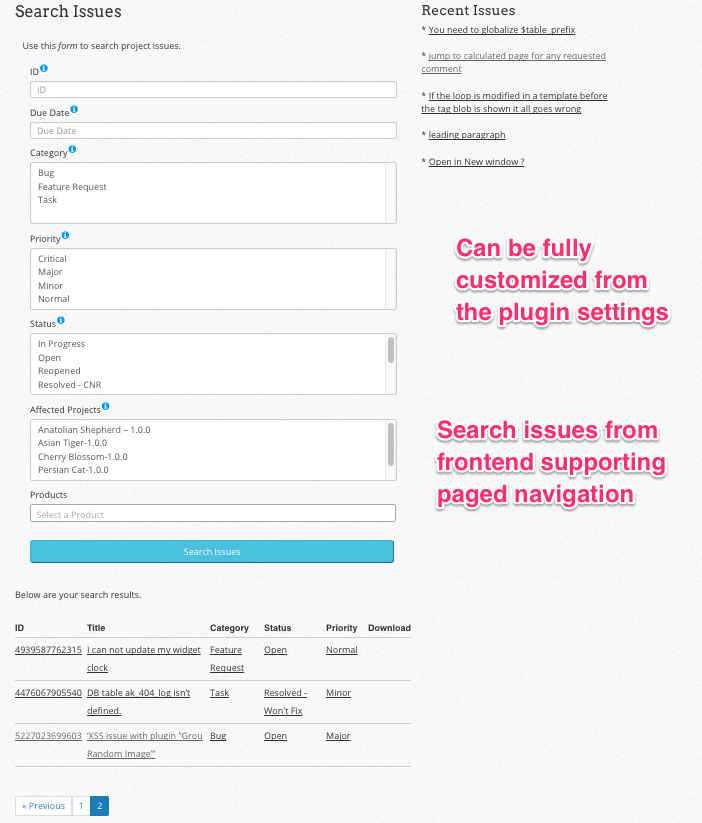
Fully customizable Search Issues form can be added in a page using a shortcode
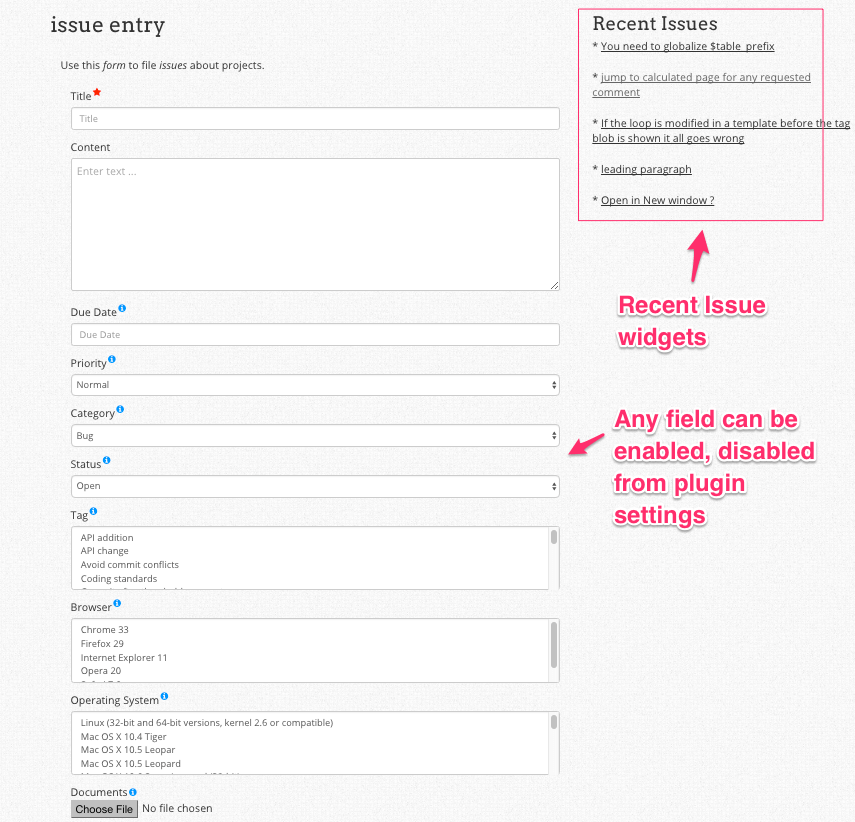
Fully customizable Issue Entry form can be added in a page using a shortcode
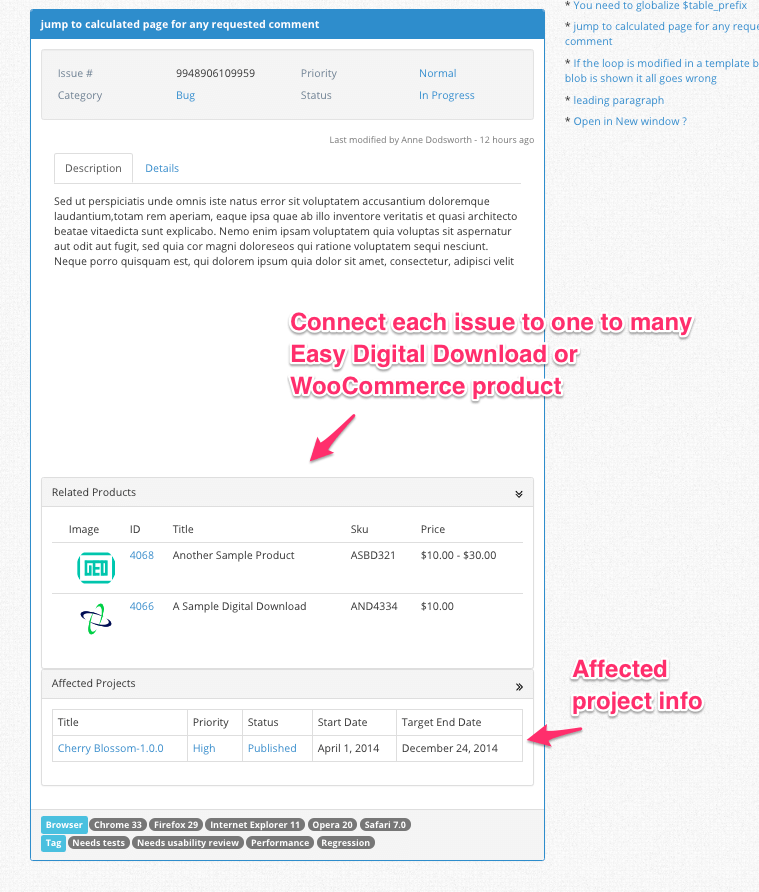
Pro level, responsive Issue single page on the frontend
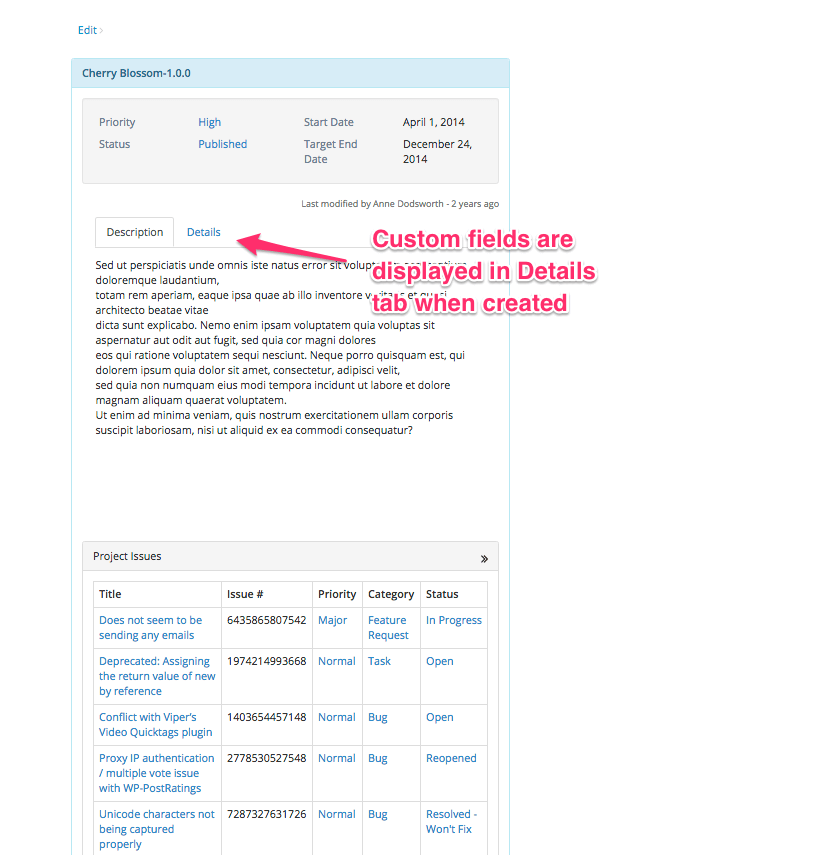
Pro level, responsive Project single page on the frontend
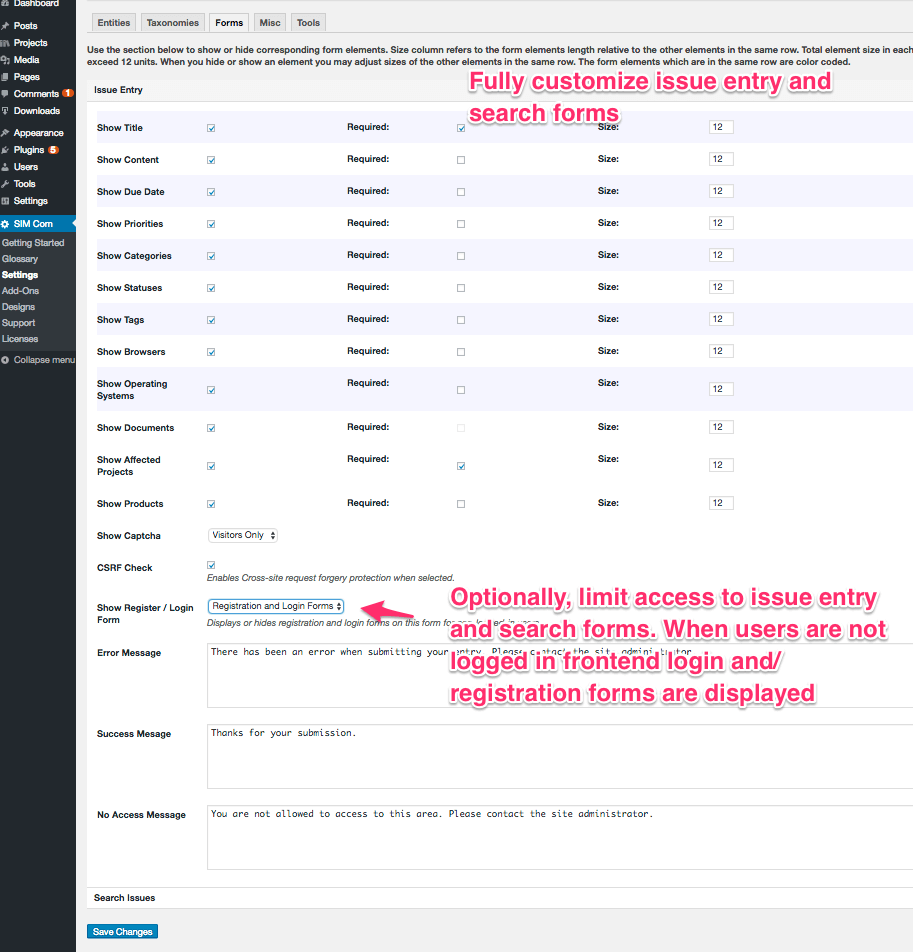
Modify Issue Entry and Search Issues forms from SIM Com Settings page
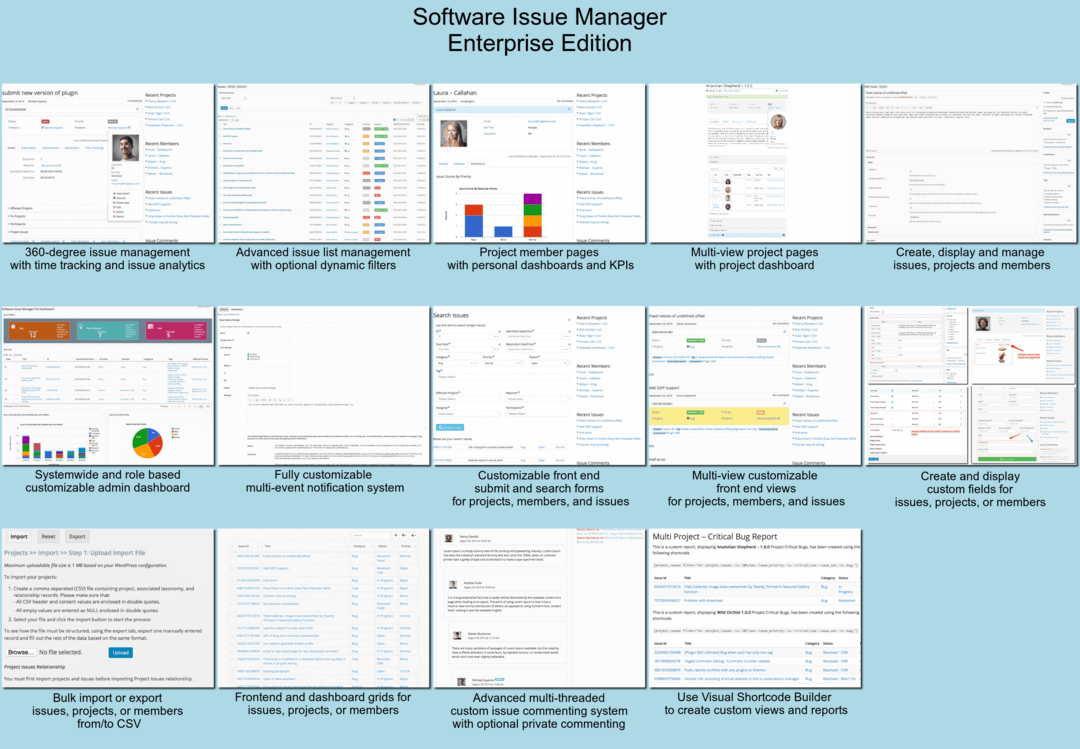
Software Issue Manager Enterprise edition offers advanced issue and project management capabilities for multi-role development teams
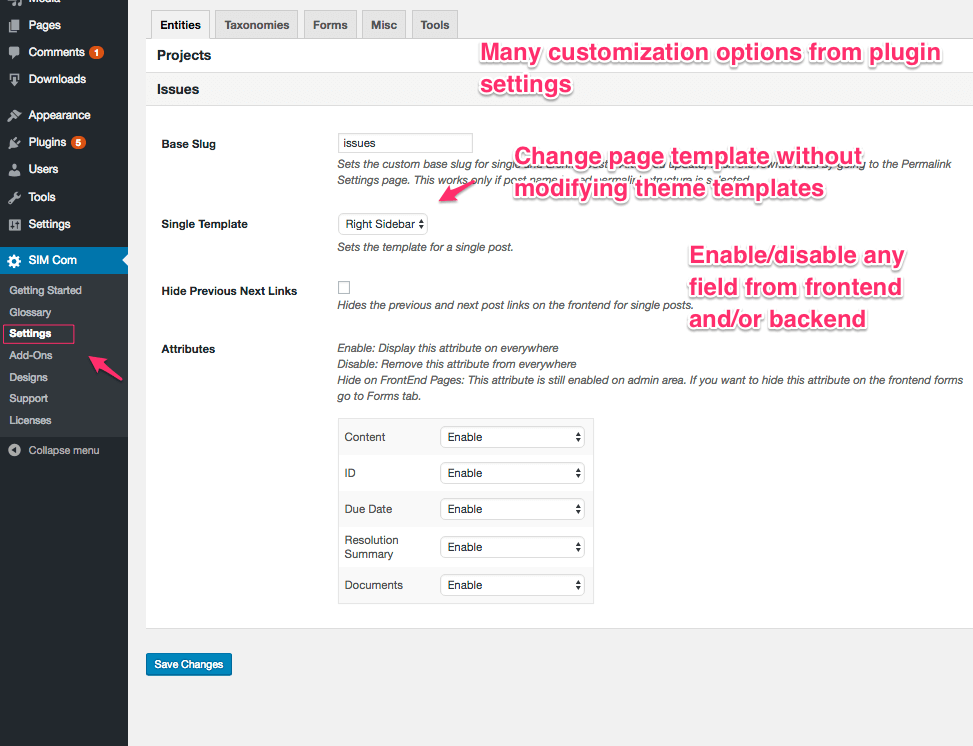
Many customization options available from plugin settings without changing theme files
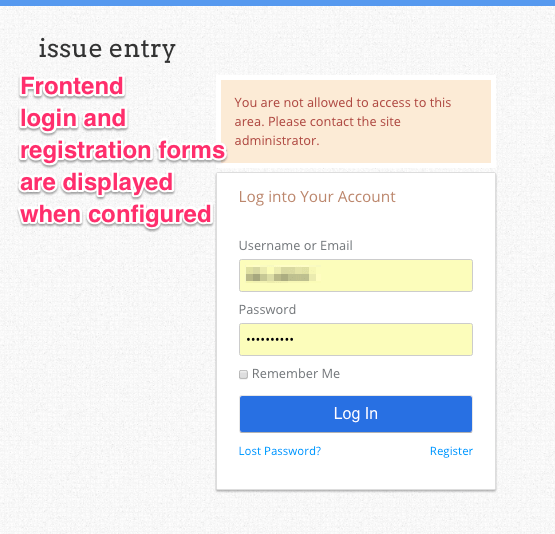
Frontend login and registration forms for private access to forms on the frontend
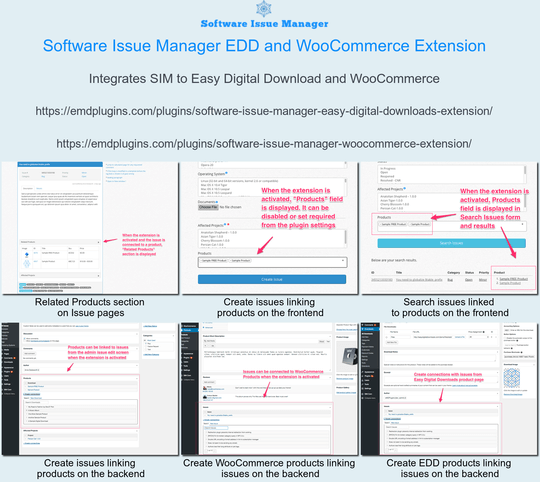
Get insight on your products linking them to issues using SIM WooCommerce and SIM Easy Digital Downloads
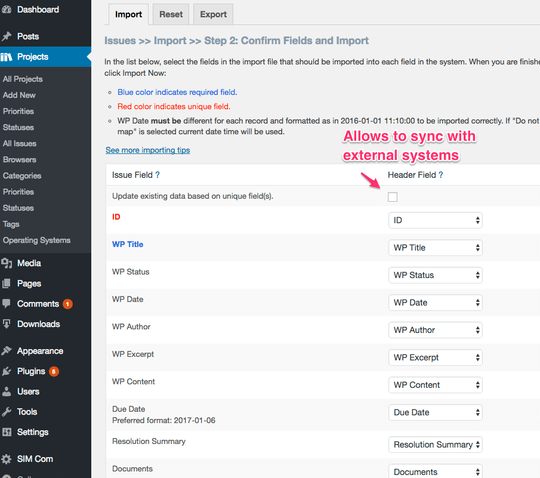
CSV Import Export Addon - Bulk import/export your issues and projects from/to CSV files
Changelog
5.0.1
- FIXED XSS vulnerability for noaccess_msg
- FIXED Validate input for emd_form_builder_lite_pagenum function
- FIXED Vulnerability related to emd_get_widg_pagenum
- FIXED Resolved an issue where deleted taxonomy terms were being unintentionally recreated.
- FIXED Removed repeated initialization of default taxonomy terms.
5.0.0
- FIXED WordPress dashboard accordions issue on setting and glossary pages due to changes in core code on WP 6.7.1
- FIXED Translation to one textdomain
4.9
- TWEAK tested with WP 6.2
- FIXED XSS issues in the WordPress admin area
= 4.8.3= - TWEAK tested with WP 5.9.2 and PHP 8
- FIXED XSS issues in the WordPress admin area
- TWEAK Added ability to set the maximum number of issues to show in multiple sidebar widgets.
- TWEAK Added ability to set pagination support with customization options for multiple sidebar widgets.
= 4.8.2= - FIXED date fields on issue and project pages
- TWEAK tested with WP 5.7
= 4.8.1= - FIXED Required field validation is not working.
= 4.8.0= - FIXED multi-select form component missing scroll bars when the content overflows its fixed height.
- TWEAK updates and improvements to libraries
4.7.0
- NEW Added previous and next buttons for the edit screens of issues and projects
- TWEAK updates and improvements to libraries
4.6.0
- NEW Added support for Emd Custom Field Builder when upgraded to premium editions
- TWEAK updates and improvements to form library
- TWEAK Emd templates
4.5.0
- TWEAK Cleaned up unnecessary code and optimized the library file content.
- FIXED XSS related issues.
- NEW Added Emd form builder support.
- FIXED Session cleanup workflow by creating a custom table to process records.
4.4.1
- TWEAK code updates for better stability and compatibility
4.4.0
- NEW Created a new shortcode page which displays all available shortcodes. You can access this page under the plugin settings.
- TWEAK Emd templating system to match modern web standards
4.3.2
- TWEAK code updates for better stability and compatibility
4.3.1
- TWEAK library updates for better stability and compatibility
4.3.0
- NEW Ability to limit max size, max number of files and file types of issue and project documents
- TWEAK library updates
4.2.0
- NEW Added custom JavaScript option in plugin settings under Tools tab
- NEW Added container type field in the plugin settings
- FIXED PHP 7 compatibility
- TWEAK Updated codemirror libraries for custom CSS and JS options in plugin settings page
4.1.0
- NEW Added Email field to Issues
- FIXED WP Sessions security vulnerability
4.0.0
- NEW Added configuration for Easy Digital Downloads Software Issue Manager extension
- NEW Added configuration for WooCommerce Software Issue Manager extension
- NEW Consolidated issues and projects under projects menu
- NEW Ability to set page templates for issue and project single pages. Options are sidebar on left, sidebar on right or full width
- NEW EMD Widget area to include sidebar widgets in plugin pages
- NEW Ability enable/disable any field, taxonomy and relationship from backend and/or frontend
- NEW Ability to add custom CSS in plugin\’s frontend pages
- NEW Ability to limit Issue search and entry forms to logged-in users only from plugin settings.
- NEW Added ability to permanently delete plugin related data from plugin settings
- NEW Added ability to recreate installation pages from plugin settings
3.0.0
- NEW Added ability to create and display custom fields for issues
- NEW Added ability to create and display custom fields for projects
- Fixed minor bugs and upgraded the libraries for WordPress 4.5.2
2.3.0
- NEW Added ability to set author on issues and projects; available for administrator role
- Fixed minor bugs and upgraded the libraries for WordPress 4.5
2.2.0
- Fixed minor bugs and upgraded the libraries for WordPress 4.4 compatibility
- Fixed issue results paging CSS
2.1.0
- Fixed issues related to WordPress 4.3 upgrade
2.0.1
- Fixed the issue related to some taxonomies not displaying in the admin backend
2.0.0
- Added settings page for form customization such as enable/disable fields, captcha and change field sizes
- Made some fields optional so that they can be disabled
- Fixed some minor bugs to improve stability
1.3.0
- Fixed unique check for issues and projects
- Moved all js and css from cdn to local
- Fixed misc bugs
1.2.0
- Fixed untranslatable search form results view header columns
- Fixed file uploads issue with file names including spaces
- Fixed various compatibility issues related to other plugins
1.1.0
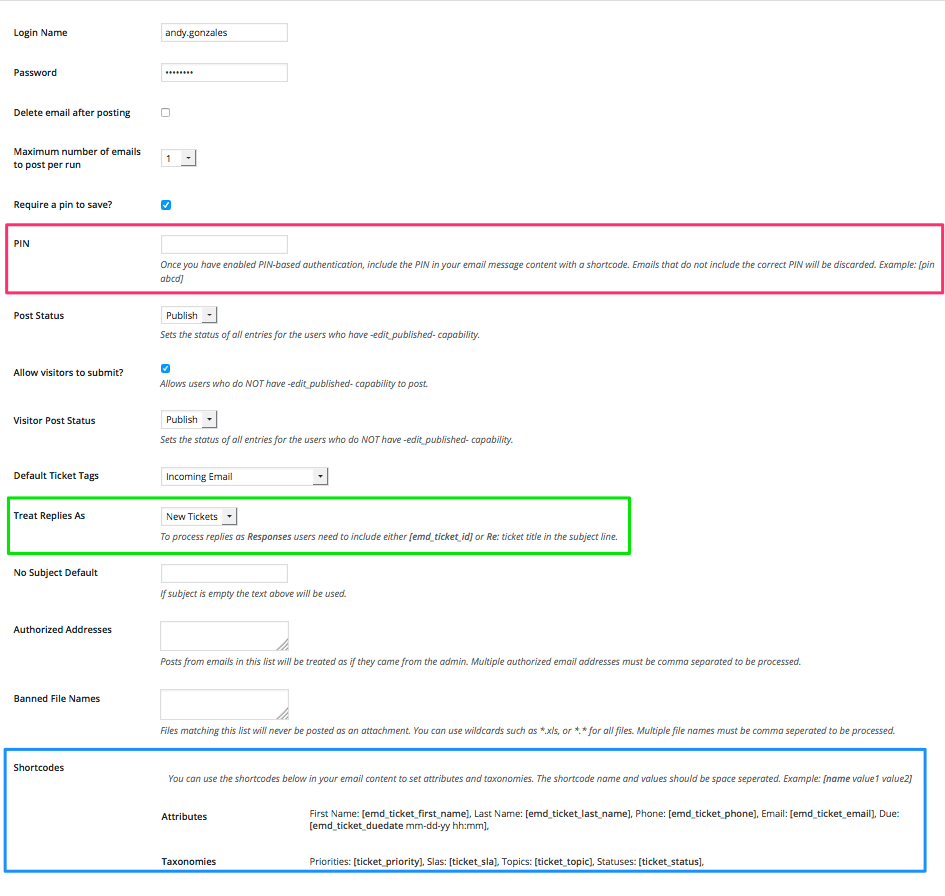
- Added the required configuration to access issues through email using incoming email extension
- Fixed Misc. bugs
1.0.5
- Fixed bug related to sidebar Recent Issues widget
1.0.4
- Fixed BuddyPress Docs conflict
1.0.3
- Fixed PHP Strict Standards Errors which became part of the E_ALL since PHP 5.4
1.0.2
- Fixed a defect in date input fields
- Fixed misc. minor defects
1.0.1
- Fixed readme
1.0.0
- Initial release