

Solar Calculator
A modern, user-friendly WordPress plugin designed to promote solar energy, calculate the potential solar power generation at a specific location.
Plugin info
Maintenance & Compatibility
Maintenance score
Stale • Last updated 313 days ago
Is Solar Calculator abandoned?
Likely maintained (last update 313 days ago).
Compatibility
Similar & Alternatives
Explore plugins with similar tags, and compare key metrics like downloads, ratings, updates, support, and WP/PHP compatibility.
Description
A WordPress plugin that helps homeowners, installers, and energy consultants easily calculate the potential solar power production of a specific location
Features include:
– Intuitive, responsive frontend calculator
– Featuring an advanced battery comparison chart and table
– Customizable backend settings (regional defaults, pricing presets etc.)
– Multilingual support (WPML, Polylang, etc.)
– Accurate solar yield estimates based on real data
– Battery and installation cost calculators
– Translation-ready with .po/.mo files (DE, GR, IT, EN, ES, FR)
Ideal for solar companies, energy advisors, and eco-conscious site owners.
Made in Germany – optimized for European conditions.
Developer Info
Plugin structure:
/wp-content/plugins/
└── solarrechner/
├── solarrechner.php Main plugin file
├── admin/
├── assets/
├── includes/
├── languages/
└── templates/
└── solarrechner-frontend-i18n.php Frontend template with multilingual support
Installation
- Upload the plugin to
/wp-content/plugins/or use the WordPress plugin installer. - Activate the plugin via the ‘Plugins’ menu in WordPress.
- Configure base values under the settings panel and save changes.
- Insert the shortcode
[solar-calculator]into any page or post. - Insert the shortcode
[login_logout_link]were ever you want. - If you want, create a user for maintaining only the backend parameters and give him the role solar_super_user.
Frequently Asked Questions
Review feed
Screenshots
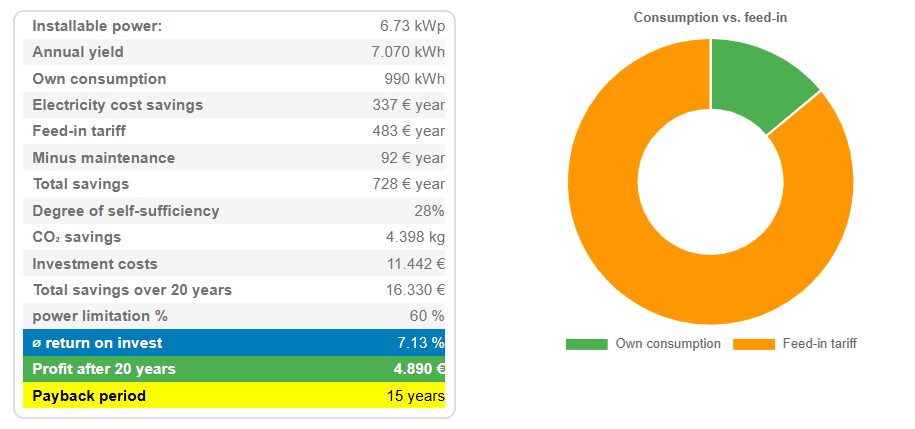
Solar Calculator results
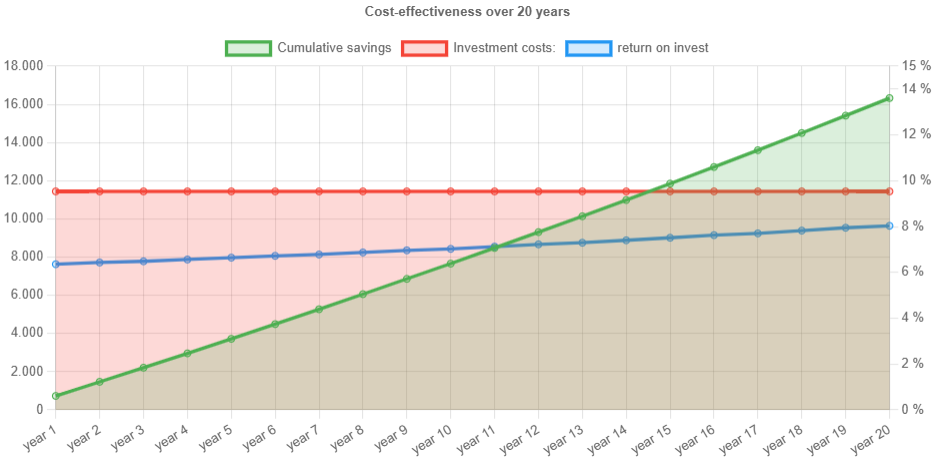
Solar Calculator line chart
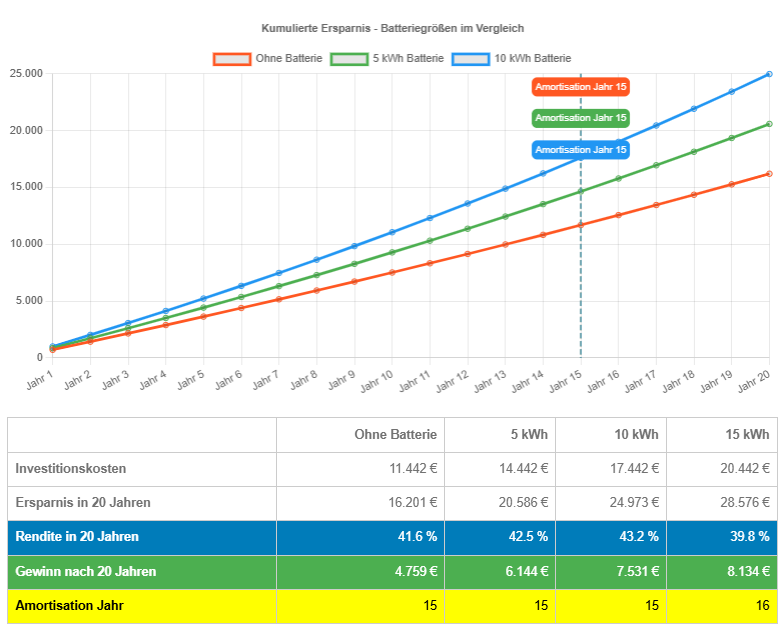
Advanced battery comparison
Changelog
1.1.4
- Language dependent currency symbols
- curruncy switcher
- some minor bugfixes
1.1.3
- Enhanced language support with fallback to englisch if missed
- updated language files.