

Plugin info
Maintenance & Compatibility
Maintenance score
Possibly abandoned • Last updated 4927 days ago • 3 reviews
Is Spoiler Block abandoned?
Possibly abandoned (last update 4927 days ago).
Compatibility
Similar & Alternatives
Explore plugins with similar tags, and compare key metrics like downloads, ratings, updates, support, and WP/PHP compatibility.
Description
This plugin create a button in your WordPress editor to set some parts of your posts as spoilers.
These parts show a blocked content to your visitors, then must click in these blocks to show the original content.
Translators
- Brazilian (pt_BR) – Brunno dos Santos
- Romanian (ro) – Alexander Ovsov
Installation
To do a new installation of the plugin, please follow these steps:
- Download the zipped plugin file to your local machine.
- Unzip the file.
- Upload the
spoiler-blockfolder to the/wp-content/plugins/directory. - Activate the plugin through the ‘Plugins’ menu in WordPress.
- Optionally, go to the Options page and set a new spoiler alert.
If you have already installed the plugin:
- De-activate the plugin.
- Download the latest files.
- Follow the new installation steps.
To set a Spoiler block, select a post, or create a new one, select any text then click in spoiler button in your WordPress Editor. Your text now is set as spoiler.
To remove a spoiler block, just select the spoiler block then click in spoiler button.
Brunno dos Santos
[email protected]
http://brunno.me/spoiler-block
Frequently Asked Questions
How can I remove a spoiler of my post?
To remove a spoiler block, just select the spoiler block then click in spoiler button.
How can I customize the spoilers blocks in my blog?
To customize the blocks of spoilers, just add the follow selectors in your css file:
* span.spoiler to spoilers closed blocks;
* span.spoiler-open to spoilers already clicked by users;
Review feed
Very nice spoiler plugin!
Screenshots

Wordpress Editor with Spoiler Block button
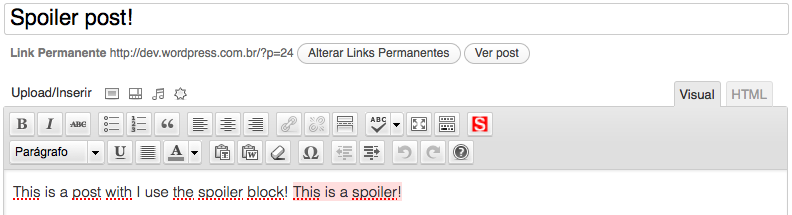
Editing a spoiler post

Show a post with spoiler
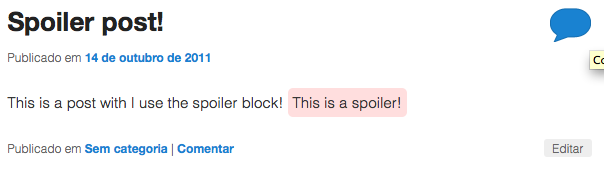
Show a post with spoiler open
Changelog
1.7
- Now the spoilers has a span that hidden the content the spoiler with CSS (thanks to Mario Ludwig);
- Resolve some Bugs;
1.6.4
- Added function to close the spoiler block when user click
1.6.3
- Added Romanian translation by Alexander Ovsov http://webhostinggeeks.com/
1.6.2
- Change contact e-mails and sites urls
1.6.1
- Bug fixes
1.6
- Resolve some bugs;
- Add i18n support;
- Include Brazilian Portugueses language;
1.5
- Now you can clear spoiler block if you click in spoiler button! 🙂
1.2
- Correction in CSS Queue.
1.1
- Add missing files to WordPress SVN