

StackCommerce Deal Feed
The StackCommerce Deal Feed plugin is the best way to surface curated and relevant tech & lifestyle deals in front of your readers.
Plugin info
Maintenance & Compatibility
Maintenance score
Possibly abandoned • Last updated 3237 days ago
Is StackCommerce Deal Feed abandoned?
Possibly abandoned (last update 3237 days ago).
Compatibility
Similar & Alternatives
Explore plugins with similar tags, and compare key metrics like downloads, ratings, updates, support, and WP/PHP compatibility.
Description
The StackCommerce Deal Feed plugin is the best way to surface curated and relevant tech & lifestyle deals in front of your readers.
Ditch standard text ads and replace them with products that are hand selected to peak your readers’ interests.
Deals in the feed will link directly to your publisher store, making you money with each purchase. Our team here at StackCommerce has found major success with WP Deal Feeds on many of our publisher stores.
Join us in our native commerce mission to provide the right products, in the right place, at the right time.
Top features:
- Our Deal Feed is not blocked by Ad Blocker! Look, it’s already worth it and you’ve only read one bullet point.
- The Deal Feed widget can be added directly into any widget area in your current WP theme. It’s plug and play!
- You can add multiple Deal Feeds into multiple widget areas. Maybe you want a ‘Deal of the Day’ in the upper right sidebar, a list of ‘Newest Deals’ at the bottom, and ‘Ending Deals’ as a horizontal module. You can do it all. Maximize the potential of your real estate with handpicked content rather that irrelevant ads.
- 5 view options! Choose between horizontal and vertical views. With the vertical view, you can choose between a list view, grid view, and a large view. We also have a shortcode option that allows you to implement a Deal Feed widget within a post.
- Fully customize any view to perfectly fir the look and feel of your site. Pick image sizes, product title sizes, headers, and more.
- Styling options allow you to pick colors to exactly match your brand.
- Customizable URL parameters for tracking. Everything will be tracked and analyzed by our Account Management team. We will make suggestions based on performance data to maximize the impact of your Deal Feed Widgets.
- Choose between surfacing Best Sellers, Newest Deals, or deals Ending Soon.
- Pick the number of products that show up in your feed.
- All deals that are shown are customized based on data from your store only. For example, Best Sellers will be the best sellers for your store.
- The fonts will inherit the current font on your page, ensuring that the widget looks and feels like part of your site.
- Customize everything! There are dozens of combinations. Adjust the color of the buy button, add or remove the discount ribbon, customize header text, change the size of product titles. Make it yours!
- Deals open in a new tab by default so that readers aren’t taken away from your site.
Installation
Frequently Asked Questions
Installation Instructions
From your WordPress dashboard
- Visit ‘Plugins > Add New’
- Search for ‘StackCommerce Deal Feed’
- Activate StackCommerce Deal Feed from your Plugins page.
From WordPress.org
- Upload the extracted archive to wp-content/plugins/ (or upload a zip through the WordPress admin)
- Activate the plugin through the ‘Plugins’ menu in WordPress
Once Activated
- Get your Publisher ID from StackCommerce
- Go to the “StackCommerce” plugin settings and setup your basic settings
- Go to Appearance > Widgets and drag the StackCommerce Deal Widget to the section of the Widget Area you’d like it to appear and configure it.
Review feed
Screenshots
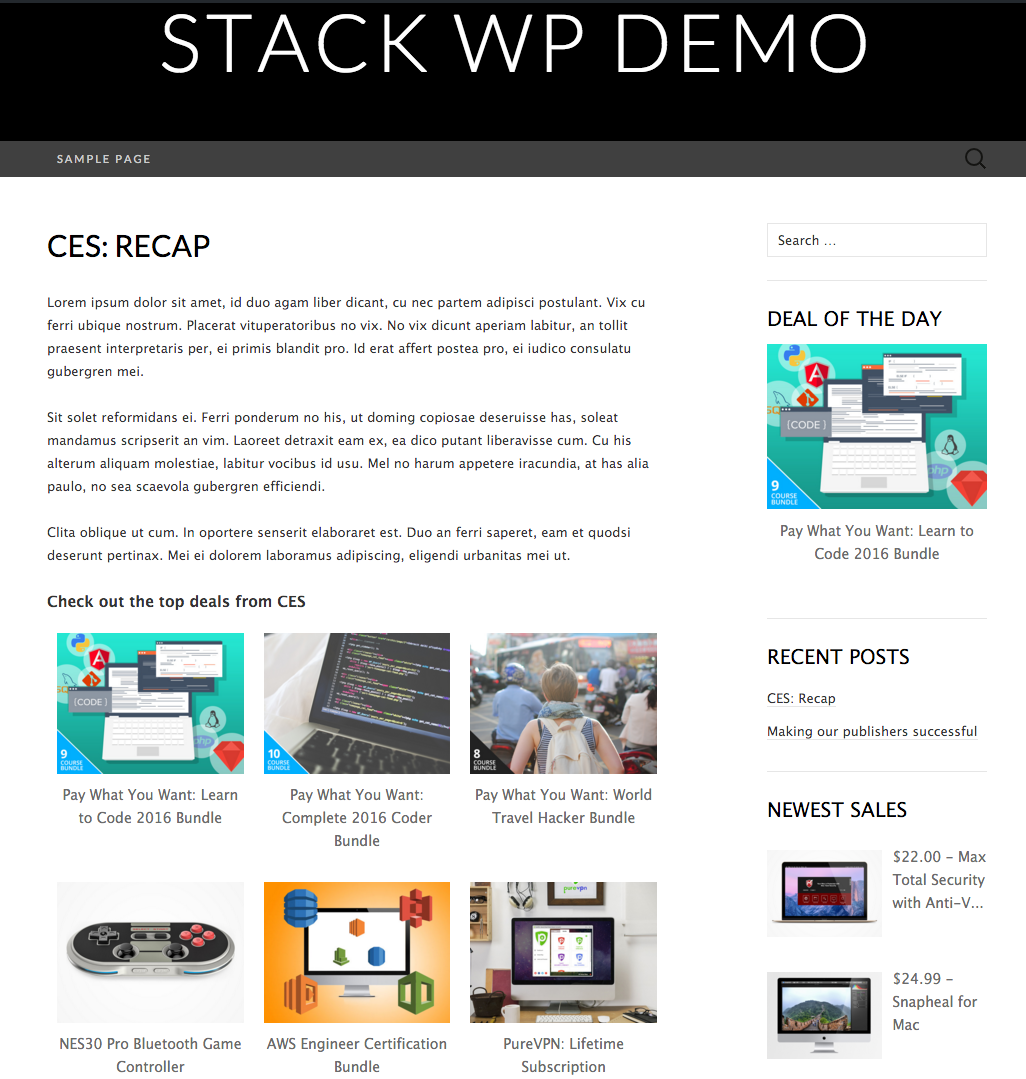
Stack WP Site

List View Medium

List View Grid

List View Large

Horizontal View

General Settings

Styling Settings

Shortcode Settings
Changelog
1.1.6
- Smaller images.
1.1.4
- Fix bad release.
1.1.3
- Fix bad release.
1.1.2
- Fix jQuery load order.
1.1.1
- Fix bug with shortcode generation that was introduced in v1.1.0
1.1.0
- Progressively load images.
- Only load widget on pages it is used on.
- Mobile responsive updates.
- Updated UTM tracking parameters.
- Various bug fixes.
- WP v4.5 compatibility
1.0.7
- CSS fixes.
1.0.6
- Better defaults out of the box.
- Use CDN to serve some assets.
1.0.5
- Responsive site updates.
1.0.4
- Fix plugin activation error.
1.0.3
- Fix installation errors.
1.0.2
- Fixed PHP parse errors.
1.0.1
- Fixed saving settings bug in Widget configuration.
1.0.0
- Added multiple image size options for List Views.
- Added new Horizontal View.
- Added ability to customize each widget independently of the global options.
0.1.4
- Added ability to add custom CSS.
0.1.3
- First release for WordPress.org plugin directory.