

Static Cache Wrangler
Export your WordPress site as a static HTML website — fast, secure, and offline-ready with WP-CLI support.
Plugin info
Maintenance & Compatibility
Maintenance score
Maintained • Last updated 127 days ago
Is Static Cache Wrangler abandoned?
Likely maintained (last update 127 days ago).
Compatibility
Similar & Alternatives
Explore plugins with similar tags, and compare key metrics like downloads, ratings, updates, support, and WP/PHP compatibility.
Description
Static Cache Wrangler is a lightweight, low‑resource static site generator and HTML export engine for WordPress. It automatically creates self‑contained, URL‑agnostic static pages of your site — perfect for anyone who needs to preserve, distribute, or accelerate WordPress content.
Originally developed as a command‑line tool for WP‑CLI, it has evolved into composable, zero‑impact tooling that supports administrators, developers, and site owners alike. Whether you’re archiving a client project, deploying to a CDN, or creating a portable offline version that runs anywhere, Static Cache Wrangler delivers fast, CDN‑ready HTML output without complex setup.
Technically, the plugin uses an asynchronous, lazy‑loading build mechanism that generates static pages as visitors browse your site. Over time, your entire site is exported as lightweight static HTML.
Free companion plugin STCW Coverage Assistant adds real‑time build monitoring and manually triggered full‑site generation for any uncached pages.
Unlike traditional static‑site plugins that require full crawls or database schema changes, Static Cache Wrangler is zero‑impact:
* Does not add custom database tables or modify your schema
* Automatically cleans up all plugin options, cron jobs, and transients upon uninstall
* Keeps your WordPress database completely untouched
* Runs all caching processes asynchronously in the background
* Offers an optional performance profiler for granular resource and execution insights
Perfect for:
* Creating fully offline or portable copies of WordPress sites
* Rsyncing to read‑only Nginx failover servers for high availability
* Publishing WordPress content to Amazon S3®, Netlify®, or other static CDNs
* Geo‑distributing static HTML for ultra‑fast global reads
* Archiving, demos, and secure client deliverables
* Small to mid‑sized sites (≈ 100 pages +) — upcoming assistant plugin expands this to 1 K pages
* Multisite administrators needing scalable static‑cache exports
A demo site created using this plugin can be found at Cache Wrangler Demo Site which is a static version of this WordPress site
Static Cache Wrangler turns WordPress into a fast, secure, and portable static‑site generator — with no database changes, no vendor lock‑in, and no maintenance overhead.
Detailed Testing and Profiling:
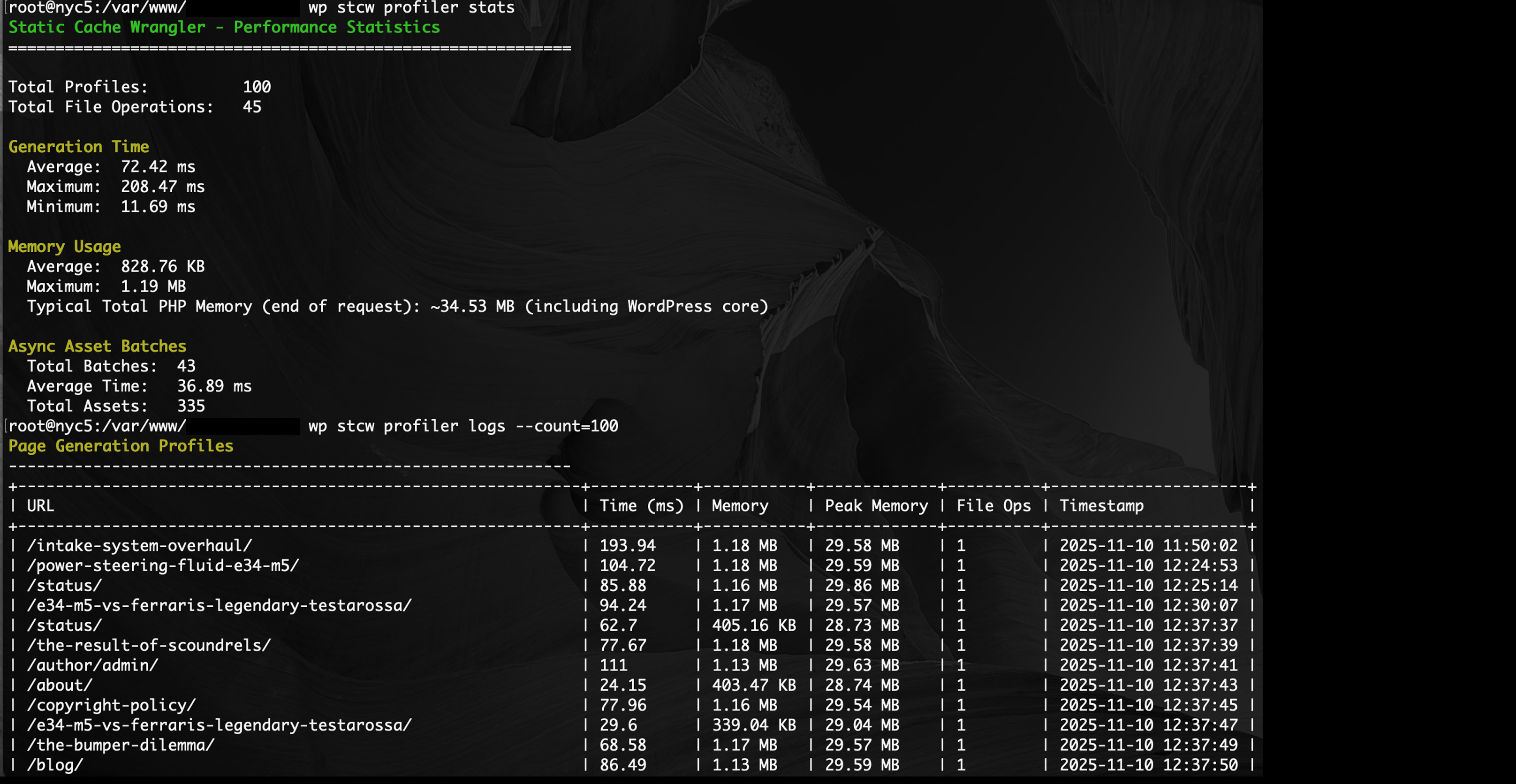
* Triggering of page rendering requires 1-2MB of PHP memory for the duration of the process.
* Average processing duration is less than 500 ms (meaning memory consumption is quickly released)
* Average asset (JS, CSS, image) batch processing is less than 100 ms
* WordPress Core and theme rendering is generally 20-25 MB; SCW usage keeps total memory below 30 MB
* CLI commands are even more efficient
Funding Model
* This plugin and all companion plugins will remain 100% free (true WordPress style)
* Want to make a donation? Consider purchasing a copy of the author’s book on command-line interfaces for yourself or as a gift.
How It Works
- Enable static site generation using the toggle in the sidebar.
- As users browse your site normally, each page visit creates a static HTML file.
- Assets (CSS, JS, images, fonts) are automatically are queued and asyncronously downloaded and localized.
- Processing happens in the background and can be paused anytime.
- Use free companion plugin to monitor and accelerate cache creation STCW Coverage Assistant
- Download the complete static site as a ZIP file.
- Extract and open
index.htmlin any browser — it works completely offline.
Key Features
What’s New in 2.0.7:
2.0.7
Version 2.0.7 is a major compatibility enhancement release, focused on improving support for Kadence Blocks and all Gutenberg block plugins that rely on dynamic JavaScript and CSS enqueues.
This update improves the accuracy of static exports by capturing all front-end assets that WordPress prints dynamically—including those output by wp_print_scripts() and wp_print_footer_scripts()—ensuring that interactive block functionality is preserved outside of WordPress.
Compatibility Improvements
- Full Kadence Blocks compatibility – Global front-end scripts and CSS are now correctly captured, enabling buttons, accordions, icons, Lottie animations, progress bars, and other JS-driven components to function in static exports.
- Enhanced Gutenberg block support – STCW now reliably detects and exports front-end assets from all major block suites (Spectra, Stackable, GenerateBlocks, CoBlocks, Otter, etc.).
- Improved script capture logic – Dynamically enqueued scripts are now collected before theme rendering, eliminating missing-asset issues for blocks that load JS only when present on a page.
- Better preservation of front-end behavior – Assets required for tooltips, animations, scroll effects, responsive layouts, and block initialization are now exported consistently.
- Resolved blank-page edge cases – Updated capture timing ensures no interference with WordPress’s script printing lifecycle, preventing rendering conflicts.
Technical Enhancements
- Added an early script-queue flush to collect output from:
wp_print_head_scripts()wp_print_scripts()wp_print_footer_scripts()
- Captured script output is appended to the main buffer before asset extraction, ensuring regex-based scanners detect dynamically enqueued JS/CSS.
- Improved compatibility with theme and plugin lifecycle order by isolating script capture from template rendering.
- Enhanced support for plugins that insert block assets conditionally based on block presence.
- Increased reliability of static exports for mixed-content layouts and advanced interactive block patterns.
What’s New in 2.0.6:
2.0.6
Version 2.0.6 is a WordPress.org compliance release.
This update ensures full compatibility with the latest repository validation standards introduced in 2025, requiring prefixed template variables and enhanced namespace isolation.
Although originally planned as a non-functional compliance update, we took the opportunity to introduce something valuable for developers — the foundation for advanced performance profiling.
Compliance & Compatibility
- Prefix standardization – All template variables, global references, and filters now use the
stcw_prefix, satisfying the latest WordPress.org code scanning rules. - Improved code validation – Passes 100% of the new “Check Plugin” API scan results.
- Updated inline documentation – Improved code clarity and compliance annotations.
Developer Enhancements
New developer hooks were introduced to support the forthcoming Static Cache Wrangler Performance Profiler, an optional MU plugin for benchmarking and advanced diagnostics via WP-CLI.
The following hooks are now available for use:
-
stcw_before_file_save— Fires immediately before a static file is written to disk.- Parameters:
$static_file(string) — Path to the file being saved. - Use Case: Start timers, collect memory data, or monitor disk operations before file write.
- Parameters:
-
stcw_after_file_save— Fires after a static file is successfully written.- Parameters:
$success(bool) — True on success.
$static_file (string) — The saved file path. - Use Case: Log, validate, or post-process generated static files.
- Parameters:
-
stcw_before_asset_download— Allows inspection or modification of asset URLs before download.- Parameters:
$url(string) — The original asset URL. - Returns: Filtered URL string.
- Parameters:
-
stcw_after_asset_download— Executes after each asset download completes.- Parameters:
$dest(string) — Destination path.
$url (string) — Original URL. - Returns: Filtered destination path (optional).
- Parameters:
-
stcw_before_asset_batch— Fires before an asynchronous asset download batch begins.- Use Case: Initialize timers or resource tracking for async performance measurement.
-
stcw_after_asset_batch— Fires after each asynchronous asset batch completes.- Parameters:
$processed(int) — Number of assets processed successfully.
$failed (int) — Number of failed downloads. - Use Case: Record async batch performance, memory usage, or queue diagnostics.
- Parameters:
New Developer Tools Directory
A new /tools/ directory has been added to the plugin to organize optional developer resources.
It currently includes:
performance-profiler.txt— A detailed guide describing how to install and use the optional Performance Profiler MU plugin for advanced benchmarking.
Developers can download the latest version of the profiler from:
https://moderncli.dev/code/static-cache-wrangler/performance-profiler/
Summary
- Compliance with 2025 WordPress.org plugin repository standards.
- New developer hooks for performance profiling and async instrumentation.
- Added
/tools/performance-profiler.txtdeveloper documentation. - No behavioral or UI changes for end users.
- Zero database impact — profiling features remain opt-in and inactive by default.
What’s New in 2.0.5:
Version 2.0.5 introduces enhanced static HTML output with comprehensive WordPress meta tag removal. Your generated static files are now 3.1% smaller, generate 2.3% faster, and contain zero WordPress-specific metadata. This makes them truly portable, more secure (no version exposure), and perfect for offline use or deployment to any platform.
Two new developer hooks (stcw_remove_wp_head_tags and stcw_process_static_html) enable companion plugins and custom integrations, opening up possibilities for agencies, developers, and SaaS providers to extend the plugin without modifying core code.
- Lazy-load static generation — creates static pages only when visited, minimizing CPU and memory usage.
- Automatic asset localization — CSS, JS, images, and fonts are downloaded and referenced locally.
- Relative path rewriting — ensures portability for offline or CDN hosting.
- Zero-configuration — works instantly after activation.
- Zero database impact — does not create or modify any database tables.
- Clean uninstall — all options, transients, and cron events are removed automatically.
- Background processing — non-blocking, low-impact generation.
- One-click export — download a ZIP of the entire static site.
- Modern UI — intuitive, card-based dashboard.
- WP-CLI Support — manage generation, status, cleanup, and export directly from the terminal.
- Clean HTML Output – Removes 7+ WordPress meta tags for portable, framework-agnostic static files
- Developer Hooks – Two extensibility hooks for companion plugins and custom integrations
- Enhanced Security – WordPress version and internal metadata hidden from static exports
- Optimized Performance – 3.1% smaller files and 2.3% faster generation than previous versions
WP-CLI Commands
Full control without the dashboard:
wp scw enable– Enable static generationwp scw disable– Disable static generationwp scw status– View current status and statisticswp scw process– Process all pending assetswp scw clear– Remove all generated static fileswp scw zip– Create a ZIP archive of the site
Advanced Configuration
Server Requirements
- PHP: 7.4 or higher
- WordPress: 5.0 or higher
- PHP Extensions: ZipArchive (for ZIP export), curl or allow_url_fopen (for asset downloads)
- Disk Space: Varies based on site size (static files = ~1.5x site size)
- Permissions: Write access to
wp-content/cache/
Performance Characteristics
- Generation overhead: ~50–100 ms/page
- Memory: ~2 MB additional per request
- Asset downloads: Handled asynchronously in background
Disk Space Considerations
Typical Usage:
* Small site (10-50 pages): 50-200 MB
* Medium site (100-500 pages): 200 MB – 1 GB
* Large site (1000+ pages): 1-5 GB
Monitor disk usage via Settings Static Cache or wp scw status.
To reduce disk usage, exclude large pages:
add_filter(‘stcw_should_generate’, function($should, $url) {
if (strpos($url, ‘/gallery/’) !== false) {
return false;
}
return $should;
}, 10, 2);
What Gets Downloaded
✅ CSS files, JavaScript files, Images (all formats), Fonts, Favicons, Responsive images (srcset)
❌ External CDN assets (preserved as-is), Third-party embeds (YouTube, Twitter), Video/audio files (intentionally excluded to save space)
Use Cases
Offline Documentation — Generate static, portable documentation sites for offline or air-gapped environments.
Client Deliverables — Deliver static versions that eliminate hosting complexity.
Failover Ready — Rsync to a read-only Nginx® server for uninterrupted uptime.
CDN / Amazon S3® Deployment — Publish static HTML to Amazon S3®, Cloudflare®, or Netlify® for instant global delivery.
Geo Load Balancing — Serve from multiple regions with Cloudflare or Amazon Route53® for high performance.
Archival Snapshots — Capture your site before major redesigns or migrations.
Trademark Recognition and Legal Disclaimer
All product names, logos, and brands referenced in this plugin and its documentation are property of their respective owners.
Static Cache Wrangler (also historically referred to as Static Cache Generator) must always be referenced using all three words — “Static Cache Wrangler.”
The prior name Static Cache Generator is considered a legacy name and is no longer in use, as it did not meet WordPress.org plugin naming standards due to its generic nature. That name was originally selected in good faith to avoid any potential confusion with existing trademarks or brand names.
Prior to renaming, U.S. and international trademark databases were reviewed by independent intellectual property counsel, and no conflicts or registered marks were identified for the phrases “Static Cache Generator,” “Cache Generator,” or “Static Cache.”
Counsel further cited legal precedent confirming that generic terms cannot be trademarked, including:
– USPTO v. Booking.com B.V., 591 U.S. ___ (2020)
– In re Hotels.com, L.P., 573 F.3d 1300 (Fed. Cir. 2009)
– Kellogg Co. v. National Biscuit Co., 305 U.S. 111 (1938)
The current and accepted plugin name Static Cache Wrangler:
– Does not imply, refer to, or associate with the standalone trademark “Wrangler” of Wrangler Apparel.
– Does not imply, refer to, or associate with the standalone trademark “Cache” (U.S. Reg. No. 6094619, registered July 7, 2020).
– Does not imply, refer to, or associate with any trademarks involving the standalone term “Static.”
– Has no connection with Automattic Inc., its employees, or any internal job titles (e.g., “Wrangler”) used within Automattic. The name Static Cache Wrangler does not suggest endorsement, employment, or automation of work performed by Automattic personnel.
This clarification is provided in accordance with U.S. trademark law, WordPress.org plugin repository policies, and general principles of fair use and naming transparency.
(U.S. Reg. No. 6094619 reference: “CACHE,” Registered July 7, 2020; Status: LIVE/REGISTRATION/Issued and Active — TSDR, generated 2025-10-23 08:17:17 EDT.)
Third-Party Trademark Notices
NGINX® is a registered trademark of F5, Inc.
Amazon S3® and Route 53™ are trademarks of Amazon Technologies, Inc.
Netlify® is a registered trademark of Netlify, Inc.
Cloudflare® and Cloudflare Pages™ are trademarks of Cloudflare, Inc.
WP-CLI® and Gutenberg® are trademarks of the WordPress Foundation.
Elementor® is a registered trademark of Elementor Ltd.
Divi® is a registered trademark of Elegant Themes, Inc.
GitHub® is a registered trademark of GitHub, Inc.
YouTube® is a registered trademark of Google LLC.
Twitter® is a registered trademark of X Corp.
ModernCLI.Dev is owned by Derick Schaefer.
This plugin has not been tested by any of the services, platforms, software projects, nor their respective owners.
These names and services are referenced solely as examples of where static cache files might be repurposed, used, uploaded, stored, or transmitted.
This plugin is an independent open-source project and is not endorsed by, affiliated with, or sponsored by any of the companies or open-source projects mentioned herein.
Support
For issues, requests, and documentation, visit:
GitHub – Static Cache Wrangler
Documentation & Guides
Interested in learning more about command-line interfaces and WP-CLI?
Check out ModernCLI.dev — a practical guide to mastering modern CLI workflows.
Installation
- Upload the plugin files to
/wp-content/plugins/static-cache-wrangler/or install via Plugins > Add New. - Activate the plugin from the Plugins screen.
- Navigate to Settings Static Cache to enable generation.
- Browse your site normally — pages are cached as they load.
- Click Download ZIP to export the complete static version.
Frequently Asked Questions
Yes — Static Cache Wrangler captures the final rendered HTML, so it works with any theme, builder, or framework (Elementor®, Divi®, Gutenberg®, etc.).
No — it’s designed as a lazy loader, generating static pages only on demand with minimal memory and CPU impact.
No — it never alters your WordPress database schema or adds tables.
All plugin-related options, transients, and scheduled events are automatically removed upon uninstall.
Absolutely. The output is plain HTML and assets — deploy it on any web server, CDN, or open it directly in a browser.
Dynamic features like forms, comments, or live feeds won’t function in the static version, but all rendered content and assets are preserved exactly.
Revisit the updated pages while generation is enabled, or run wp scw process to rebuild all static content.
Yes! You can customize file locations and behavior using constants in wp-config.php:
Change static files location:
define(‘STCW_STATIC_DIR’, WP_CONTENT_DIR . ‘/my-static-files/’);
Change assets location:
define(‘STCW_ASSETS_DIR’, WP_CONTENT_DIR . ‘/my-assets/’);
Disable async asset processing (process immediately):
define(‘STCW_ASYNC_ASSETS’, false);
You can use WordPress filters to customize behavior:
Exclude specific URLs from generation:
add_filter(‘stcw_should_generate’, function($should, $url) {
if (strpos($url, ‘/private/’) !== false) {
return false;
}
return $should;
}, 10, 2);
Modify HTML before saving:
add_filter(‘stcw_before_save_html’, function($html) {
return str_replace(”, ‘
Generated: ‘ . date(‘Y-m-d’) . ‘
‘, $html);
});
Version 2.0.5 removes the following WordPress-specific meta tags from static HTML:
* RSD (Really Simple Discovery) links for XML-RPC
* Windows Live Writer manifest links
* WordPress shortlink tags
* Generator meta tags (WordPress version)
* REST API discovery links
* oEmbed discovery links
* REST API HTTP headers
* data-wp-strategy attributes on script tags
These tags serve no purpose in static sites and removing them improves portability and security.
Remove additional WordPress tags:
add_action('stcw_remove_wp_head_tags', function() {
    remove_action('wp_head', 'your_custom_action');
});
Modify HTML before saving:
add_filter('stcw_process_static_html', function($html) {
    // Add custom footer, remove tracking, etc.
    return $html;
});
See the plugin documentation for 15+ complete examples.
No, but it’s recommended. Existing static files will continue to work, but regenerating will give you the cleanest output with all WordPress meta tags removed:
wp scw clear
wp scw enable
Then browse your site to regenerate pages.
Yes! Version 2.0.5 introduces two hooks specifically designed for companion plugins:
* stcw_remove_wp_head_tags – Remove additional WordPress tags
* stcw_process_static_html – Modify final HTML output
These enable agencies, developers, and SaaS providers to build specialized extensions without modifying core plugin code.
Yes! Version 2.0.5 is fully compatible with:
* Yoast SEO
* Rank Math
* All in One SEO Pack
* SEOPress
* The SEO Framework
The meta tag removal only affects WordPress core tags, not SEO plugin meta tags that contain important information.
Review feed
Screenshots

Card-based dashboard showing generation status and stats
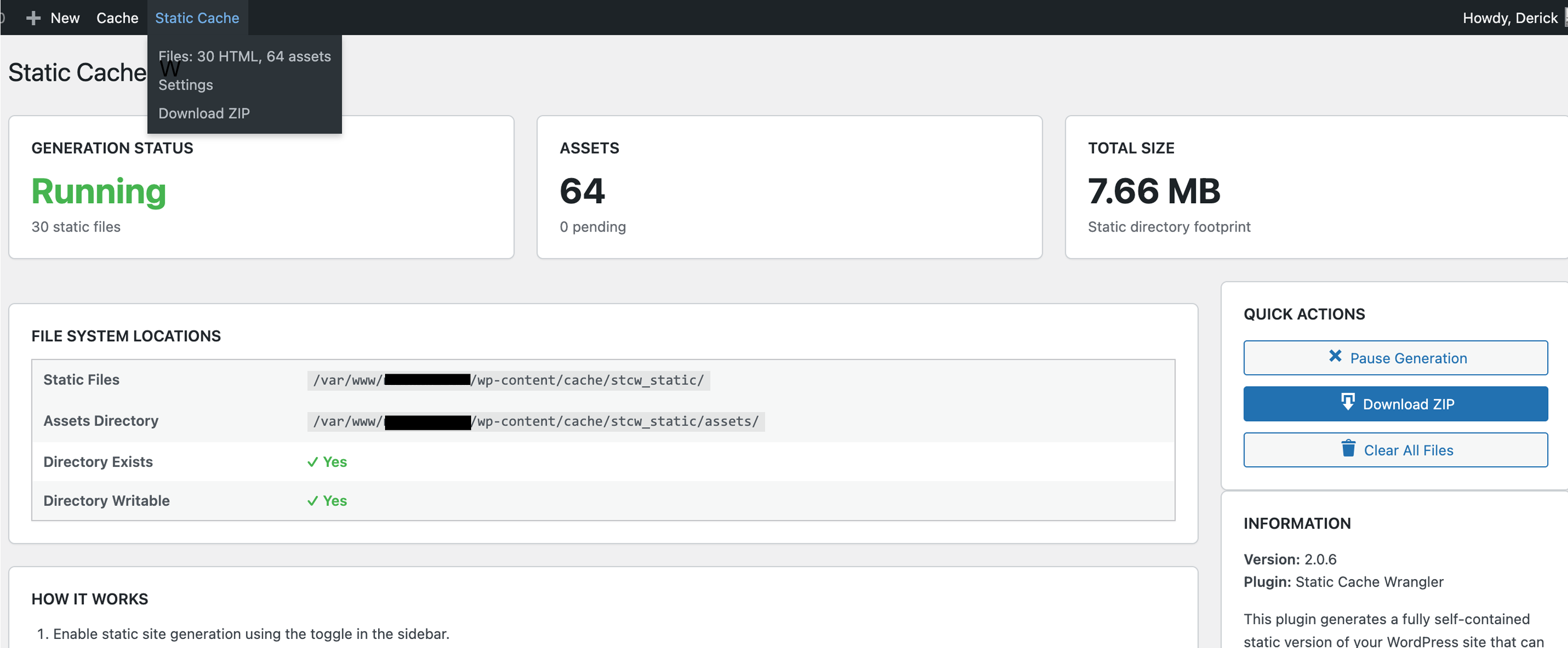
Admin bar actions and stats
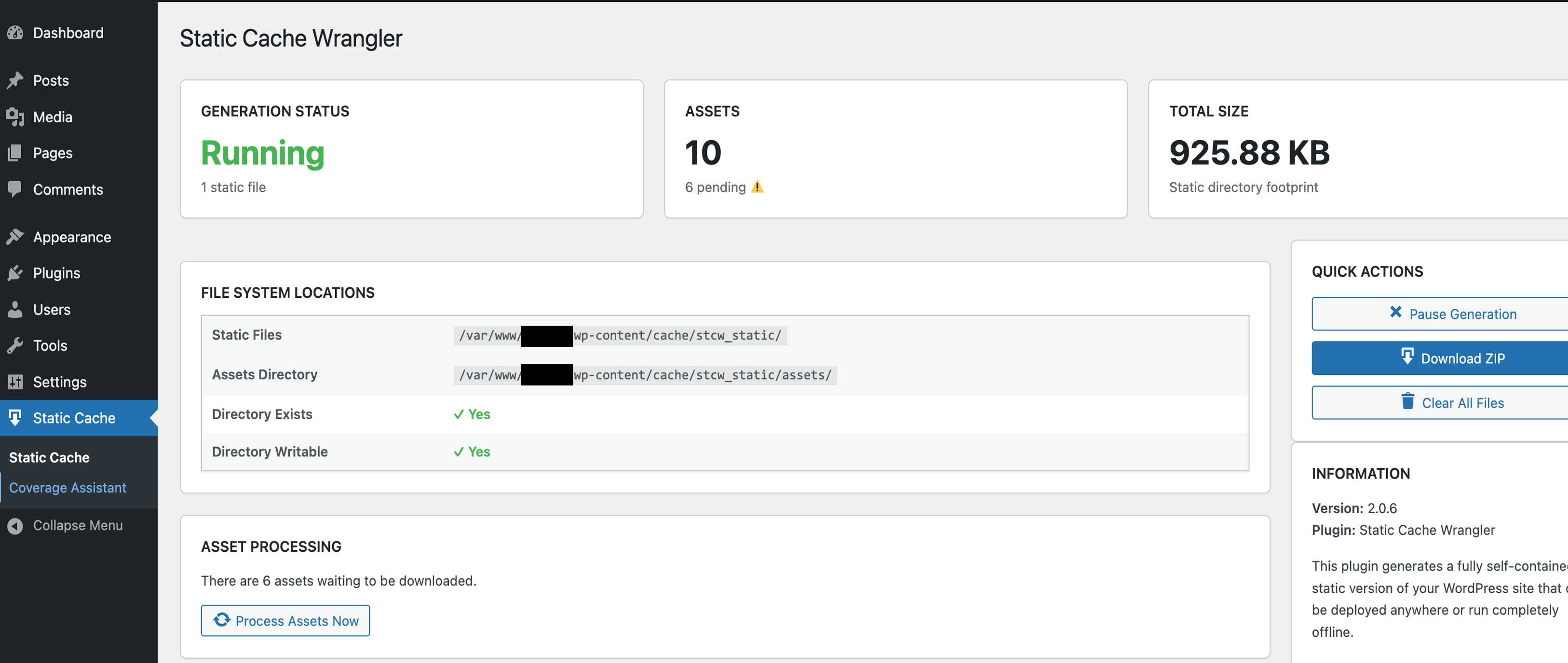
Background asset queue with progress indicator
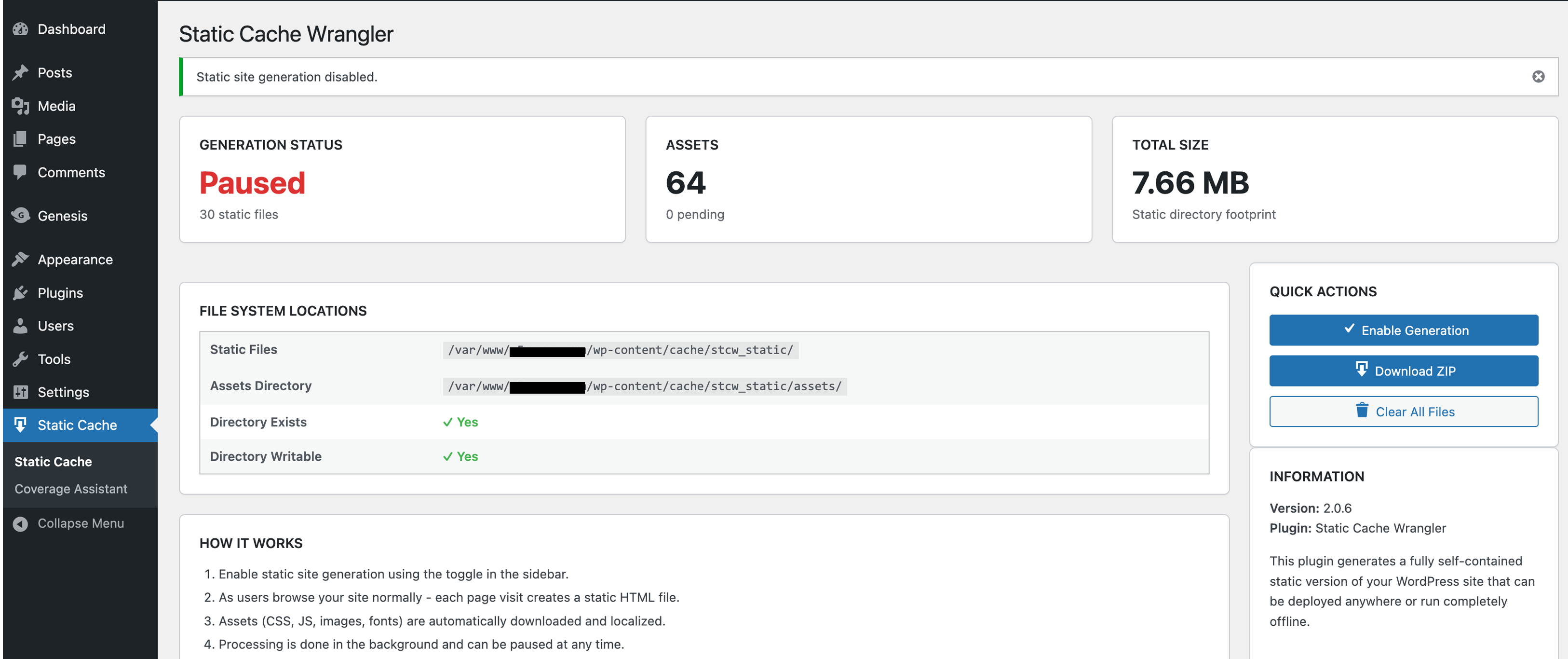
Paused status with ability to resume
Changelog
2.0.7
- Major Compatibility Enhancement Release
- Version 2.0.7 delivers extensive improvements to Kadence Blocks support and significantly enhances compatibility with all Gutenberg block plugins that rely on dynamically printed JavaScript and CSS.
- Ensures accurate static exports by capturing all front-end assets output by WordPress during rendering—including assets printed via
wp_print_scripts()andwp_print_footer_scripts()—preserving full block interactivity outside of WordPress.
Compatibility Improvements
* Full Kadence Blocks compatibility – Global front-end scripts and styles are now correctly captured, enabling complete functionality for JS-dependent components (accordions, buttons, icons, Lottie animations, progress bars, etc.).
* Enhanced Gutenberg block suite support – Reliable detection and export of dynamic assets from Spectra, Stackable, GenerateBlocks, CoBlocks, Otter, and other major block libraries.
* Improved dynamic script capture logic – Scripts enqueued conditionally based on block presence are now collected earlier, preventing missing-asset issues.
* Better preservation of interactive behavior – Tooltips, animations, scroll effects, responsive scripting, and block initialization logic now export more consistently.
* Resolved rare blank-page rendering issues caused by timing conflicts in WordPress’s script-printing lifecycle.
Technical Enhancements
* Implemented an early script-queue flush to capture output from:
* wp_print_head_scripts()
* wp_print_scripts()
* wp_print_footer_scripts()
* Captured script output is now injected into the main buffer before asset parsing, ensuring regex scanners detect all JS/CSS printed during rendering.
* Improved isolation of script-capture routines from theme templates to avoid lifecycle interference.
* Better support for plugins that enqueue front-end assets only when specific blocks are present.
* Increased reliability for mixed-content layouts and advanced interactive block patterns.
Compatibility
* Tested with WordPress 6.8.3 and PHP 7.4–8.3
* Fully backward compatible with 2.0.6
Migration Notes
* No configuration changes required.
* Recommended: Regenerate static exports after update to ensure full compatibility with updated asset-capture behavior.
2.0.6
- WordPress.org Compliance Release – “Moving Goal Post”
- Version 2.0.6 is a WordPress.org compliance update ensuring full compatibility with the latest repository validation standards introduced in 2025
- Implemented prefix standardization – all template variables, global references, and filters now use the
stcw_prefix for WordPress.NamingConventions.PrefixAllGlobals compliance - Achieved 100% pass on the updated “Check Plugin” API validation scans
- Enhanced namespace isolation and improved code safety for plugin interoperability
- Improved inline documentation for better code clarity and compliance traceability
- Developer Enhancements
- Introduced new developer hooks to support the forthcoming Static Cache Wrangler Performance Profiler MU plugin available here: Performance Profiler
- Added foundations for advanced performance profiling and benchmarking via WP‑CLI integration
- Enhanced developer experience with cleaner structure for extending cache behavior
- Improvements
- Non‑functional update focused on long‑term maintainability and ecosystem compliance
- Verified adherence to current WordPress.org repository and coding‑standards checks
- Refined internal structure to support future diagnostic and profiling modules
- Compatibility
- Tested with WordPress 6.8.3 and PHP 7.4 – 8.3
- Fully backward compatible with 2.0.5
- Migration Notes
- No functional changes to caching logic
- Recommended: Regenerate static files after update for clean metadata
2.0.5
- Enhanced Static HTML Output
- Implemented hybrid WordPress meta tag removal using native
remove_action()with regex safety net - Removed 7+ WordPress-specific meta tags from static output (RSD, wlwmanifest, shortlinks, generator, REST API, oEmbed discovery)
- Stripped
data-wp-strategyattributes from script tags for cleaner HTML - Reduced HTML file size by 3.1% and generation time by 2.3%
- Improved security by hiding WordPress version information from static exports
- New Developer Hooks
- Added
stcw_remove_wp_head_tagsaction hook – remove additional WordPress head tags before generation - Added
stcw_process_static_htmlfilter hook – modify HTML output before saving to file - Added
STCW_Generator::remove_wordpress_meta_tags()method for centralized tag removal - Improvements
- Enhanced code documentation with comprehensive PHPDoc comments
- Better extensibility for companion plugins and theme integration
- Follows WordPress coding standards and best practices
- More maintainable code with clear separation of concerns
- Compatibility
- Tested with WordPress 6.8.3
- Compatible with PHP 7.4, 8.0, 8.1, 8.2, 8.3
- Works with all major themes, page builders, and SEO plugins
- Migration Notes
- No breaking changes – fully backward compatible with 2.0.4
- Recommended: Clear and regenerate static files for cleanest output (
wp scw clear && wp scw enable) - Optional: Review new hooks for customization opportunities
2.0.4
- Major WordPress.org Compliance & Refactor Release
This update brings the plugin fully in line with current WordPress.org Plugin Directory requirements and coding standards. Nearly every internal file, reference, and namespace was audited, renamed, or rewritten for long-term maintainability and compliance. - Plugin slug, text domain, and directory renamed from
static-cache-generatorstatic-cache-wranglerto meet naming and trademark guidelines. - All file, class, and function prefixes updated from
STCGSTCWfor consistent 4-character namespace compliance. - Text domain and translation calls unified across all PHP files for proper i18n validation.
- Folder structure and includes modernized for autoloading consistency and WP.org scanning compatibility.
- Admin interface and view templates refactored for cleaner markup and translation readiness.
- CLI namespace and command base confirmed as
scw(formerlyscg) with backward compatibility removed for clarity. - All GitHub and asset references updated to reflect the new canonical project name and repository.
- Packaging and distribution scripts updated for compliance (clean
.zipexports excluding dev files). - BREAKING CHANGE: Sites upgrading from earlier builds must deactivate the old “Static Cache Generator” plugin, delete it, and install/activate “Static Cache Wrangler.”
Data and generated files can be safely regenerated once activated.
2.0.3
- WordPress.org Compliance Update
- Changed all PHP prefixes from SCG_ to STCW_ (4+ character requirement)
- Properly enqueued all scripts and styles (removed inline code)
- Extracted CSS to admin/css/admin-style.css
- Extracted JavaScript to admin/js/admin-script.js and includes/js/auto-process.js
- WP-CLI commands unchanged for user convenience (still
wp scw) - BREAKING CHANGE: Requires clearing and regenerating static files after update
- All option names changed (scw_enabled stcw_enabled, etc.)
- All WordPress hooks changed (scw_process_assets stcw_process_assets, etc.)
- See full migration guide on GitHub for technical details
2.0.2
- Enhanced stability and performance
- Improved CLI feedback and logging
- Refined asset handling and path rewriting
- Clean uninstall now clears all options, transients, and cron events
- Minor UI and accessibility improvements
2.0
- Complete rewrite with modern coding standards
- WP_Filesystem support for all operations
- Stronger security and sanitization
- Modern admin UI with real-time asset tracking
- Full WP-CLI integration
- Fixed Plugin Check and PHPCS compliance
1.0
- Initial release