

Simple Sticky Add To Cart For WooCommerce
Simple Sticky add to cart for WooCommerce show on product page top and bottom with full color customization and much more option.
Plugin info
Maintenance & Compatibility
Maintenance score
Stale • Last updated 232 days ago • Support resolved 100% • 38 reviews
Is Simple Sticky Add To Cart For WooCommerce abandoned?
Likely maintained (last update 232 days ago).
Compatibility
Similar & Alternatives
Explore plugins with similar tags, and compare key metrics like downloads, ratings, updates, support, and WP/PHP compatibility.
Description
Documentation | Support | Demo |Variable Product | Premium Version
Welcome to the Simple Sticky Add To Cart for WooCommerce plugin. Use this plugin to show visitors a sticky add to cart button on your product pages. This plugin enhances the user experience on your Woocommerce store, to help grab more sales and improve your ecommerce conversions. The plugin supports Ajax add to cart functionality, with automatic color and font customizations according to your theme. Many top ecommerce stores are now using sticky add to cart buttons like this (which float through the product page) to always show your potential customers the add-to-cart button. it keeps the add to cart button in front of your customers eyes and keeps encouraging them to make a purchase.
Some products have long content. When you finish the reading often you find add the cart button getting hidden and customers end up ignoring the add to cart button. but if you have the Simple Sticky Add To Cart it will not let the Add to cart button hidden.
✨ It helps to increase the conversion rate.
✨ Mostly People use mobile for shopping this plugin helps visitors to add a product to cart .
Fermium Features
👉 Enable / Disable On Desktop, Tablet, Mobile
👉 Sticky Bar Position
👉 Product Name
👉 Background Color
👉 Rating Star Color
👉 Rating Count Color
👉 Button Color
👉 Button Hover Color
👉 Stock Color
👉 Show/hide Product Image
👉 Show/Hide Price Range on Variable Product
👉 Font Size customization
Premium Features
👉 Ajax Add To Cart
👉 Animation
👉 Color customization
👉 Stock count label styles
👉 Add To Cart Button Text
👉 Product Image Shape ( Round | square )
👉 Sale / Price Style
👉 Review Star Color customization
👉 Box Shadow Color customization
👉 Out Of Stock Color customization
👉 Hide on specific Product or Category
👉 Variable Product Behavior
👉 Analytics
👉 Redirect After Add To Cart
👉 Premium Support
Installation
This section describes how to install the plugin and get it working.
e.g.
- Extract the zip file and just drop the contents in
/wp-content/plugins/directory of your WordPress installation. - Activate the plugin through the ‘Plugins’ menu in WordPress
Frequently Asked Questions
Simple Sticky Add To Cart Bar For WooCommerce is use to add sticky add to cart button for WooCommerce on products. It helps to get more conversion, and helps the mobile user to find the add to cart button easily.
Yes, We Have Premium Version.
Simple Sticky Add To Cart Bar For WooCommerce is use to add sticky add to cart button for WooCommerce on products. It helps to get more conversion, and helps the mobile user to find the add to cart button easily.
Review feed
Great and easy to use plugin!
Screenshots

Simple Sticky add to cart bar Demo
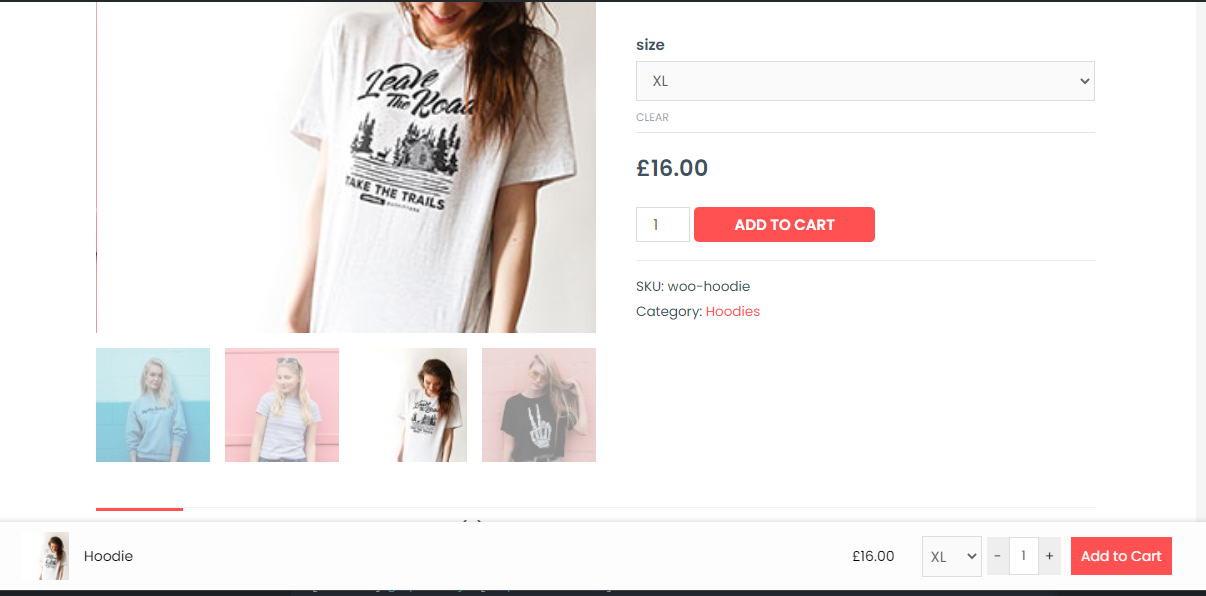
Variable Product Demo

Analytics

Design Settings

Configuration Settings

Visibility Settings
Changelog
1.4.7 22-04-2025
- [Bugfix] : Don’t count admin view on analytics
- [compatible] : WP 6.8.2 compatibility added
1.4.7 22-04-2025
- [compatible] : WP 6.7.2 compatibility added
1.4.6 30-11-2024
- [compatible] : WP 6.7.2 compatibility added
- [compatible] : WC 9.7.1 compatibility added
1.4.5 30-11-2024
- [compatible] : WP 6.7.1 compatibility added
- [compatible] : WP 6.7.1 compatibility added
- [Improvement] : WC dependency added added
1.4.4 29-04-2024
- [Bug fix] : Fix Undefined array key “wsatc-pixels-to-hide” on fresh install
- [compatible] : 6.5.2 compatibility added
1.4.3 11-12-2023
- [compatible] : 6.3.2 compatibility added
1.4.2 10-19-2023
- [Bug fix] : Restrict admin view count stat in analytics wasn’t working after recent release.
1.4.1 10-19-2023
- [compatible] : 6.3.2 compatibility added
- [compatible] : Woo 8.2.1 compatibility added
- [compatible] : High Performance Order Storage compatibility added
- [Bug fix] : Restrict admin view count stat in analytics.
1.4.0 01-31-2023
- [compatible] : 6.1.1 compatibility added
- [compatible] : Woo 7.3.0 compatibility added
1.3.9 06-11-2022
- [compatible] : 6.1.0 compatibility added
1.3.8 02-14-2022
- [compatible] : 5.8.2 compatibility added
1.3.7 11-22-2021
- [compatible] : 5.8.2 compatibility added
1.3.6 07-30-2021
- [New Feature] : Show/Hide quantity field on sticky cart,
- [compatible] : 5.8 compatibility added
1.3.5 04-06-2021
- [Bug fix] : Desktop/Tablet disable functionality bug fix
1.3.4 03-31-2021
- [Bug fix] : Hover pointer fix on quantity increase decrease buttons
- [New Feature] : Set specific pixel height to show sticky bar on scroll.
1.3.3 03-16-2021
- [compatible] : 5.7 compatibility added
1.3.2 02-23-2021
- [Bug fix] : Array element ending with code Fatal Error in PHP 7.0.3 Blue Host
1.3.1 02-18-2021
- [Improvement] : Analytics icon color changed
- [Bug fix] : recent update some files unable to commit.
1.3.0 02-18-2021
- [New Feature] : Analytics Added
- [Improvement] : PHP 7.4 compatibility issue fix
- [Bug fix] : If Variable product image or price not showing or added in correct WC standard.
1.2.2 12-08-2020
- [compatible] : 5.6 compatibility added
- [compatible] : External/Affiliate type Product Support added
1.2.1 12-02-2020
- [Improvement] : quantity field arrow removed
- [Improvement] : Position classes prefix added
1.2.0 1-30-2020
- [New Feature] : Font size customization added
1.1.1 11-29-2020
- [Improvement] : Code Optimization
- [Added] : Deactivation feedback added
1.1.0 11-12-2020
- [Improvement] : New Dashboard Design
- [Added] : More customization
- [Added] : Pro launch
1.0.0 10-30-2020
- landing on org