

Stimulate Correct Headings
This plugin stimulates WordPress editors to use correct headings for accessibility and seo.
Plugin info
Maintenance & Compatibility
Maintenance score
Possibly abandoned • Last updated 4601 days ago
Is Stimulate Correct Headings abandoned?
Possibly abandoned (last update 4601 days ago).
Compatibility
Similar & Alternatives
Explore plugins with similar tags, and compare key metrics like downloads, ratings, updates, support, and WP/PHP compatibility.
Description
This plugin stimulates WordPress editors to use correct headings for accessibility and seo. The heading tags are on the second row and hidden in the WYSIWYG editor in WordPress by default. The (non visual) text edit screen has no heading tag buttons at all.
Editors will make heading bold instead of using the correct heading while the use of correct (nested) heading is important for accessibility and seo.
This plugin add the format menu with heading tags in the first row of the WYSIWYG editor and add heading tags to the text editor.
Accessibility
[Section 508]( followed by an other
or a subordinate heading element (h2 to h6). The structure of the headers should reflex the structure of your document. So the heading structure should be logically nested. Screen readers read this semantic heading structure to construct a table of contents. Screen readers don’t use any formatted style. Visual readers use the formatted style in stead of the semantic structure. See also: http://accessibility.psu.edu/headings.
SEO
When the importance of a heading is established with HTML tags, you’re actually making it easy for the search engine robots to determine what your web page is all about. The search engine doesn’t have to guess at it. It can see exactly what your main topic is and place you under the appropriate keywords so your potential customers will be able to find you on the WWW.
Also read: The heading structure for your blog
Contribute!
If you have suggestions for a new feature or improvement, feel free to contact us on Twitter. Alternatively, you can fork the plugin from Github.
Requirements
- WordPress tested with >= 3.6
Support
We are always happy to help you. If you have any question regarding this code. Send us a message or contact us on twitter @JamedoWebsites.
Installation
-
You can download and install this plugin using the built in WordPress plugin installer. If you download the Stimulate Correct Headings plugin manually, make sure it is uploaded to “/wp-content/plugins/stimulate_correct_headings/”.
-
Activate Stimulate Correct Headings in the “Plugins” admin panel using the “Activate” link.
Frequently Asked Questions
Review feed
Screenshots
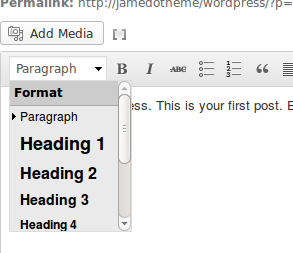
Dropdown formatting menu in the WYSIWYG editor

Heading buttons in the text editor
Changelog
1.0
- First version