

Storefront Homepage Contact Section
Add a "Contact" section to the Storefront homepage.
Plugin info
Maintenance & Compatibility
Maintenance score
Possibly abandoned • Last updated 2044 days ago • 7 reviews
Is Storefront Homepage Contact Section abandoned?
Possibly abandoned (last update 2044 days ago).
Compatibility
Languages
Similar & Alternatives
Explore plugins with similar tags, and compare key metrics like downloads, ratings, updates, support, and WP/PHP compatibility.
Description
A simple plugin that adds custom “Contact” homepage section to Storefront. Customise the display by adding your contact details via the Customizer.
This plugin requires the Storefront theme to be installed. Jetpack is required for the contact form.
Installation
- Upload
storefront-homepage-contact-sectionto the/wp-content/plugins/directory - Activate the plugin through the ‘Plugins’ menu in WordPress
- Configure the display in the Customizer (look for the ‘Homepage Contact’ section).
- Done!
Frequently Asked Questions
I installed the plugin but cannot see the “Contact” section
This plugin will only work with the Storefront theme.
I can’t see the contact form
This plugin requires the Jetpack plugin for the contact form to work.
Google map won’t generate
The Google Static Maps API requires an API key (as of June 22, 2016), which you can generate from here: https://developers.google.com/maps/documentation/static-maps/. Once you have the API key, add it to the settings, and the map will be displayed.
Review feed
Lots of spam
Screenshots
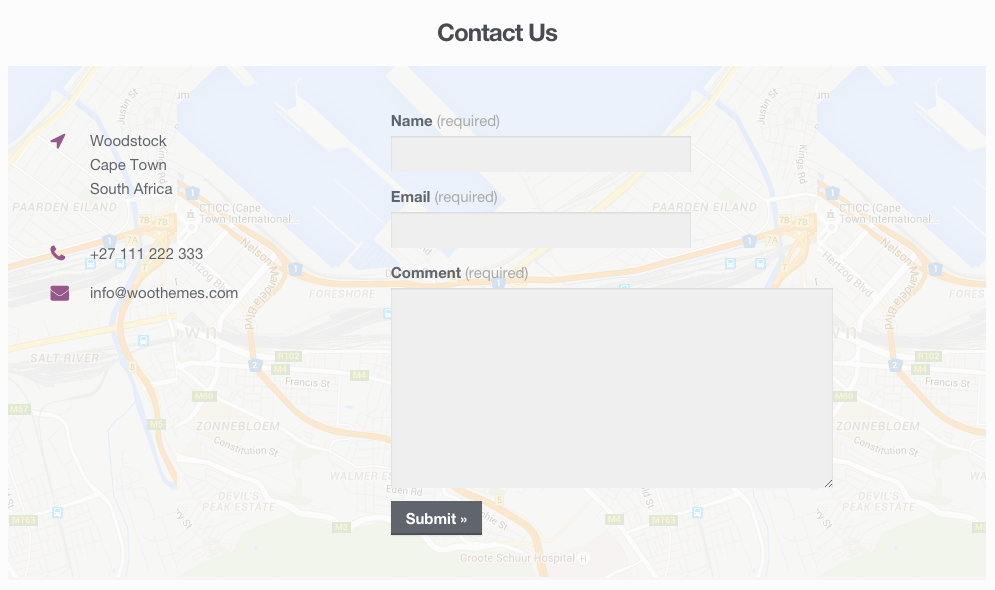
The Homepage Contact Section
Changelog
1.0.5
Fix – Move “send to” attribute to correct shortcode.
1.0.4
Fix – Set Jetpack Contact Form “send to” email address to the address in General Settings.
1.0.3
New – Added setting for users to include own Google Static Maps API key (these API keys are required as of June 22, 2016).
1.0.2
New – Added filter to manipulate the section title.
1.0.1
Tweak – Improvements to the Google Maps Static API call. Kudos @tarranjones.
1.0.0
Initial release.