
Utimate Kit ( Styler ) for WPForms
Ultimate Kit for WPForms makes the task of designing WPForms an easy one.
Plugin info
Maintenance & Compatibility
Maintenance score
Stale • Last updated 198 days ago • 113 reviews
Is Utimate Kit ( Styler ) for WPForms abandoned?
Likely maintained (last update 198 days ago).
Compatibility
Similar & Alternatives
Explore plugins with similar tags, and compare key metrics like downloads, ratings, updates, support, and WP/PHP compatibility.
Description
Ultimate Kit for WPForms has built in free styler addon that lets you create beautiful designs for WPForms. It gives you an intutive interface with design controls and form preview. It has been tested to work with Divi, Elmentor, Visual composer, Thrive Architect Beaver Builder, Astra, GeneratePress, Oxygen Builder, Avada theme, OceanWP theme, Genesis Framework, The7, Salient and more.
Here is step by step guide to style your forms
It comes with 150+ options to customize various parts of WPForms like form wrapper,form header, submit button, radio inputs, checkbox inputs, paragraph textarea, labels, section breaks, descriptions, text inputs, confirmation message, error message and more. You can easily design a multipage form with this.
You get to set the options like background color, font-size, font family, borders, width, text alignment, margin, padding and more for all the sections. You are no longer required to add custom CSS codes in your theme files to design forms. The designs created with this plugin will work even if you change your theme.
There are also responsive design controls for width, height, font size etc so, that you can set different values for different devices like mobiles, tablets and desktops.
PREMIUM ADDONS TO EXTEND THE FUNCTIONALITY
- Bootstrap for WPForms:
Bootstrap for WPForms Forms is an easy to use addon to add bootstrap design in one click . This plugin the latest major release of Bootstrap ( i.e Bootstrap 4 ). The bootsrap design will be applied to all fields and you can also change its theme to compliment your theme color.
- Tooltips for WPForms :
Tooltips for WPForms addon give you the options to add tooltips in field labels with ease. There are multiple colors, icons, animation effects, position options so, that they look the way you want them.
- Field Icons for WPForms :
Field Icons for WPForms lets you add Fontawesome Icons ( 500+ ) inside inputs and textarea fields. There are plenty of design options to change position, color, alignmnet and size of icons.
- Bulk Actions for WPForms :
It lets you perform bulk actions like duplicating multiple fields, deleting multiple fields, moving fields from one form to another and editing multiple fields. This is your are all in one solution to quickly and efficently manage/update your complex forms.
- File Renamer for WPForms :
It lets you rename the uploaded files with ease. There are options to create folders as well to better organize the uploaded fields.
- Powerups for WPForms :
Powerups for WPForms is collection small yet useful features for WPForms. There are options to make fields as readonly, disable empty fields in submission preview, set password strength and more.
Installation
- Upload the plugin files to the
/wp-content/plugins/styler-for-wpformsdirectory, or install the plugin through the WordPress plugins screen directly. - Activate the plugin through the ‘Plugins’ screen in WordPress
- Now go to any post/page(in frontend) where you have added a WPForms. Make sure you are logged in.
- Click on the Customize button to launch WordPress Cusotmizer.
- Click on Styler for WPForms and then select the WpFors you want to customize.
- Wait while the plugin saves you form selection and refreshes the page.
- Now start beautiful designs for your forms
Frequently Asked Questions
Yes each form design is stored separately. So, design for each form can be different
As of now you can only create one design for one form. If you want to create multiple for single form then first duplicate it in WPForms and then create a new design using WPForms Styler plugin.
Review feed
Screenshots
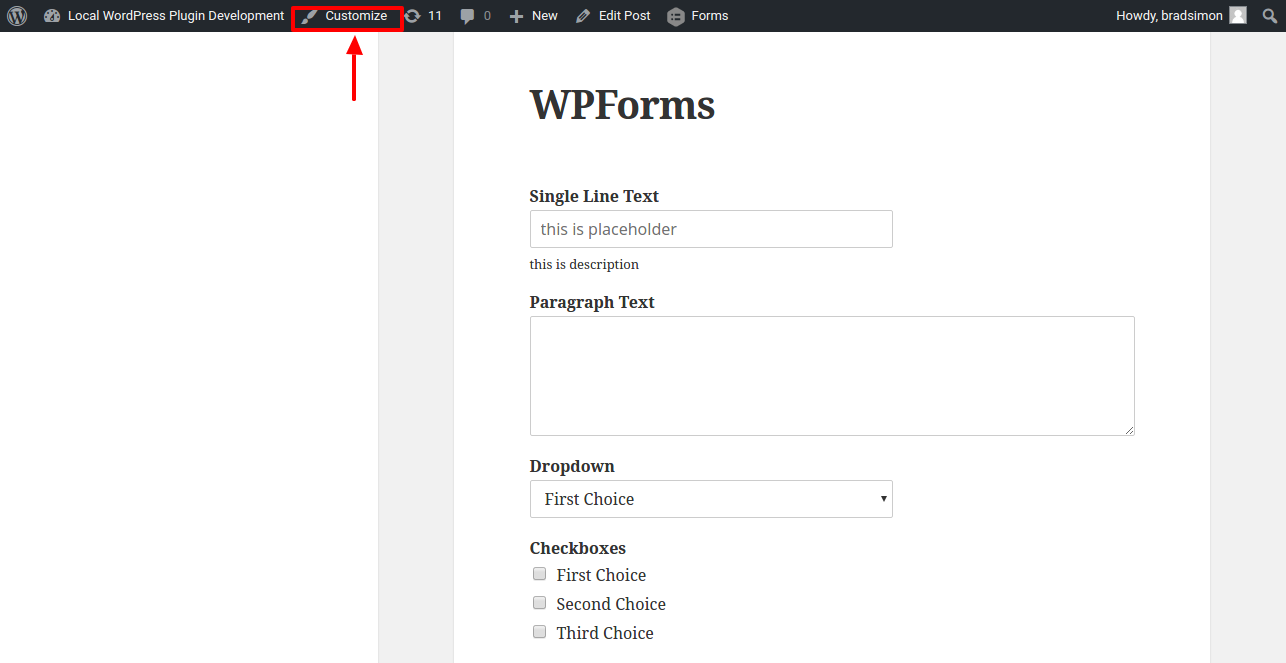
Open Customize window
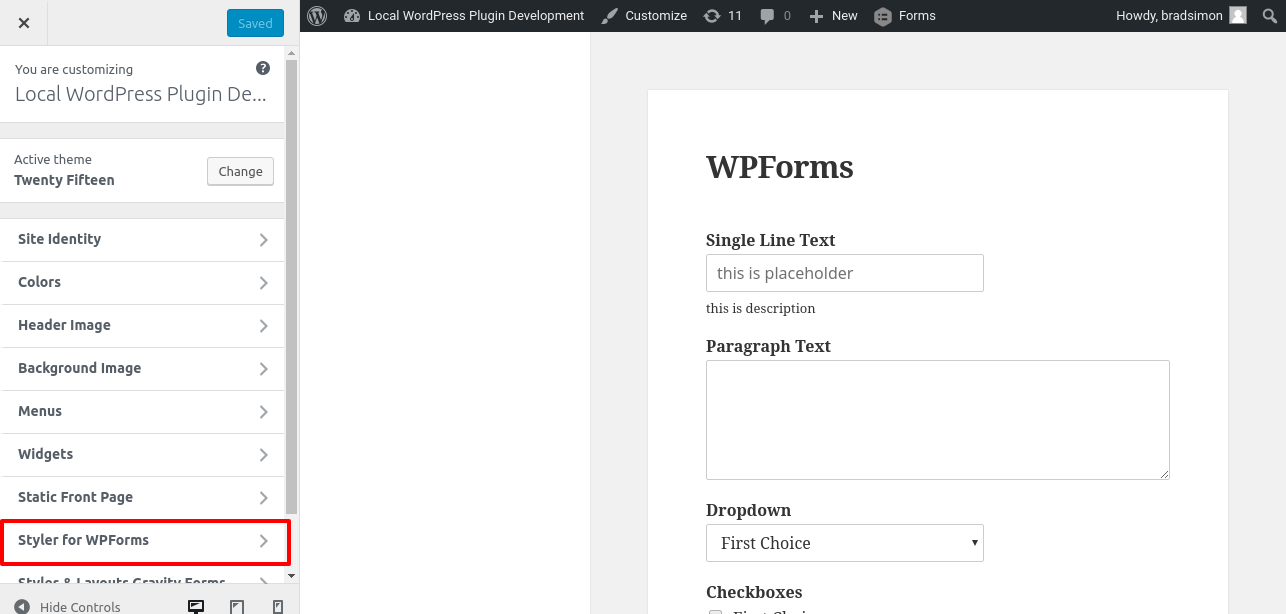
Styler for WPForms Panel
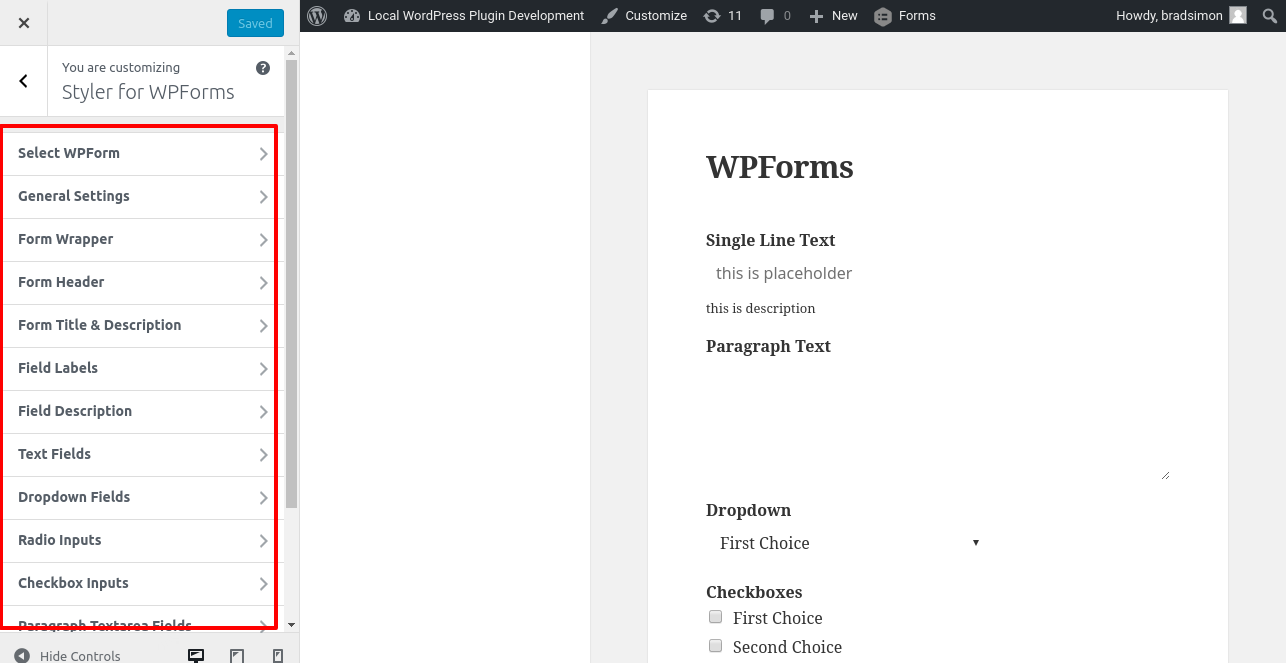
Sections for Settings
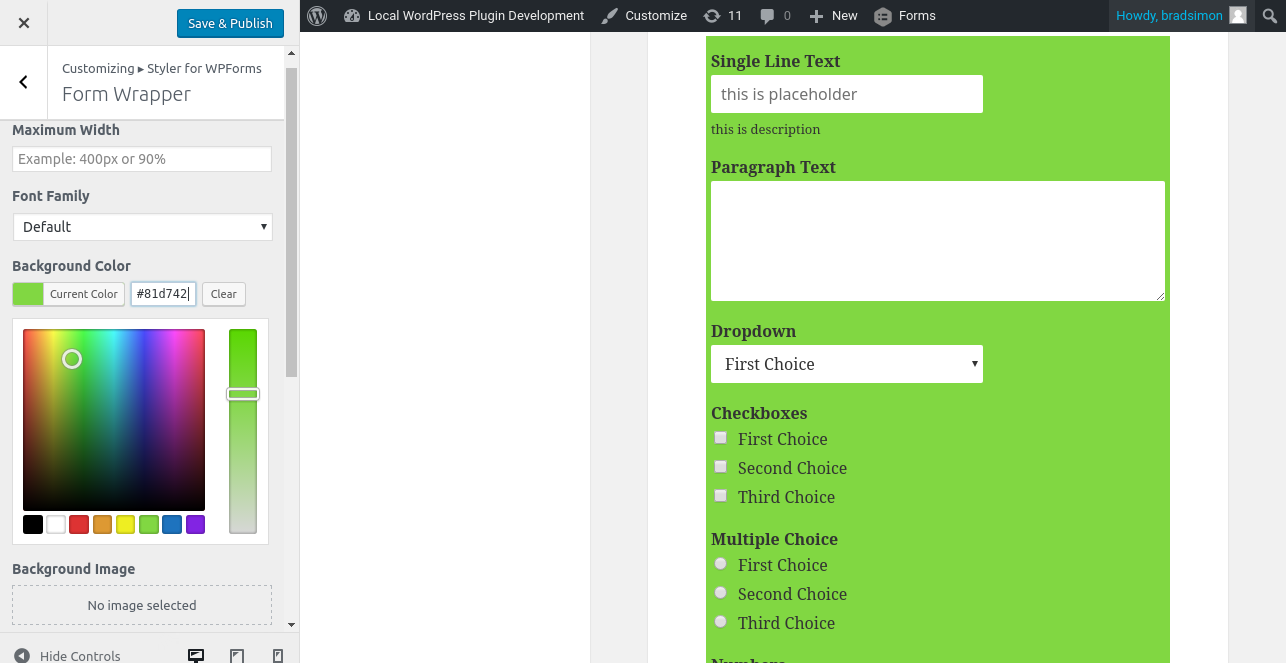
Options in settings
Changelog
3.8 (16/09/2025)
- Fixed an issue with bulk actions for WPForms
3.7 (15/09/2025)
- Added support for File Renamer license key
- Added support for Bulk Actions for WPForms
3.6 (03/05/2025)
- Updated plugin name to Ultimate Kit
3.5 (31/1/2025)
- Fixed support for powerup addons
3.4 (10/12/2024)
- Added support Powerup addons
3.3 (20/11/2024)
- Added support for old versions of WPForms
- Added support for blacklist addon
3.2 (20/11/2024)
- Minor bugfix
3.1 (20/11/2024)
- Fixed margin and paddings controls not showing values
3.0 (20/11/2024)
- Added new interface for styling WPForms
- Added direct link for styling forms
- Bugfixes and enhancements
2.0.6 (16/07/2024)
- Fixed minor bug
2.0.5 (02/10/2023)
- Fixed dropdown styling on modern design
- Updated licensing file
2.0.4 (8/05/2022)
- General fix
2.0.3 (06/04/2021)
- Fixed warning message
2.0.2 (15/01/2021)
- added information about views for wpforms
2.0.1 (29/12/2020)
- fixed warnings
2.0 (31/05/2019)
- added quick edits shortcuts to open relevant customizer sections
- added welcome page
- added option to set !important for all Styler for WPForms styles
- added conditions to prevent styling for form elements which aren’t set.
- added separate width control for textarea field
- fixed issue with rating link
1.1.2 (09/05/2019)
- added compatability with 5.2
- added support for bootstrap addon
1.1.1 (07/04/2019)
- fixed issue with bold, italics, underline and uppercase buttons in customizer
- added rating notification message
1.1 (01/03/2019)
- fixed compatability with latest version of WPForms
- fixed borders of fields not visible in Customizer
- fixed ‘Delete Styles’ not working
- fixed form selection bug
- fixed next button not getting styling
- added option to set line height
1.0 (28/03/2017)
- initial release