

Sup Post Widget
Is a plugin where you can display the number of popular posts, latest and random post with thumbnail image on your sidebar or page/post using short co …
Plugin info
Maintenance & Compatibility
Maintenance score
Possibly abandoned • Last updated 3965 days ago
Is Sup Post Widget abandoned?
Possibly abandoned (last update 3965 days ago).
Compatibility
Similar & Alternatives
Explore plugins with similar tags, and compare key metrics like downloads, ratings, updates, support, and WP/PHP compatibility.
Description
Is a plugin where you can display the number of popular posts, latest and random post with thumbnail image on your sidebar or page/post using short code.
Feature :
– Random post, Popular Posts and Latest posts
– Thumbnail image, support 3rdparty source image
– Widget ready
– Short code support
– Tabview menu with jQuery
Installation
- Upload the ‘sup-post-widget’ folder to the ‘/wp-content/plugins/’ directory
- Activate the plugin through the ‘Plugins’ menu in WordPress
- Go to the Appearance -> Widgets -> Choose a “Posts Widget” and drag it to the sidebar where you wish it to appear.
- You are done.
More info about this plugin >> SPW Plugin
Frequently Asked Questions
Q : How can I add a list of posts widget to my sidebar?
A : Go to the Appearance -> Widgets -> Choose a “Posts Widget” and drag it to the sidebar where you wish it to appear.
Q : How can I add a list of posts widget to my page or post?
A : You can use the short code to add a list popular, random or latest post to the page/post.
Manual widget code : <?php echo spw_display(''); ?>
Individual selection Use short codes below to your post/page :
Popular post   :  [sup_popular]
Latest post    :  [sup_latest]
Random post    :  [sup_random]
Review feed
Screenshots
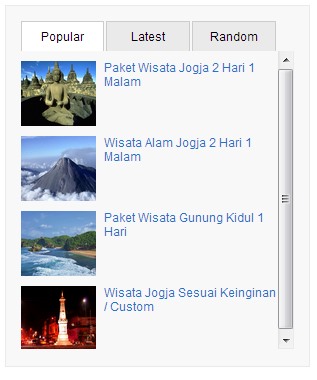
Post Widget form in the sidebar

Post Widget form in the Page/Post

Changelog
1.0
- Initial release
1.1
- Fixed little bug on widget
1.2
- Fixed little bug on style class
1.3
- Added new style
1.4
- Added post widgets options
- Default image if no thumbnail
1.5
- NA
1.6
- NA
1.7
- NA
1.8
- Fixed bug error for not found links
- New options feature
- Post Comments count
- Post date