

Super Simple Google Analytics
Very simple plugin for reliably inserting your Google Analytics tracking code on every page.
Plugin info
Maintenance & Compatibility
Maintenance score
Possibly abandoned • Last updated 2974 days ago • 10 reviews
Is Super Simple Google Analytics abandoned?
Possibly abandoned (last update 2974 days ago).
Compatibility
Similar & Alternatives
Explore plugins with similar tags, and compare key metrics like downloads, ratings, updates, support, and WP/PHP compatibility.
Description
This is a bare bones option for people who are looking to simply insert the basic Google Analytics tracking code into the head section of every page without any fuss.
I’ve only included the essential options; it’s not very exciting, but works reliably.
Readme Generator
- This plugin’s readme.txt file was generated by the bitacre Readme Generator for WordPress Plugins.
Support
Donations
Donations are graciously accepted to support the continued development and maintenance of this and other plugins. We currently accept Paypal and kind words.
Installation
- Download the latest zip file and extract the
super-simple-google-analyticsdirectory. - Upload the this directory inside your
/wp-content/plugins/directory. - Activate ‘Super Simple Google Analytics’ on the ‘Plugins’ menu in WordPress.
- Click ‘Settings’ underneath the plugin or navigate to Settings > Google Analytics and insert your GA tracking code and click the checkbox to turn it on.
- That’s it.
Frequently Asked Questions
Installation Instructions
- Download the latest zip file and extract the
super-simple-google-analyticsdirectory. - Upload the this directory inside your
/wp-content/plugins/directory. - Activate ‘Super Simple Google Analytics’ on the ‘Plugins’ menu in WordPress.
- Click ‘Settings’ underneath the plugin or navigate to Settings > Google Analytics and insert your GA tracking code and click the checkbox to turn it on.
- That’s it.
Can you add this feature I just thought of?
Possibly, I’m trying to keep this as simple as possible, but if it’s a really useful/uncomplicated feature that I’ve omitted I will definitely consider it.
Review feed
Screenshots

The bare bones options page.
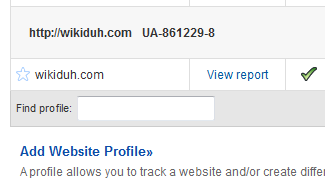
Where to find your Google Analytics account number.
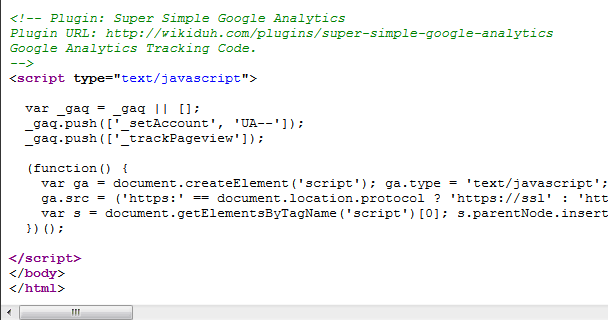
Source of the tracking code inserted just before </body>.
Changelog
1.7.3
- Got rid of the maxlength fields for tracking codes with more than 8 digits
1.7.2
- Purely cosmetic update for WordPress 4.4
1.7.1
- Added namespacing collision check
- Minor updates for WordPress 3.5 update
1.7
- Added i18n (multi-language) support
- Recoded plugin as PHP class
- Added function to save options when upgrading from very old versions
1.6
- Added option to track integrated adsense stats.
1.5.1
- Fixed an error causing malformed tracking code to be output.
1.5.0
- Added a option to toggle tracking of logged in administrators.
- Added internationalization language support.
1.4.2
- Fixed error causing population of ALL settings links on plugin menu.
1.4.1
- Fixed missing ‘ in Analytics code.
1.4
- Added a location option for code insert.
- Changed variable names for uniqueness.
- Lowered insert priority to get closer to /head or /body tags
1.3.2
- Fixed typo introduced in 1.3.1 update which can disrupt plugin meta links and throw an error in some situations.
1.3.1
- Fixed Settings link using generic function name which might prevent plugin from being activated.
1.3
- Added a ‘default values’ function for people doing multiple installations.
- Clarified/additional code commenting.
- Fixed weird line break printing in HTML source.
1.2
- Added a Settings link directly to the plugins page for convenience.
- Made the Settings page look more normal.
- Changed maxlength of 2nd box to 3 characters (since someone might have more than 99 sites on the same Analytics account).
1.1
- Fixed maxlength of 1st box (from 6 to 8 characters).
1.0
- First released version.
- There may still be bugs, but I can’t find any.