

SyntaxHighlighter Evolved PHP5
Adds support for the PHP5 language to the SyntaxHighlighter Evolved plugin using the [sourcecode language="php5"] tag and [php5] shortcode.
Plugin info
Maintenance & Compatibility
Maintenance score
Possibly abandoned • Last updated 5250 days ago
Is SyntaxHighlighter Evolved PHP5 abandoned?
Possibly abandoned (last update 5250 days ago).
Compatibility
Similar & Alternatives
Explore plugins with similar tags, and compare key metrics like downloads, ratings, updates, support, and WP/PHP compatibility.
Description
SyntaxHighlighter Evolved PHP5 is a plugin for self-hosted WordPress that adds support to Alex Mills’ (Viper007) SyntaxHighlighter Evolved plugin for the PHP5 language .
It provides a brush designed to work with the SyntaxHighlighter Evolved WordPress plugin . To be able to use this plugin, you will need the SyntaxHighlighter Evolved plugin installed.
Features:
-
it includes many improvements over the bundled PHP plugin
- PHP opening and closing tags are captured
- Variables within double-quoted strings are captured
- Numerical values are captured
- a large superset of PHP’s function names are recognized
- Custom function names are captured
-
this plugin does not interfere with the standard bundled version of the PHP hightligher; both versions can be used together, as shown here :live demo
Notes:
-
this plugin follows the programming conventions outlined by Alex Mills (Viper007) for extending his plugin: Adding A New Brush (Language)
-
uses the advanced javascript brush provided by David Chambers PHP brush for SyntaxHighlighter
-
this plugin is based on similar work by apollox2: Scott Selikoff SyntaxHighlighter Evolved AppleScript
-
SyntaxHighlighter Evolved WordPress plugin by Alex Mills (Viper007) is based on the SyntaxHighlighter JavaScript package by Alex Gorbatchev.
Installation
Prerequisite
In order to use SyntaxHighlighter Evolved PHP5, you must first install SyntaxHighlighter Evolved.
Installation
Extract all files from the ZIP file, making sure to keep the file/folder structure intact, and then upload it to /wp-content/plugins/.
Plugin Activation
Go to the admin area of your WordPress install and click on the “Plugins” menu. Click on “Activate” for the “SyntaxHighlighter Evolved: PHP5” plugin.
Plugin Usage
Just wrap your code in [sourcecode language="php5"]your code here [/sourcecode]
or
wrap your code in [php5], such as [php5] code here [/php5] .
The shortcodes accept a wide variety of parameters. For details, see the bottom of the SyntaxHighlighter Evolved’s settings page.
Frequently Asked Questions
The code is just being displayed raw. It isn’t being converted into a code box or anything. What’s wrong?
Make sure your theme’s footer.php file has <?php wp_footer(); ?> somewhere inside of it, otherwise the plugin won’t be able to do it’s thing.
INFO: When you find a that a keyword or a other special word of PHP5 is not highlighted. Please write entry into the forum of this plugin. -> Support Forum
Review feed
Screenshots
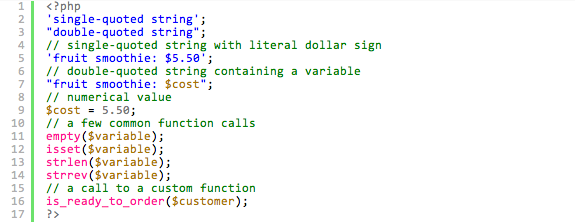
This is a sample image of the plugin in action as applied to PHP5 code.
Changelog
1.4.1
- Peer review and quality assurance; first version to be officially published
1.4.0
- Updated php5 brush stylesheet and script to version 3.0.83, as provided by David Chambers.
1.3.0
- Added support for accessing plugin via [php5].
1.2.0
- Bug fixes.
1.1.0
- Initial release