

Plugin info
Maintenance & Compatibility
Maintenance score
Possibly abandoned • Last updated 4892 days ago • 4 reviews
Is Tabber Tabs Widget abandoned?
Possibly abandoned (last update 4892 days ago).
Compatibility
Similar & Alternatives
Explore plugins with similar tags, and compare key metrics like downloads, ratings, updates, support, and WP/PHP compatibility.
Description
This plugin is not actively supported anymore.
The easiest way to add a tabbed content area in your sidebar.
If you can use widgets… then you can use this plugin.
(Of course, your theme must support widgets)
Want to see what it looks like? Check out the Screen Shots.
Thanks
This plugin couldn’t have been created without Patrick Fitzgerald’s awesome JavaScript tabifier: http://www.barelyfitz.com/projects/tabber/
Installation
- Activate the Tabber Tabs Widget plugin
- Head on over to your themes widget area. You will see two news items: Tabber Tabs Widget Area and Tabber Tabs Widget.
- Drag some of your existing widgets (ie. Pages, Archives, etc) on to the Tabber Tabs Widget Area.
- Drag the Tabber Tabs Widget on to one of your sidebars (ie Sidebar 1, Sidebar 2, etc)
BAM! You now have a tabbed area in your sidebar. Congratulations!
IMPORTANT: Do not place the Tabber Tabs WIDGET in the Tabber Tabs WIDGET AREA.
Frequently Asked Questions
What does this plugin do?
It makes it very easy for users to add a cool tabbed area in their sidebar.
I don’t like the look, can I change it?
Tabber Tabs comes with two tabs styles built in. Just choose which one you want from the dropdown in the Tabber Tabs widget.
I tried the default styles and still don’t like the look, can I change it?
Absolutely! If you know CSS then you can change the entire look of your tabbed area; colors, tab style, anything.
I just designed the coolest custom tabs! Do you want to include them with the plugin?
That would be great. If you designed some really cool tabs, with some custom CSS, and you would like us to include it as a “style”, then please contact us.
Review feed
Still works
Screenshots

Tabber Tabs Style 1 in a sidebar

Tabber Tabs Style 2 in a sidebar
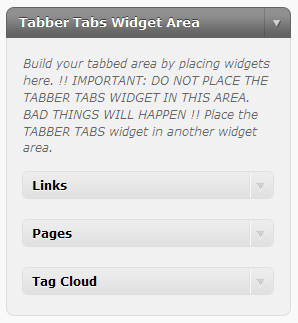
Tabber Tabs Widget Area - place other widgets here to create tabs

Tabber Tabs Widget: Place this widget in your sidebar to show tabs, and seletct a style
Changelog
0.39
- CSS updates to help stop vertical tabs.
0.38
- Switched to plugins_url() function *Props to Mile Rosu for the suggestion
0.37
- Fixed formatting issue
0.36
- Only load our widget area last so we don’t effect other widget areas.
- Load all other functions normally.
0.35
- Load our widget area last so we don’t effect other widget areas
0.34
- Temporarily hide tabber so it does not flash on the page as plain HTML.
0.33
- Translation file added
- Conditionally stop Javascript load in admin area.
0.3
- Added style chooser – choose from two styles
- Switched to minimized Javascript
0.2
- Typo in directory path
- Small updates
0.1
- Initial release