

Table Builder for CSV
The Table Builder for CSV is a simple plugin that creates HTML table from csv file.
Plugin info
Maintenance & Compatibility
Maintenance score
Possibly abandoned • Last updated 2349 days ago
Is Table Builder for CSV abandoned?
Possibly abandoned (last update 2349 days ago).
Compatibility
Similar & Alternatives
Explore plugins with similar tags, and compare key metrics like downloads, ratings, updates, support, and WP/PHP compatibility.
Description
The Table Builder for CSV creates HTML table from csv file. It provides pagination and search filter capabilities for created table. Also,
you can customize settings of created table and define new captions for columns headers. For using this plugin, you should place your csv
files in the WordPress uploads folder.
To use this plugin, after activation of the plugin, you should place [table_builder_for_csv] shortcode in your posts.
Attributes for the shortcode:
1) src: Path to csv file from uploads folder( For example, if test.csv file is in the WordPress uploads folder, then src=”test.csv”.)
2) id: Assign an ID for each shortcode in content. (For example id=”1″)
3) captions: You can define custom captions for columns headers of table. If you want to use first row of the csv file as columns headers,
don’t use this attribute. Separate each header with @#. (For example captions=”col1@#col2@#col3″
4) searchbox: Assign true (searchbox=”true”), if you want to use search filter for table. (Default is false)
5) rows: Number of rows per page for table pagination. (for example, rows=”5″. Default is 10)
6) textalign: Text alignment for table.
7) headerbg: Background color for columns headers.
8) headercolor: Text color of columns headers.
9) pagebg: Background color for pagination links.
10) pagecolor: Text color of pagination links.
11) pageactive: Background color for active pagination link.
12) pagehoverbg: Background color for pagination links on mouse hover.
13) pagehovercolor: Text color of pagination links on mouse hover.
14) pagealign: Alignment for pagination links.
You can see some examples of using this plugin and its shortcode in screenshots.
Installation
Upload the Table Builder for CSV plugin to your blog, Activate it.Then place [table_builder_for_csv] shortcode in your posts to load it.
Frequently Asked Questions
Review feed
Screenshots
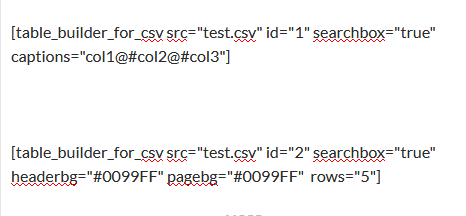
Shortcodes in the post content
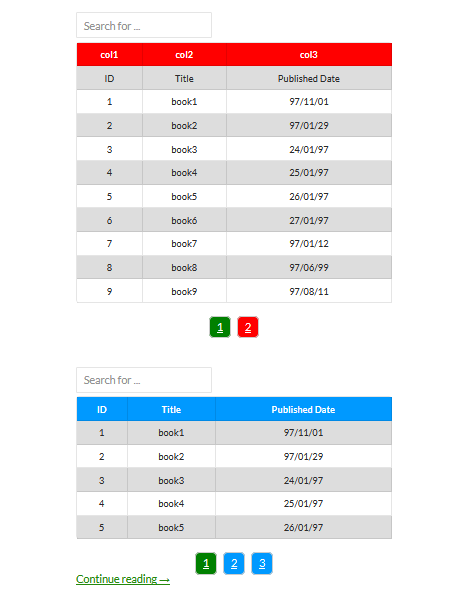
Output
Changelog
1.0
First release