

Tag Cloud Shortcode
The plugin enables any page or post author to include a Tag Cloud by using a shortcode instead of hacking theme template files.
Plugin info
Maintenance & Compatibility
Maintenance score
Possibly abandoned • Last updated 2353 days ago • 3 reviews
Is Tag Cloud Shortcode abandoned?
Possibly abandoned (last update 2353 days ago).
Compatibility
Similar & Alternatives
Explore plugins with similar tags, and compare key metrics like downloads, ratings, updates, support, and WP/PHP compatibility.
Description
The plugin gives users the oportunity to embed a tag cloud for a site within any page.
When using the shortcode [tagcloud] when
writing in the content of any page, the user includes in the page, a
tag cloud for posts on that site.
I am working on adding the ability to set options, such as sizes, etc…
Installation
This section describes how to install the plugin and get it working.
-
Download the tag-cloud-shortcode.zip file to a directory of your
choice(preferably the wp-content/plugins folder) -
Unzip the tag-cloud-shortcode.zip file into the wordpress
plugins directory: ‘wp-content/plugins/’ -
Activate the plugin through the ‘Plugins’ menu in WordPress
-
Include the [tagcloud] shortcode in any page you wish to include the tag cloud display.
Frequently Asked Questions
How do I use the plugin?
When you write or edit the content of a page, simply include
[tagcloud] (along with the brackets) whenever you want the tag cloud to
be displayed. Make sure you activate the plugin before you use the
shortcode.
Why is the tag cloud not displayed, even though I included the shorttag ?
The plugin probably has not yet been activated.
Why does my posted content also show the shortcode [tagcloud]?
At the moment, the tag-cloud-shortcode plugin only works when used
in pages. The content displayed by the plugin table probably
malfunctioned if you used the shortcode in a post.
Review feed
Screenshots
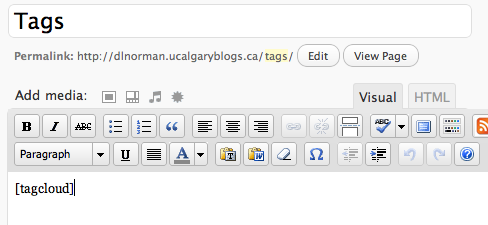
adding the shortcode to a page

sample embedded tag cloud
Changelog
0.1
- First draft of the plugin. It’s not parameterizable yet, but works.