

Plugin info
Maintenance & Compatibility
Maintenance score
Possibly abandoned • Last updated 3312 days ago • 4 reviews
Is Tags Page abandoned?
Possibly abandoned (last update 3312 days ago).
Compatibility
Similar & Alternatives
Explore plugins with similar tags, and compare key metrics like downloads, ratings, updates, support, and WP/PHP compatibility.
Description
Standard installation of WordPress provides tags for posts and also Tag Cloud widget for 45 most common tags. Unfortunatelly there is no option to offer your web visitors list of all tags. And that is purpose of this plugin.
This plugin adds a link to the bottom of the Tag Cloud widget, which leads to a page displaying table of all tags from the website. This table consists of two columns, in the first one you find tag name, which also serves as a link to the articles tagged in it. The second column contains count, how many times the tag is used. The table is sortable by both columns, just by clicking on the header of the column. Sorting is provided by JavaScript, so no reloading of page.
License
WTFPL License 2.0 applies
           DO WHAT THE FUCK YOU WANT TO PUBLIC LICENSE
                   Version 2, December 2004

Copyright (C) 2004 Sam Hocevar

Everyone is permitted to copy and distribute verbatim or modified
copies of this license document, and changing it is allowed as long
as the name is changed.

           DO WHAT THE FUCK YOU WANT TO PUBLIC LICENSE
  TERMS AND CONDITIONS FOR COPYING, DISTRIBUTION AND MODIFICATION

 0. You just DO WHAT THE FUCK YOU WANT TO.ToDo
* compatibility with WordPress not using permalinks
Installation
- Upload the full directory to wp-content/plugins
- Activate plugin Tags Page in plugins administration
- Make sure you are having the Tags Cloud widget on your website
- Enjoy!
- For detailed customization, please see the FAQ section
Frequently Asked Questions
Plugin registers new shortcode [get_tags], which generates the table with all tags. You can use this shortcode on a page or in a post, if you wish.
The shortcode supports pagination via optional attribute pagesize; if set to an integer value, the table will be split into pages containing the specified amount of tags (lines), with listing through pages below the table. If the attribute pagesize is omited, then a full table with all tags is displayed, without any pagination. To utilize pagination, to specify it in the shortcode, you need to display the table on a real page, not virtual — please see below.
Example: [get_tags pagesize="100"]
When you activate the plugin, it will display the table with all tags on a virtual page, which it will generate on fly, when needed. The virtual page can have any URI (located within your installation of WordPress) — simply what is configured in the widget settings, this will become the address of the virtual page. The virtual page contains only the table generated by the [get_tags] shortcode, nothing else; the title of the page is All Tags. The templates used to generate the virtual page are (within your theme) in the following priority:
- page-tags-page.php
- page.php
If you wish, you can use a real page instead of the virtual one. Just create a page, put the shortcode [get_tags] into the content, optionally add the pagesize attribute or any other content; in the Tag Cloud widget configuration, set the URL of the link to lead to this real page.
Graphical style of the table is fully managed by CSS (cascade style sheets), so you can easily override the default lookout just by your own CSS values after calling wp_head(); in your theme header.
Review feed
Poor quality
Screenshots
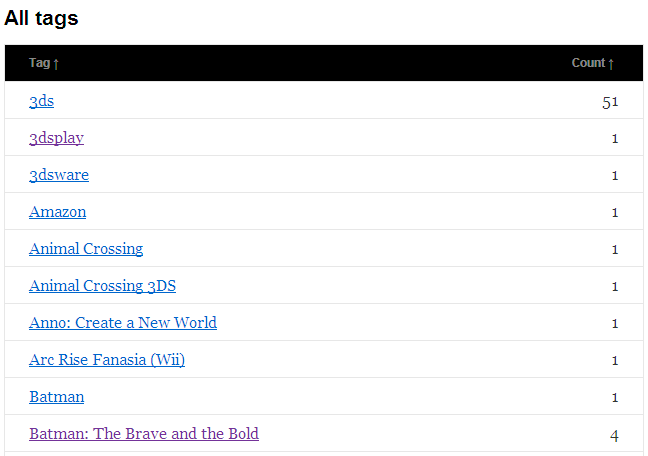
All tags listed to a table
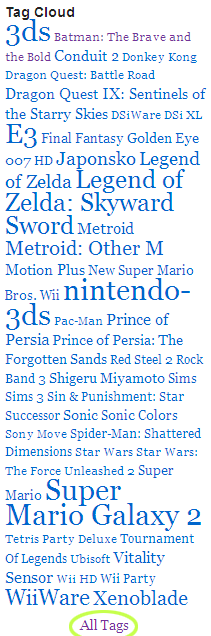
Tag cloud widget with link to all tags
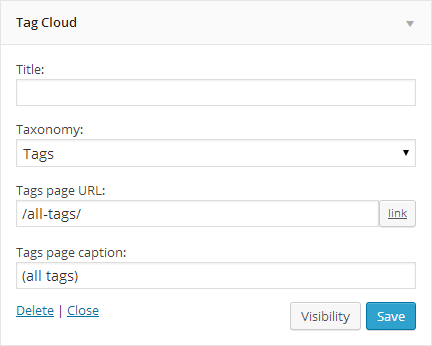
Tag cloud widget gets two more options
Changelog
1.3.1
- fix: failed on tables without footer
1.3
- fix: sorting did not work when clicking in table footer
1.2
- fix: virtual page not working for permalinks set to /%category%/%postname%/
1.1
- added pagination support (user request); please see the FAQ for details how to use it
- no need for user to manually create the All Tags page anymore; if it does not exist, plugin will create virtual page on fly; if the user creates the All Tags page by himself, then the plugin can still use this user-created page
- options specified now directly in Tag Cloud widget settings, no need for separate settings page anymore
- new option to specify caption of the link to All Tags page
- URL option supports WordPress dialog for inserting a link
- not showing the link to All Tags page in WordPress admin anymore
- not showing the link to All Tags, if the widget shows Categories (and not Post tags) anymore
- rewritten as class
- jscript loaded only when needed (when the table shown), run after webpage loaded
- internal optimization and code cleanup
1.0
- Initial release.