

Plugin info
Maintenance & Compatibility
Maintenance score
Possibly abandoned • Last updated 3458 days ago • 77 reviews
Is Tako Movable Comments abandoned?
Possibly abandoned (last update 3458 days ago).
Compatibility
Similar & Alternatives
Explore plugins with similar tags, and compare key metrics like downloads, ratings, updates, support, and WP/PHP compatibility.
Description
This plugin allows you to move comments from one post or page to another. You can also move comments across post types and custom post types.
By using this plugin in order to move comments, admins no longer need to manually insert the post ID number. Instead, admins can choose the post title through a drop down list. This allows admins to choose the post title that they want to move the comments to easily. Nested comments will also be automatically moved if the comment chosen to be moved has any nested comments under it. This plugin also allows admin to move WordPress comments in bulk. It has a bulk action that moves bulk comments automatically across posts, pages, and custom post types!
In order to use the plugin, just click on edit comments and move your comments through the ‘Move Comments with Tako’ metabox.
Notice: PHP5 is required since version 1.0.5!
Features:
- Move comments across posts, pages, and posts under custom post types
- Automatically move all the nested comments under the comment chosen to be moved
- Manual insertion of post ID is not needed; post/page can be chosen under a dropdown list
- No more ugly dropdowns! Autocomplete enabled; searching for post title becomes easier
- Comments can be move in bulk! No more slaving around and moving only one comment at a time!
Rate this Plugin
Please rate this plugin if you find it useful. It gives the plugin more exposure and it will generate more downloads. Thank you so much for your help! 🙂
Installation
- Upload the Tako folder to the
/wp-content/plugins/directory - Activate the plugin through the ‘Plugins’ menu in WordPress
- Click on edit comment and move the comment through the ‘Move Comments with Tako’ metabox
Frequently Asked Questions
How do I contact you if I have a question?
Email me at ren.aysha[at]gmail.com. Please include [tako-movable-comments] on the subject line. I am also on Twitter; tweet your questions to @RenettaRenula. You can also post your questions via the support forum.
Review feed
Perfect!
Screenshots
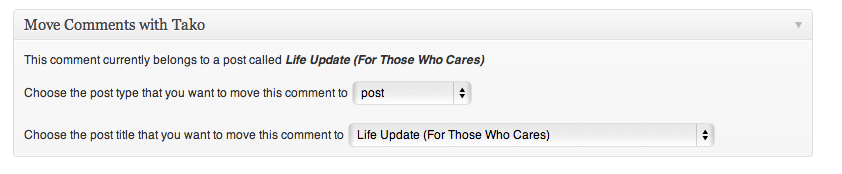
The Meta Box

The Edit Comment Page with the Tako Meta Box

Move bulk WordPress comments