

Tap Chat
Lightweight WhatsApp chat button with welcome bubble, working hours, page controls. GDPR-friendly, no tracking.
Plugin info
Maintenance & Compatibility
Maintenance score
Maintained • Last updated 124 days ago
Is Tap Chat abandoned?
Likely maintained (last update 124 days ago).
Compatibility
Developers
Languages
Similar & Alternatives
Explore plugins with similar tags, and compare key metrics like downloads, ratings, updates, support, and WP/PHP compatibility.
Description
Tap Chat adds a beautiful floating WhatsApp button with advanced features. Set business hours, show welcome messages with multiple styles, control visibility, and customize appearance – all while keeping your site fast and privacy-friendly.
Key Features
- Floating Chat Button – Beautiful, customizable button that sticks to your site
- Custom Icon Upload – Replace WhatsApp icon with your own brand logo or custom image
- Welcome Bubble – Friendly greeting message to encourage conversations with two styles (Modern & Simple)
- Smart Triggers – Show the bubble at the perfect moment based on visitor behavior
- Country Selector – Easy phone number configuration with 150+ country codes and flags
- Working Hours – Display button only during business hours with timezone support
- Page Visibility – Show or hide button on specific pages/posts
- Fully Customizable – Colors, sizes, positions, labels – make it yours
- Mobile Optimized – Separate mobile/desktop configurations
- Zero Tracking – GDPR-friendly, no cookies, no external requests
- Translation Ready – Fully translatable with .pot file included
- Performance First – Minimal footprint, no jQuery dependencies in frontend
Welcome Bubble Features
The welcome bubble is designed to increase engagement and conversions:
-
Two Beautiful Styles:
- Modern – Rich bubble with avatar, name, and online status
- Simple – Clean bubble with message only, positioned above or beside button
-
Smart Triggers – Show bubble based on visitor behavior:
- Time on Page – After visitor spends specific time (recommended)
- Scroll Depth – When visitor scrolls to specific percentage
- Exit Intent – When visitor moves to close tab/window
- Idle Detection – When visitor is inactive
-
Customization Options:
- Custom welcome message with emoji support
- Agent/team name display (Modern style)
- Avatar image upload (Modern style)
- Multiple trigger combinations
- Auto-close on interaction
- Session-based display (won’t annoy visitors)
Advanced Features
-
Custom Icon Upload:
- Replace default WhatsApp icon with your brand logo
- Supports PNG, JPG, SVG formats
- Perfect circular display with automatic sizing
- Works in floating button, offline button, and bubble avatar
- Easy fallback to default icon
-
Business Hours Control:
- Set different hours for each day of the week
- Timezone support for accurate scheduling
- Custom offline message
- Choose to hide button or show offline state
-
Visibility Rules:
- Show on specific pages only
- Hide on specific pages (e.g., checkout, cart)
- Combine show/hide rules for precise control
- Support for all post types and WooCommerce pages
-
Customization Options:
- Button position (left/right)
- Custom colors
- Icon sizes (separate for desktop/mobile)
- Hide/show label on mobile or desktop
- Pre-filled message text
- Page context appending (automatic page info in message)
Perfect For
- E-commerce stores (WooCommerce ready)
- Service businesses
- Support teams
- Real estate agents
- Consultants
- Educational institutions
- Healthcare providers
- Any business that wants instant communication
Translation Ready
Tap Chat is fully translatable and includes:
* English (default)
* German (Deutsch) – coming soon
* Spanish (Español) – coming soon
* French (Français) – coming soon
* RTL language support
Want to translate? Submit your translation and get credit!
Privacy & GDPR
- No tracking or analytics
- No cookies stored
- No external requests
- No data collection
- 100% GDPR compliant
Usage
Shortcode:
Display chat link anywhere with: [tapchat]
Custom shortcode parameters:
[tapchat phone=”+1234567890″ message=”Hello!” label=”Contact us”]
Technical Details
- Clean, semantic HTML5
- Modern CSS3 with smooth animations
- Vanilla JavaScript (no jQuery frontend dependency)
- Follows WordPress coding standards
- Passes WordPress.org plugin review
- Regular security updates
- Compatible with all major themes and page builders
Mobile Experience
- Fully responsive design
- Touch-optimized interactions
- Native app integration
- Separate mobile size controls
- Optional label hiding on mobile
Customization
Make Tap Chat match your brand:
* Custom button colors with color picker
* Adjustable icon sizes
* Flexible positioning
* Label customization
* Modern or Simple bubble styles
* Custom welcome messages
* Avatar personalization
* Upload custom icons
What’s New in 1.6.0
- Improved Admin UX – Tab navigation without page refresh
- Unified Settings – All settings save together from any tab
- Dynamic Bubble Positioning – Bubble automatically adjusts to icon size
- Better Responsive Behavior – Perfect alignment on all screen sizes
Privacy Policy
Tap Chat does not:
* Collect any user data
* Use cookies or browser storage (except sessionStorage for bubble display)
* Make external HTTP requests
* Track or monitor user behavior
* Share data with third parties
The only data processed is:
* Phone number (stored in WordPress database)
* User preferences (stored in WordPress database)
* Temporary session data for bubble display (sessionStorage, cleared when browser closes)
When users click the chat button, they are redirected to the chosen messaging service, which is governed by that service’s privacy policy.
Support
Need help? We’re here for you!
- Documentation: Plugin documentation
- Support Forum: WordPress.org support
- Bug Reports: GitHub issues
Credits
- Icons from messaging platform brand resources
- Country flags from Unicode emoji standard
- Developed with love by Tapchat Team
Roadmap
Planned features for future versions:
- Multiple agents support with round-robin
- Custom working hours per agent
- Analytics dashboard (privacy-friendly)
- More bubble styles and animations
- Team chat widget
- Pre-chat form
- Quick replies templates
- Multi-language welcome messages
- Integration with popular form plugins
Want a specific feature? Let us know in the support forum!
Installation
Automatic Installation
- Go to WordPress Dashboard Plugins Add New
- Search for “Tap Chat”
- Click “Install Now” and then “Activate”
- Go to Settings Tap Chat to configure
Manual Installation
- Download the plugin zip file
- Go to WordPress Dashboard Plugins Add New Upload Plugin
- Choose the downloaded zip file and click “Install Now”
- Activate the plugin
- Go to Settings Tap Chat to configure
Configuration
-
General Tab:
- Select your country code from the dropdown
- Enter your phone number (without country code)
- Upload custom icon to replace WhatsApp logo (optional)
- Customize button appearance (color, size, position)
- Set default message and label
-
Welcome Bubble Tab:
- Enable welcome bubble
- Choose style (Modern or Simple)
- Customize message, name, and avatar
- Configure smart triggers (Time on Page recommended)
-
Business Hours Tab:
- Enable working hours if needed
- Set schedule for each day
- Choose timezone
- Add optional offline message
-
Visibility Tab:
- Control where button appears
- Show on specific pages only
- Hide on specific pages (e.g., checkout)
-
Advanced Tab:
- Enable page context appending
- Additional customization options
Frequently Asked Questions
Yes! Tap Chat is completely free with all features included. No premium version, no upsells.
No. Tap Chat works with regular accounts or business accounts from supported messaging platforms.
No. Tap Chat is extremely lightweight (< 15KB total) and loads asynchronously. It won’t affect your site speed.
Yes! Tap Chat doesn’t use cookies, doesn’t track users, and doesn’t make external requests. It’s 100% GDPR compliant.
Yes! You can customize colors, sizes, position, and labels. The button adapts to your brand.
Yes! Go to General Settings and use the Custom Icon Upload feature to replace the WhatsApp icon with your own brand logo or any custom image.
Yes! Tap Chat is fully responsive and optimized for mobile devices with separate mobile/desktop controls.
Absolutely! Tap Chat works perfectly with WooCommerce and supports all WooCommerce pages.
Smart triggers show the welcome bubble based on visitor behavior:
– Time on Page: After visitor stays for X seconds (default and recommended)
– Scroll Depth: When visitor scrolls to X% of page
– Exit Intent: When visitor moves mouse to close tab
– Idle Detection: When visitor is inactive for X seconds
When multiple triggers are enabled, the bubble shows when ANY trigger condition is met first.
Modern Style:
– Includes avatar image
– Shows agent/team name
– Displays online status indicator
– Positioned above button
Simple Style:
– Clean, minimal design
– Message only
– Can be positioned above or beside button
– Faster to configure
Yes! The welcome bubble is optional. You can use just the floating button without the bubble.
No. After a visitor closes the bubble or clicks it, they won’t see it again during that browsing session (using sessionStorage).
Yes! Use: [tapchat phone="+1234567890"] to override the default number.
Yes! Tap Chat is fully compatible with RTL (Right-to-Left) languages like Arabic and Hebrew.
Yes! Use the shortcode with custom message parameter: [tapchat message="Custom message for this page"]
- Go to Business Hours tab
- Enable “Enable Working Hours”
- Select your timezone
- Toggle days on/off and set times
- Optionally add offline message
- Save changes
You have two options:
– Hide the button completely (leave offline message empty)
– Show grayed-out button with offline message
Yes! Use the Visibility tab:
– “Show ONLY on specific pages” – button appears only where selected
– “Hide on specific pages” – button hidden where selected
– Combine both for precise control
Review feed
Best lightweight WhatsApp plugin
Very useful and customizable
Screenshots
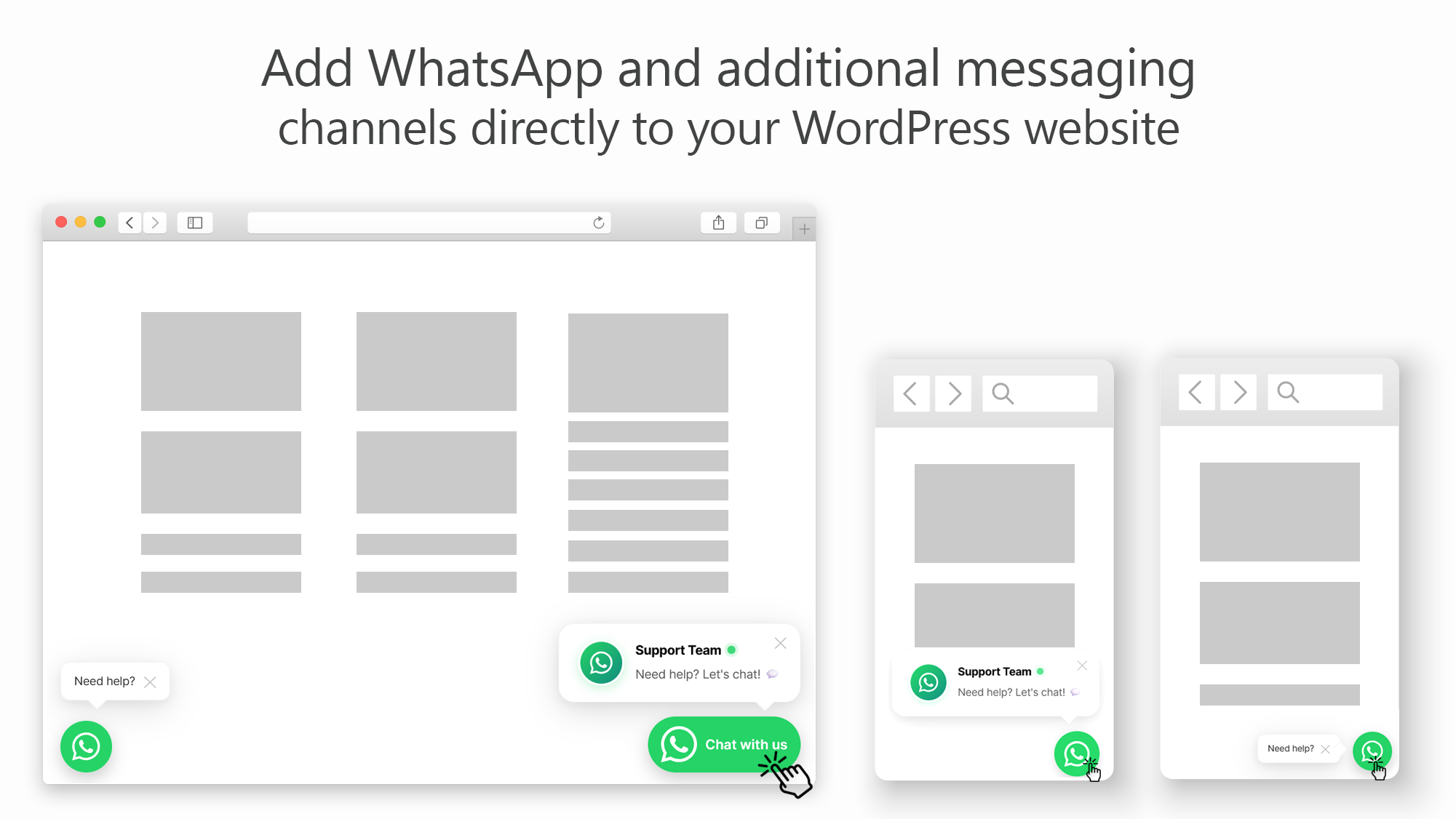
Floating Chat Button - Clean, professional button on your site

General Settings - Easy configuration with country selector

Modern Welcome Bubble - Rich bubble with avatar and name

Simple Welcome Bubble - Minimal, clean bubble design

Smart Triggers - Configure when bubble appears

Business Hours - Set schedule with timezone support

Visibility Controls - Choose where button appears

Advanced - other options
Changelog
1.6.0 – 2025-11-27
- Improved: Admin settings now use JavaScript tabs without page refresh
- Improved: All settings from all tabs save together in one submission
- Improved: Dynamic bubble positioning – automatically adjusts to icon size changes
- Improved: Better responsive behavior for welcome bubble on all screen sizes
- Fixed: Bubble alignment issues when changing icon sizes
- Performance: Smoother admin experience with no page reloads between tabs
1.5.0 – 2025-11-25
- New: Custom Icon Upload feature – Replace WhatsApp icon with your brand logo
- New: WordPress Media Library integration for icon selection
- Improved: Perfect circular icon display with automatic sizing
- Improved: Custom icon works in floating button, offline button, and bubble avatar
- Improved: Responsive icon behavior across all devices
- Fixed: Icon sizing and display issues on mobile
- Fixed: Border spacing around custom icons
- Performance: Optimized icon rendering with CSS
1.4.0 – 2025-11-21
- New: Smart Triggers system for welcome bubble
- Time on Page trigger (enabled by default)
- Scroll Depth trigger
- Exit Intent trigger
- Idle Detection trigger
- Improved: Simplified trigger configuration
- Improved: Better default settings for new installations
- Improved: Enhanced UX with Time on Page as recommended option
- Fixed: Removed duplicate Display Delay field
- Fixed: Various minor bug fixes and improvements
- Performance: Optimized trigger detection algorithms
1.3.0 – 2025-08-15
- New: Welcome Bubble feature with two styles (Modern & Simple)
- New: Bubble customization options (message, name, avatar)
- New: Welcome bubble animations and interactions
- New: Session-based bubble display control
- Improved: Better mobile experience
- Fixed: Avatar upload functionality
- Performance: Optimized CSS animations
1.2.0 – 2025-06-10
- New: Business Hours feature with timezone support
- New: Offline message option
- New: Page visibility controls (show/hide on specific pages)
- New: Support for all post types and WooCommerce pages
- Improved: Better settings organization with tabs
- Improved: Enhanced admin UI
- Fixed: Various compatibility issues
1.1.0 – 2025-04-20
- New: Country selector with 150+ countries and flags
- New: Separate mobile and desktop size controls
- New: Hide label options for mobile/desktop
- New: Page context appending option
- Improved: Phone number validation
- Improved: Better URL encoding for messages
- Fixed: International phone number handling
1.0.0 – 2025-03-01
- Initial release
- Floating chat button
- Customizable colors, sizes, and positions
- Pre-filled messages
- Shortcode support
- Translation ready
- GDPR compliant