

Product Catalog
TC Product Catalog helps to nicely present your company products in your WordPress Website.
Plugin info
Maintenance & Compatibility
Maintenance score
Possibly abandoned • Last updated 475 days ago • 5 reviews
Is Product Catalog abandoned?
Possibly abandoned (last update 475 days ago).
Compatibility
Languages
Similar & Alternatives
Explore plugins with similar tags, and compare key metrics like downloads, ratings, updates, support, and WP/PHP compatibility.
Description
TC Product Catalog helps to nicely present your company products in your WordPress Website.
- Upgrade to PRO »
- View live Demos »
- Documentation »
- Support »
- Send Message On Facebook »
- How To Create A Website »
How to Use the shortcode ?
Show all products.
[tcproduct-catalog]
Show Products of a specific Catalog. just put the catalog slug in the catalog Attribute
[tcproduct-catalog catalog="catalog-slug"]
TC Portfolio Plugin Features:
- Easy installable
- Fully Responsive.
- Supported all Modern browsers
- Custom post type – add Product like any post.
- Hide/Show filter Menu .
- You can Add Product Nmae/Title , Product Description,Product Image,Product Regular Price , Sale price , Currency Icon
Pro Version Features:
- Besides, free version fields , You can Add multiple images to create Gallery
- Multiple column 2,3,4,5.
- Short-code Generator.
- Transparent Hover Overly color
- Single Product Page Template
- Related/same category Product item in single Page Template
- Latest Product item in single Page Template
- Setting Options to manage Latest Product item in single Page Template – hide/show related/Latest Products
- Advanced Setting Panel to manage color,font size
- tcpc slug has been removed from url
Watch the Video tutorial to work with the plugin
Installation
Installing TC Product Catalog is easy like a regular WordPress plugin. Here goes the step by step Guide to Install TC Product Catalog plugin :
Install Plugin using WordPress Admin Panel Search Option
- In your Admin, go to menu Plugins > Add New
- Search TC Product Catalog
- Click to install
- Activate the plugin
- TC Product Catalog post type will show below POSTS .
Install Plugin using Upload Method in WordPress Admin Panel
- Download the latest version of TC Product Catalog (.zip file)
- In your Admin, go to menu Plugins > Add New
- click on the Upload Tab
- Click on “Choose File from your Hard Disk”
- Browse and Select downloaded tc-team-members.zip & click on ‘Install Now’ button
- Activate the plugin
- TC Product Catalog type will show below POSTS
Install Plugin using FTP Manager
- Upload TC Product Catalog folder with all files inside the /wp-content/plugins/ directory
- Go to WordPress dashboard > Plugins & Activate the TC Product Catalog plugin
- TC Product Catalog post type will show below POSTS with its owl icon.
How to Use the shortcode ?
Show all products.
[tcproduct-catalog]
Show Products of a specific Catalog. just put the catalog slug in the catalog Attribute
[tcproduct-catalog catalog="catalog-slug"]
Frequently Asked Questions
Review feed
Screenshots
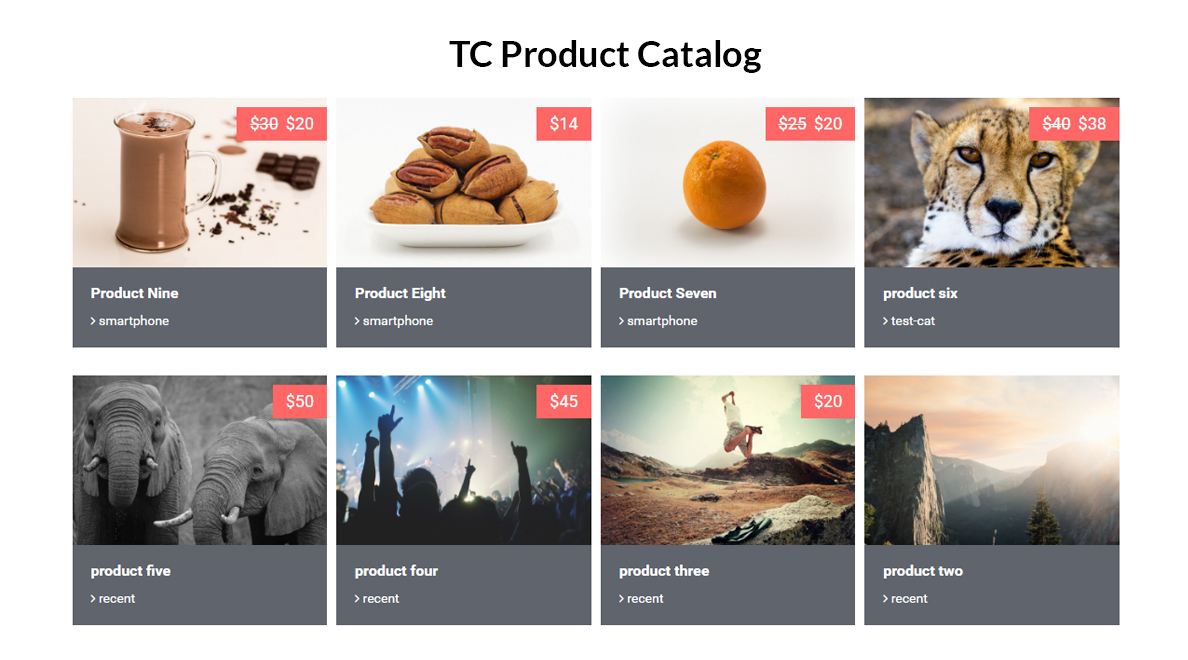
Final output after adding shortcode .
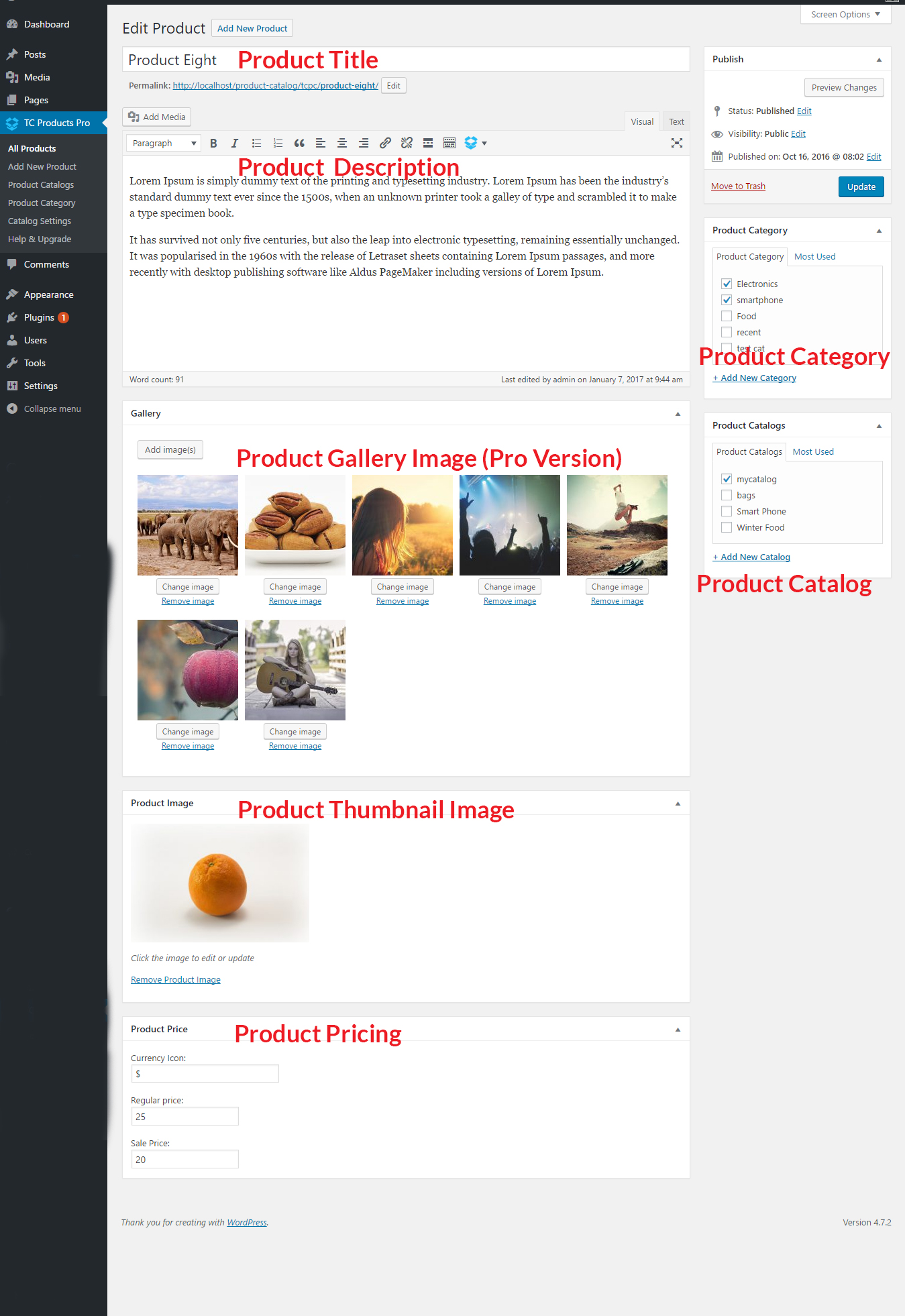
TC Products > Add New Product. Then fill the respective fields.
![Add the [tcproduct-catalog] shortcode in any page or post. .](https://ps.w.org/tc-product-catalog/assets/screenshot-3.jpg?rev=1584392)
Add the [tcproduct-catalog] shortcode in any page or post. .
Changelog
Version 1.2.1 – Dec 13 , 2024
- Tested: WordPress 6.7.1 compatibility.
version 1.2
CSS bug Fixed
version 1.1 =
=> CSS added
=> Pro Version Released