

TC Testimonials
Testimonial Slider carousel is an easy plugin to display testimonials of clients,business partners or affiliates along with title, URL on your website …
Plugin info
Maintenance & Compatibility
Maintenance score
Possibly abandoned • Last updated 473 days ago • 1 reviews
Is TC Testimonials abandoned?
Possibly abandoned (last update 473 days ago).
Compatibility
Languages
Similar & Alternatives
Explore plugins with similar tags, and compare key metrics like downloads, ratings, updates, support, and WP/PHP compatibility.
Description
Testimonial Slider carousel is an easy plugin to display testimonials of clients,business partners or affiliates along with title, URL on your website.
Responsive design and easy to embed in any post or page using shortcode [tc-testimonial] .
also can be add in themes PHP template using
Plugin Features:
- Easy installable.
- Fully Responsive.
- Supported all Modern browsers
- Powered By OWL carousel 2 .
- Custom post type .
- Work with all WordPress theme.
- Developer friendly & easy to customize.
- Background , Text , Navigation , Dots , Middle border and Quote Icon color are change able through the setting panel .
- You can hide or show nav,dots and middle horizontal line.
- you can define Number number of columns for desktop and Tablet screens.
Watch the video tutorial (free version)
Use following shortcode to display clients, partners or sponsors Testimonials.
Basic Usages
[tc-testimonial]
Show Testimonial carousel of any category
[tc-testimonial category="category-slug"]
Installation
Installing TC Testimonial is easy like a regular WordPress plugin. Here goes the step by step Guide to Install TC Testimonial plugin :
Use following shortcode to display clients, partners or sponsors Testimonials.
Use following shortcode to display clients, partners or sponsors Testimonials.
Watch the video tutorial (free version)
Basic Usages
[tc-testimonial]
Show Testimonial carousel of any category
[tc-testimonial category="category-slug"]
Install Plugin using WordPress Admin Panel Search Option
- In your Admin, go to menu Plugins > Add New
- Search TC Testimonial
- Click to install
- Activate the plugin
- TC Testimonial post type will show below POSTS .
Install Plugin using Upload Method in WordPress Admin Panel
- Download the latest version of TC Testimonial (.zip file)
- In your Admin, go to menu Plugins > Add New
- click on the Upload Tab
- Click on “Choose File from your Hard Disk”
- Browse and Select downloaded tc-testimonial.zip & click on ‘Install Now’ button
- Activate the plugin
- TC Testimonial type will show below POSTS
Install Plugin using FTP Manager
- Upload TC Testimonial folder with all files inside the /wp-content/plugins/ directory
- Go to WordPress dashboard > Plugins & Activate the TC Testimonial plugin
- TC Testimonial post type will show below POSTS with its owl icon.
Frequently Asked Questions
Review feed
Screenshots
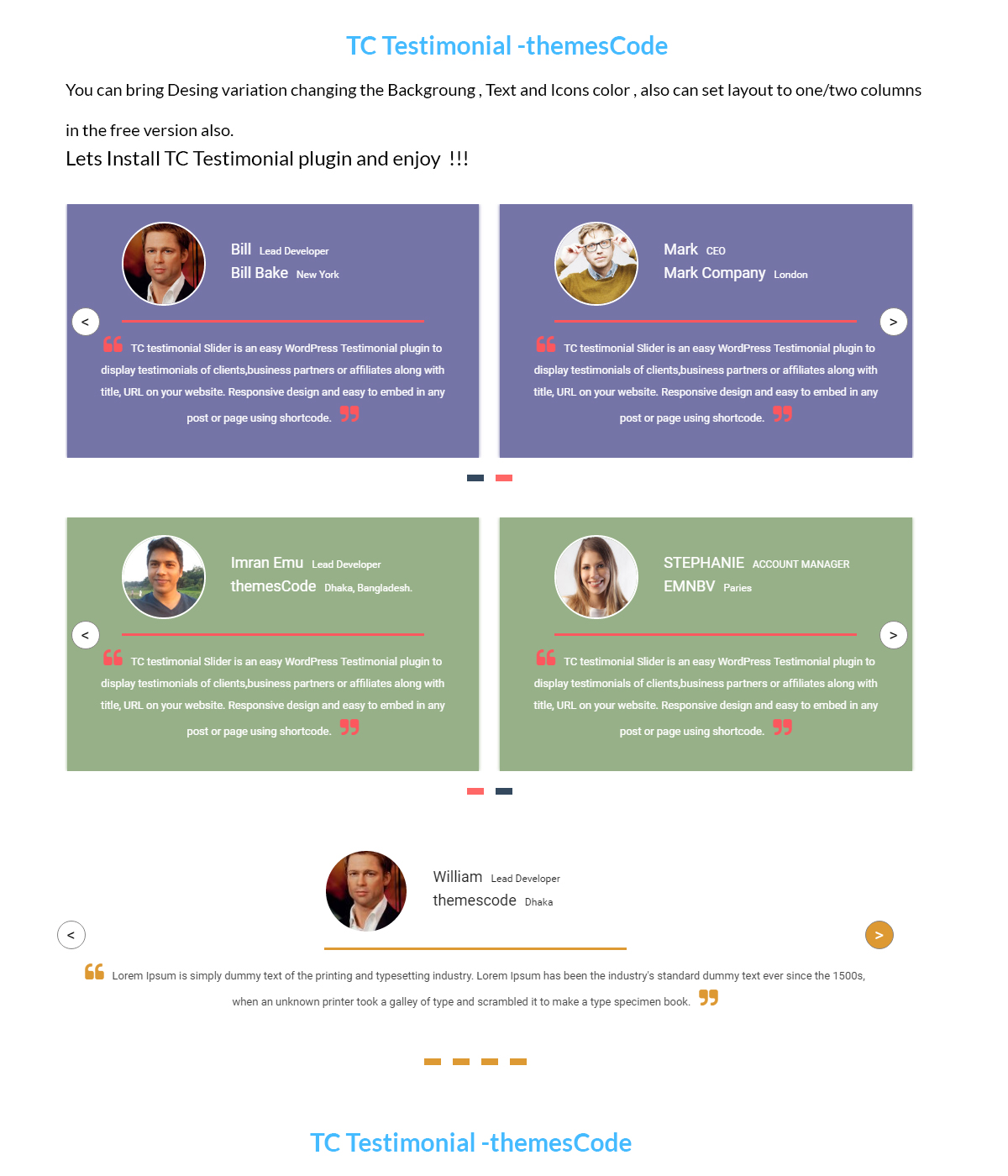
Demo 1 - (free version)
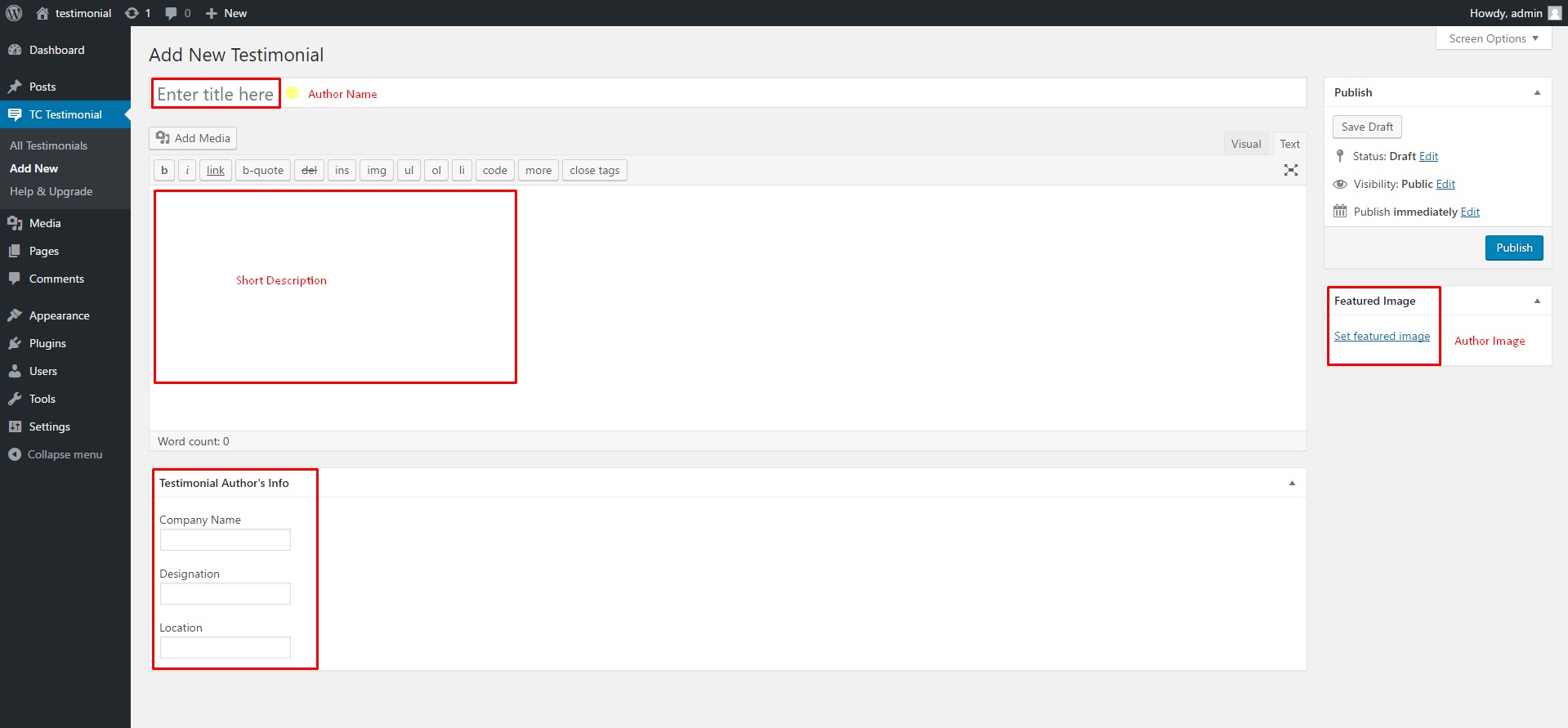
Add a Testimonial.
Changelog
Version 1.8.1 (15 December, 2024)
- Checked compatibility with WordPress 6.7.1
version 1.0
- setting panel added
- design updated
version 1.0
- Initial release