

Maintenance 26/100683d since update
Active installs
10
Downloads
5,092
Reviews
0
Age
10.7y
Plugin info
Total downloads: 5,092
Active installs: 10
Total reviews: 0
Average rating: 0
Support threads opened: 0
Support threads resolved: 0 (0%)
Available in: 1 language(s)
Contributors: 1
Last updated: 5/19/2024 (683 days ago)
Added to WordPress: 8/4/2015 (10 years old)
Minimum WordPress version: 3.0
Tested up to WordPress version: 6.5.7
Minimum PHP version: f
Maintenance & Compatibility
Maintenance score
Possibly abandoned • Last updated 683 days ago
26/100
Is TCBD Modals abandoned?
Possibly abandoned (last update 683 days ago).
Compatibility
Requires WordPress: 3.0
Tested up to: 6.5.7
Requires PHP: f
Similar & Alternatives
Explore plugins with similar tags, and compare key metrics like downloads, ratings, updates, support, and WP/PHP compatibility.
No similar plugins found yet.
Description
Plugin Features
- Easy to use.
- Modals Button in Editor.
- TinyMCE Button added for generating Shortcode.
- Customizable.
Demo
Installation
Installation
- Upload ‘tcbd-modals’ folder to the ‘/wp-content/plugins/’ directory.
- Activate the plugin through the ‘Plugins’ menu in WordPress.
How to use?
- Button: You find TCBD Modals button in Editor. Just Click what you want and fill information.Than just click OK.
-
Custom use: Just use rel attribute in anchor or span. Example code is given below.
[tcbd-modals id=”modals_one” title=”TCBD Modals” text=”Lorem ipsum dolor sit amet, consectetuer adipiscing elit, sed diam nonummy nibh euismod tincidunt ut laoreet dolore magna aliquam erat volutpat. Ut wisi enim ad minim veniam” place=”top”]Click ME![/tcbd-modals]
Frequently Asked Questions
- For more questions or help, contact me.
Review feed
No reviews available
Screenshots

TCBD Modals Preview.

TCBD Modals Button.
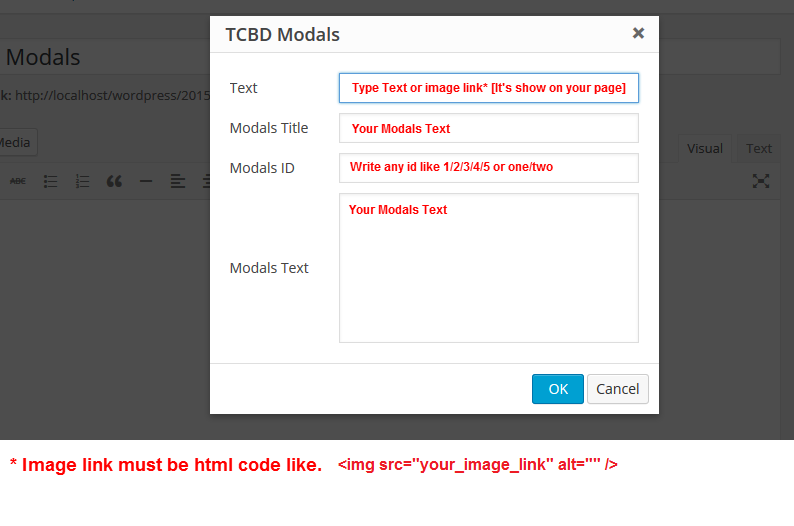
TCBD Modals Shortcode generating.
Changelog
1.0
- Initial release
1.0
- Add Modals ID. So, Now any one can use unlimited modals in same page.