

Text Domain Inspector
Text Domain Inspector is a plugin that helps to inspect text domains of translatable strings
Plugin info
Maintenance & Compatibility
Maintenance score
Possibly abandoned • Last updated 657 days ago • 4 reviews
Is Text Domain Inspector abandoned?
Possibly abandoned (last update 657 days ago).
Compatibility
Similar & Alternatives
Explore plugins with similar tags, and compare key metrics like downloads, ratings, updates, support, and WP/PHP compatibility.
Description
Have you ever been frustrated when trying to find the text domain of translatable string you want to translate? This task can be challenging and it can take a lot of your time even if you have code reading skills.
This plugin aims to solve this problem by allowing website administrator to inspect text domains of translatable strings directly in the browser.
How to use:
* Press “Inspect Text Domains” button in admin menu bar;
* Red dots will appear next to translatable strings;
* Hover the red dot to view the text domain;
* Open source code in the browser to view text domains in HTML attributes (ctrl+u (Windows) / cmd+opt+u (Mac));
Works in:
* HTML documents;
* HTML fragments;
* HTML attributes;
* Plain text;
* Dynamically loaded content (through AJAX);
* JSON;
Installation
Upload this plugin to your website and activate it.
You’re done!
Frequently Asked Questions
Review feed
The MUST-HAVE tool for WordPress localization
Screenshots
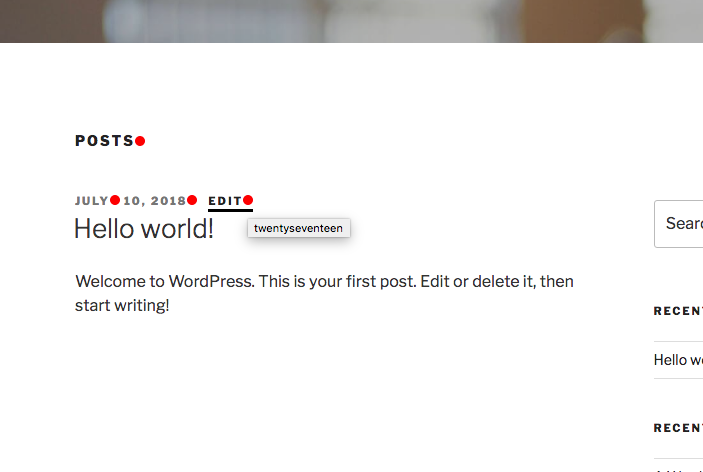
In the browser.

HTML attributes which are visible in the browser.

HTML attributes in the source code.

JSON AJAX response.
Changelog
1.1
- Added support for i18n
- Text domain is now appended as a query param if string is a URL (fixes the error for WP >= 5.9)
1.0
- Initial version.