
Thermometer for WooCommerce Crowdfunding
Thermometer for WooCommerce Crowdfunding products.
Maintenance 20/1003249d since update
Active installs
10
Downloads
1,927
Reviews
0
Age
8.9y
Plugin info
Total downloads: 1,927
Active installs: 10
Total reviews: 0
Average rating: 0
Support threads opened: 0
Support threads resolved: 0 (0%)
Available in: 1 language(s)
Contributors: 1
Last updated: 5/11/2017 (3249 days ago)
Added to WordPress: 5/11/2017 (8 years old)
Minimum WordPress version: 4.4
Tested up to WordPress version: 4.7.31
Minimum PHP version: f
Maintenance & Compatibility
Maintenance score
Possibly abandoned • Last updated 3249 days ago
20/100
Is Thermometer for WooCommerce Crowdfunding abandoned?
Possibly abandoned (last update 3249 days ago).
Compatibility
Requires WordPress: 4.4
Tested up to: 4.7.31
Requires PHP: f
Similar & Alternatives
Explore plugins with similar tags, and compare key metrics like downloads, ratings, updates, support, and WP/PHP compatibility.
Donation Thermometer
Rating 4.4/5 (12 reviews) • Active installs 2,000
Description
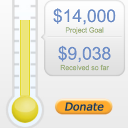
This plugin lets you create a thermometer for a Crowdfunding WooCommerce product.
REQUIRES Booster for WooCommerce 2.7+ and the Crowdfunding module enabled
When a product has a crowdfunding goal set, you will have the possibility to create a thermometer for that product with:
- Goal (i.e. pledged) amount.
- Total amount received.
- Deadline or end date.
Also you will be able to:
- Display campaign thermometer in posts, pages, and widgets using shortcode.
- Share iframe embed code to display thermometer on external websites.
Shortcodes
When displaying crowdfunding data for the product, you should use plugin’s shortcodes:
- [wcj_product_crowdfunding_thermometer product_id=”12345″] – graphical progress thermometer with goal and received amount.
- [wcj_product_crowdfunding_thermometer product_id=”12345″ show_date=”true”] – graphical progress thermometer with goal and deadline.
Feedback
- We are open to your suggestions and feedback. Thank you for using or trying out our plugin!
- Drop us a line at www.danielbair.com.
More
- Visit the Booster for WooCommerce plugin page.
Installation
- Upload the entire ‘wcj_product_crowdfunding_thermometer’ folder to the ‘/wp-content/plugins/’ directory.
- Activate the plugin through the ‘Plugins’ menu in WordPress.
- Start by adding a goal and deadline to a product.
- Then visit plugin settings at WooCommerce > Thermometer.
Frequently Asked Questions
Installation Instructions
- Upload the entire ‘wcj_product_crowdfunding_thermometer’ folder to the ‘/wp-content/plugins/’ directory.
- Activate the plugin through the ‘Plugins’ menu in WordPress.
- Start by adding a goal and deadline to a product.
- Then visit plugin settings at WooCommerce > Thermometer.
Review feed
No reviews available
Screenshots
No screenshots available
Changelog
1.0.1 – 09/05/2017
- Fix – Admin page only shows
crowdfundingtype products now.
1.0.0 – 05/05/2017
- Initial Release.