

Timezone Conversion Widget
A simple light weight plugin to Convert the time from one timezone to other timezone.
Plugin info
Maintenance & Compatibility
Maintenance score
Possibly abandoned • Last updated 529 days ago • 2 reviews
Is Timezone Conversion Widget abandoned?
Possibly abandoned (last update 529 days ago).
Compatibility
Similar & Alternatives
Explore plugins with similar tags, and compare key metrics like downloads, ratings, updates, support, and WP/PHP compatibility.
Description
This is a light weight plugin which allows your customer to convert the time from one timezone to another timezone.
Basically, this plugin add a Timezone Conversion widget, which shows the date & time, from timezone and to timezone selection field on the front end of website.
Visitor can select date and time, from and to timezone from the dropdown and submission of it will show the converted date & time.
Some of our other free plugins
Some of our Pro plugins
Installation
Method 1:
- Download the plugin tzc-timezone-conversion.zip
- Unpack the tzc-timezone-conversion.zip file and extract the tzc-timezone-conversion folder
- Upload the plugin folder to your /wp-content/plugins/ directory
- Go to WordPress dashboard, click on Plugins from the menu
- Locate the Timezone Conversion and click on Activate link to activate the plugin.
Method 2:
- Download the plugin tzc-timezone-conversion.zip
- Go to WordPress Dashboard-Plugins-Add New
- Click on Upload Plugin link from top
- Upload the downloaded tzc-timezone-conversion.zip file and click on Install Now
- After installation, click on Activate Plugin link to activate the plugin.
Frequently Asked Questions
Review feed
Screenshots
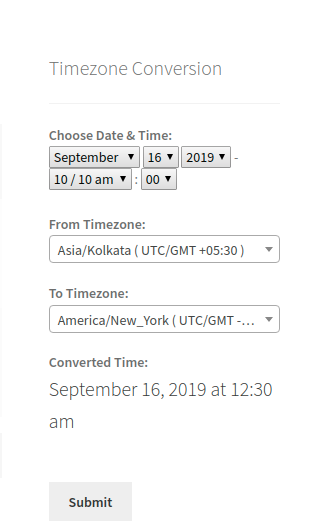
Timezone Conversion Widget on front end.
Changelog
= 1.5 (20.10.2024)
* WordPress v5.9 Compatibility
= 1.4 (29.01.2022)
* WordPress v5.9 Compatibility
= 1.3 (16.10.2020)
* Fix – Widget doesn’t work when JQuery is not included.
1.2 (07.10.2020)
- Spelling correction.
- Widget was not working for guest user.
1.1 (26.07.2020)
- Localization.
- WPCS Compliance.
- Filter to change labels – tzc_form_label
- Fix – Strip out the extra space after the closing
1.0 (01.09.2019)
- Initial release.