

BuzzSubs
Buzzsub’s cutting edge gamified email subscriber app gives you the ability to make your pop-ups truly interactive.
Plugin info
Maintenance & Compatibility
Maintenance score
Possibly abandoned • Last updated 3116 days ago • 1 reviews
Is BuzzSubs abandoned?
Possibly abandoned (last update 3116 days ago).
Compatibility
Similar & Alternatives
Explore plugins with similar tags, and compare key metrics like downloads, ratings, updates, support, and WP/PHP compatibility.
Description
Buzzsub’s cutting edge gamified email subscriber extension for WordPress gives you the ability to make your pop-ups truly interactive. Imagine the scenario, there is a user on your site and they are about to leave. Normally the only incentive you can give them to stay or subscribe is a pop-up with a discount code, free shipping deal etc. Ok. But not engaging. And research has shown that simple exit pop-up discount codes largely go unused. People just don’t feel engaged enough to use them.This is where Buzzsubs comes in.
Now imagine that instead of a simple pop up window to click, they are faced with a wheel of fortune. And all they need to do is to submit their email and it spins, giving them a chance of winning any number of cool prizes – from discount codes, free shipping etc. They are locked in. The evidence is clear: by gamifying the exit pop-up you will get 10x more (in most cases even more) email subscribers. Not only that, these subscribers are already actively engaged with your store. You’ve triggered real brand awareness and a desire to find out more. And active subscribers always lead to way higher conversions to sale. That’s bigger profits.
With Buzzsubs, your store is a winner every time!
You are required to create a separate Buzzsubs account. After you created your account, you can login to the dashboard using following link: BuzzSubs dashboard. The extension itself is free, but the service is not. The extensions costs 15$ per month. You will be given 3 trial days and at any time you can cancel the subscription and will not be charged.
With Buzzsubs, you can:
- Customise your pop-ups to fit your store
- Change language
- Change colors
- Use pre-installed event templates to increase traffic
- Set automatic scheduling for your pop-ups
- Push all your email subscriptions automatically to MailChimp, Claviey etc.
Installation
Upload the BuzzSubs plugin to your blog, Activate it, register an account and you’re done!
When using BuzzSubs plugin, some other plugin, that makes your blog into a store is required. We recommend WooCommerce.
After BuzzSubs installation, using an app that allows to create discounts, create 6 different discounts.
Copy these discount codes into BuzzSubs dashboard “Coupon slices” section.
Frequently Asked Questions
Installation Instructions
Upload the BuzzSubs plugin to your blog, Activate it, register an account and you’re done!
When using BuzzSubs plugin, some other plugin, that makes your blog into a store is required. We recommend WooCommerce.
After BuzzSubs installation, using an app that allows to create discounts, create 6 different discounts.
Copy these discount codes into BuzzSubs dashboard “Coupon slices” section.
Review feed
Screenshots

If you want BuzzSubs app to show to all users, not just in your preview, please enable it.

Customize your JackPot or Wheel of fortune to suite your needs.

If your store is not in English, you can use translations section to change It that suits your needs.
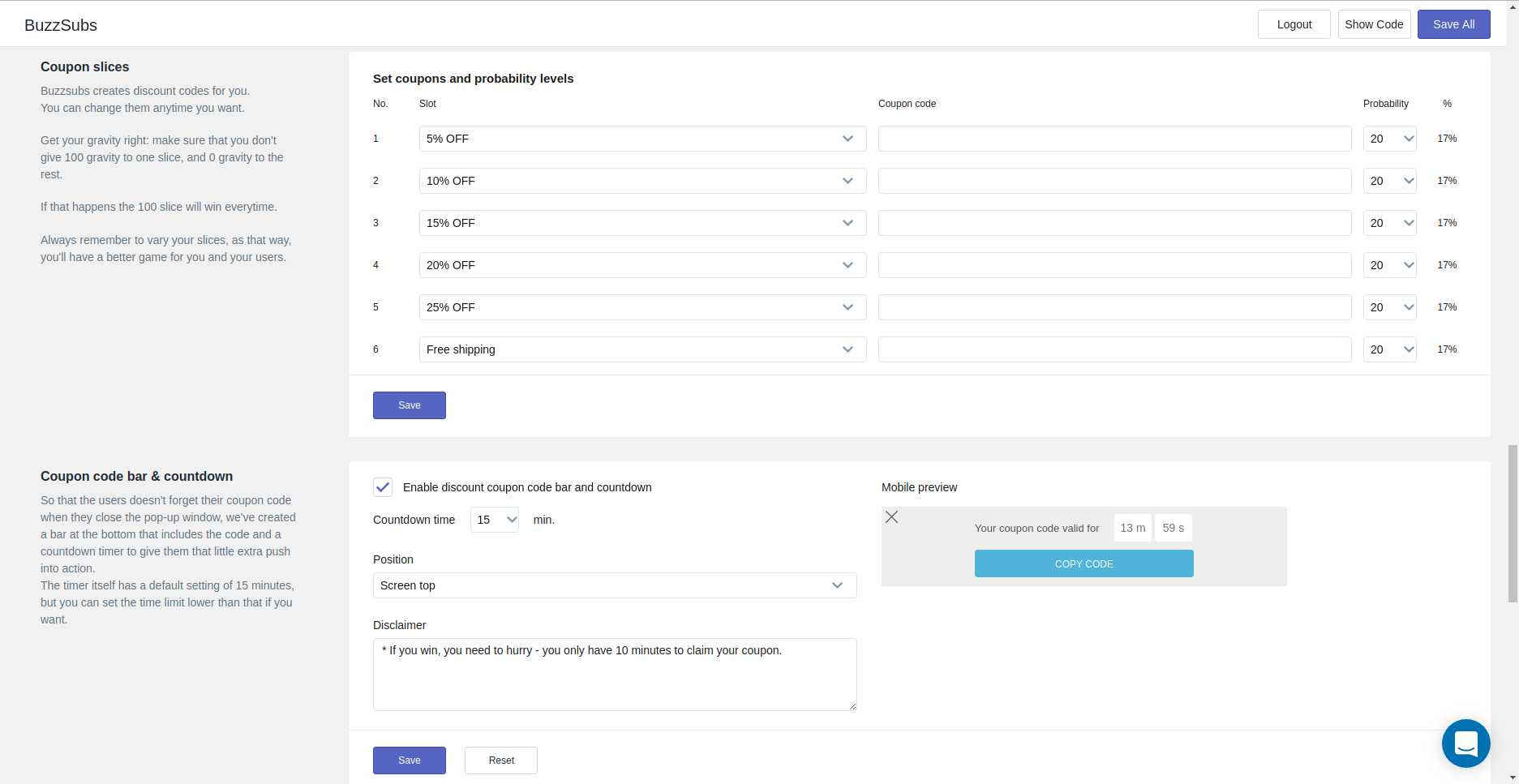
Use Coupon slices and Coupon code bar sections to setup what discount codes and where the client will see.

Use placement ant triggers to setup in what pages and when the user will see BuzzSubs script.
Changelog
1.0.0
- Created BuzzSubs WordPress extension.