

Plugin info
Maintenance & Compatibility
Maintenance score
Possibly abandoned • Last updated 1623 days ago
Is TukuToi Contact Form abandoned?
Possibly abandoned (last update 1623 days ago).
Compatibility
Similar & Alternatives
Explore plugins with similar tags, and compare key metrics like downloads, ratings, updates, support, and WP/PHP compatibility.
Description
TukuToi Contact Form Plugin lets you add a simple Contact Form to any Page, Post or Custom Post of your WordPress Website.
Using the ShortCode [tkt_cntct_frm_contact_form] with attributes you can configure several aspects of the Contact Form, such as:
– Form ID
– Label for the Name Input
– Label for the Email Input
– Label for the Subject Input
– Label for the Message Input
– Label for the Send Button
– Error message for required Fields
– Error for invalid Emails
– Success message
Why would we need one more Contact Form Plugin? There are too many Contact Form Plugins already!
Because most Contact Form Plugins are/became actual Form Builders, that let you create any kind and sort of Form.
Which is great, of course, but it also means the actual purpose of the “Contact Form”, being a wrapper for the “Email Me” link, got sort of defied in most “Contact Form” Plugins.
TukuToi Contact Form does exactly what its name suggests.
It lets you add simplest of Contact Forms to your Website thru a ShortCode.
That’s it. There’s no Form Builder, complex validation or Captcha Settings (there’s a honeypot against robots, inbuilt in the plugin).
With a minimal set of ShortCode attributes you can control the visual aspects of the Form (Labels and Success/Error messages).
Thru a set of Filters and Actions you can further control the Form and its behaviour, down to almost every action and string it does or uses.
These Filters and Actions usually get “wrapped” into a Graphical User Interface (GUI) for anyone to easily change those settings, however that also adds bloat, and encourages to ask for more tiny features, which one added to another, end up making the Contact Form Plugins be actual Form Builders.
Thus a clear decision was made to not provide a GUI for this plugin.
Furthermore, keeping the plugin minimal, targeted and not using any advanced features, we can keep it compatible with WordPress versions from 4.x up to any version to come, without having to make a split between the worlds.
This plugin therefore is compatible with ClassicPress, as well as with WordPress.
Note: Only one Contact Form can be inserted each page or post.
ShortCode Attributes
id. ID of the Form. Defaults to 1 if not passed. Must be set when using Filters or actions referring to this ID, Accepts only text or numeric value. Can be string or numeric (although we recommend string, since it is used as the Form HTML ID as well).label_name. Label of Name Input. Defaults to “Your Name”. Accepts only text.label_email. Label of the Email Input. Defaults to “Your E-mail Address”. Accepts only text.label_subject. Label of the Subject Input. Defaults to “Subject”. Accepts only text.label_message. Label of the Message Input. Defaults to “Your Message”. Accepts only text.label_submit. Label for the Submit Button. Defaults to “Submit”. Accepts only text.error_empty. Error message for empty field(s). Defaults to “Please fill in all the required fields.”. Accepts only text.error_noemail. Error message for empty or invalid Email Input. Defaults to “Please enter a valid e-mail address.”. Accepts only text.success. Success message shown instead of the Form when the email was sent successfully. Defaults to “Thanks for your e-mail! We’ll get back to you as soon as we can.”. Accepts only text.
Installation
- Install and Activate like any other WordPress Plugin
- Insert and configure the ShortCode
[tkt_cntct_frm_contact_form]anywhere you want to see the form
Frequently Asked Questions
tkt_cntct_frm_email. Allows to modify the receveir email of a Contact form. Defaults to get_bloginfo( 'admin_email' ). Second argument passed is the Form ID.
add_filter( 'tkt_cntct_frm_email', 'special_receiver', 10, 2 );
function special_receiver( $email, $id ){
    if( (int)$id === 1 ){// If your Form ID is 1
        return '[email protected]';
    } else {
        return '[email protected]';
    }
}
tkt_cntct_frm_from. Allows to modify the “from” email header of a the email sent. Defaults to get_bloginfo( 'name' ). Second argument passed is the Form ID.
add_filter( 'tkt_cntct_frm_from', 'special_header_from', 10, 2 );
function special_header_from( $from, $id ){
    if( (int)$id === 1 ){// If your Form ID is 1
        return 'A prospect';
    } else {
        return $from;
    }
}
tkt_cntct_frm_subject. Allows to modify the Subject passed in the Form. This subject is appended to the Footer of the Email. Second argument are ALL the form fields (array). Form ID is part of the form fields. Third argument is the receiver Email.
add_filter( 'tkt_cntct_frm_subject', 'special_subject', 10, 3 );
function special_subject( $subject, $form_fields, $receiver ){
    if( $form_fields['id'] === 'my-contact-form' ){// If your Form ID is my-contact-form
        return 'Custom Subject';
    } else {
        return $subject;
    }
}
tkt_cntct_frm_internal_subject. Allows to modify the Subject in the sent mail Header. This subject is the one you see in the “From” of the email you will receive when this Contact Form is submitted. Second argument are ALL the form fields (array). Form ID is part of the form fields. Third argument is the receiver Email.
add_filter( 'tkt_cntct_frm_internal_subject', 'special_internal_subject', 10, 3 );
function special_internal_subject( $subject, $form_fields, $receiver ){
    if( $form_fields['id'] === 'my-contact-form' ){// If your Form ID is my-contact-form
        return 'You have new mail';
    } else {
        return $subject;
    }
}
tkt_cntct_frm_message. Allows to modify (or append to) the Message of email sent. Second argument are ALL the form Fields (array). Form ID is part of the form fields. Third argument is the receiver Email.
add_filter('tkt_cntct_frm_message', 'append_to_message', 10, 3);
function append_to_message( $message, $form_fields, $receiver ){
    if( $form_fields['id'] === 'my-contact-form' ){// If your form is ID my-contact-form
        return $message . '<p>appended string</p>';
    } elseif( $receiver === '[email protected]' ){
      return 'overwrite the entire message';
    } else{
        return $message;
    }

}
tkt_cntct_frm_redirect_uri. Allows to filter the Redirect URL. Defaults to current page with ?success=true appended on success. Second argument passed is Form ID.
add_filter('tkt_cntct_frm_redirect_uri', 'redirect_url', 10, 2);
function redirect_url( $redirect, $id ){
    if( $id === 'my-contact-form' ){// If your form is ID my-contact-form
        return 'https://custom.url/thing';
    } else{
        return $redirect;
    }

}
tkt_cntct_frm_ip. Allows to filter the IP Address appended to the email body (useful to remove it, for example). Second argument passed is Form ID.
add_filter('tkt_cntct_frm_ip', 'filter_ip', 10, 2);
function filter_ip( $ip, $id ){
    if( $id === 'my-contact-form' ){// If your form is ID my-contact-form
        return '';// remove IP alltogether.
    } else {
        return $ip;
    }
}
tkt_cntct_frm_send_confirmation. Allows to stop the Confirmation Email from being sent. Second argument passed is Form ID.
add_filter('tkt_cntct_frm_send_confirmation', 'stop_confirmation', 10, 2);
function filter_ip( $ip, $id ){
    if( $id === 'my-contact-form' ){// If your form is ID my-contact-form
        return false;// stop email.
    } else {
        return true;
    }
}
tkt_cntct_frm_confirmation_message. Allows to change the Confirmation Email Text. Defaults to We have received your message and will reply soon. For the records, this was your message: Second argument passed is Form ID.
NOTE: The Message the prospect sent in the form is always appended in a separate paragraph.
NOTE: all filters applied to From/Receiver, Subjects, and form message are applied to this email as well.
add_filter('tkt_cntct_frm_confirmation_message', 'confirmation_message', 10, 2);
function filter_ip( $message, $id ){
    if( $id === 'my-contact-form' ){// If your form is ID my-contact-form
        return 'We will reply to you. This is your message:';// stop email.
    }
    else {
        return $message;
    }
}
tkt_cntct_frm_pre_send_mail. Action fired right before the mail is sent. Second argument all form fields. Helpful to do things before the mail is sent…
add_action( 'tkt_cntct_frm_pre_send_mail', 'pre_send_mail', 10, 1 );
function pre_send_mail($form_fields){
    if($form_fields['id'] === 'my-contact-form'){
        wp_mail( '[email protected]', 'new mail', 'someone is about to send an email with your contact form' );
    }
}
tkt_cntct_frm_post_send_mail. Action fired right after the email is sent. Arguments include $receiver, $email_subject, $email_message, $headers, $form_fields. Helpful to for example send another email to another place, after the mail was sent. Or whatever, abort the script, if you like.
add_action( 'tkt_cntct_frm_post_send_mail', 'post_send_mail', 10, 5 );
function post_send_mail($receiver, $email_subject, $email_message, $headers, $form_fields){
    if($form_fields['id'] === 'my-contact-form'){
        wp_mail( '[email protected]', 'new mail', 'someone has sent an email with your contact form' );
    }
}
tkt_cntct_frm_pre_redirect. Action fired right before the wp_redirect is fired. Arguments are $redirect_url, $form_id
add_action( 'tkt_cntct_frm_pre_redirect', 'pre_redirect', 10, 2 );
function pre_redirect($redirect_url, $form_id){
    if($form_id === 'my-contact-form'){
        wp_redirect( 'https://wherever.com' );
        exit;
    }
}
tkt_cntct_frm_post_redirect. Action fired right after the wp_redirect is fired. No arguments.
add_action( 'tkt_cntct_frm_post_redirect', 'post_redirect', 10 );
function post_redirect(){
    wp_mail( '[email protected]', 'new mail', 'someone has sent an email with your contact form and everything went well, they where redirected to your target url' );
}
The Form is built with native HTML and minimal markup, so you can apply whatever styles you want in general.
The few classes and IDs passed have all a tkt- prefix.
Available classes and IDs:
tkt-contact-form. Class for theformHTML attribute.- Form ID is the ID you pass to the ShortCode
idattribute. - Each input has an error class set when failing validaton:
tkt-missing-or-invalid - Honeypot fields are usually not to be styled further, but who knows you might need to access them, they use class
tkt-ohnohoney
Note that Plugin CSS (and JS) are enqueued only when the ShortCode is added to a page/post. For this reason scripts are added to the footer.
Review feed
Screenshots

Default Contact Form
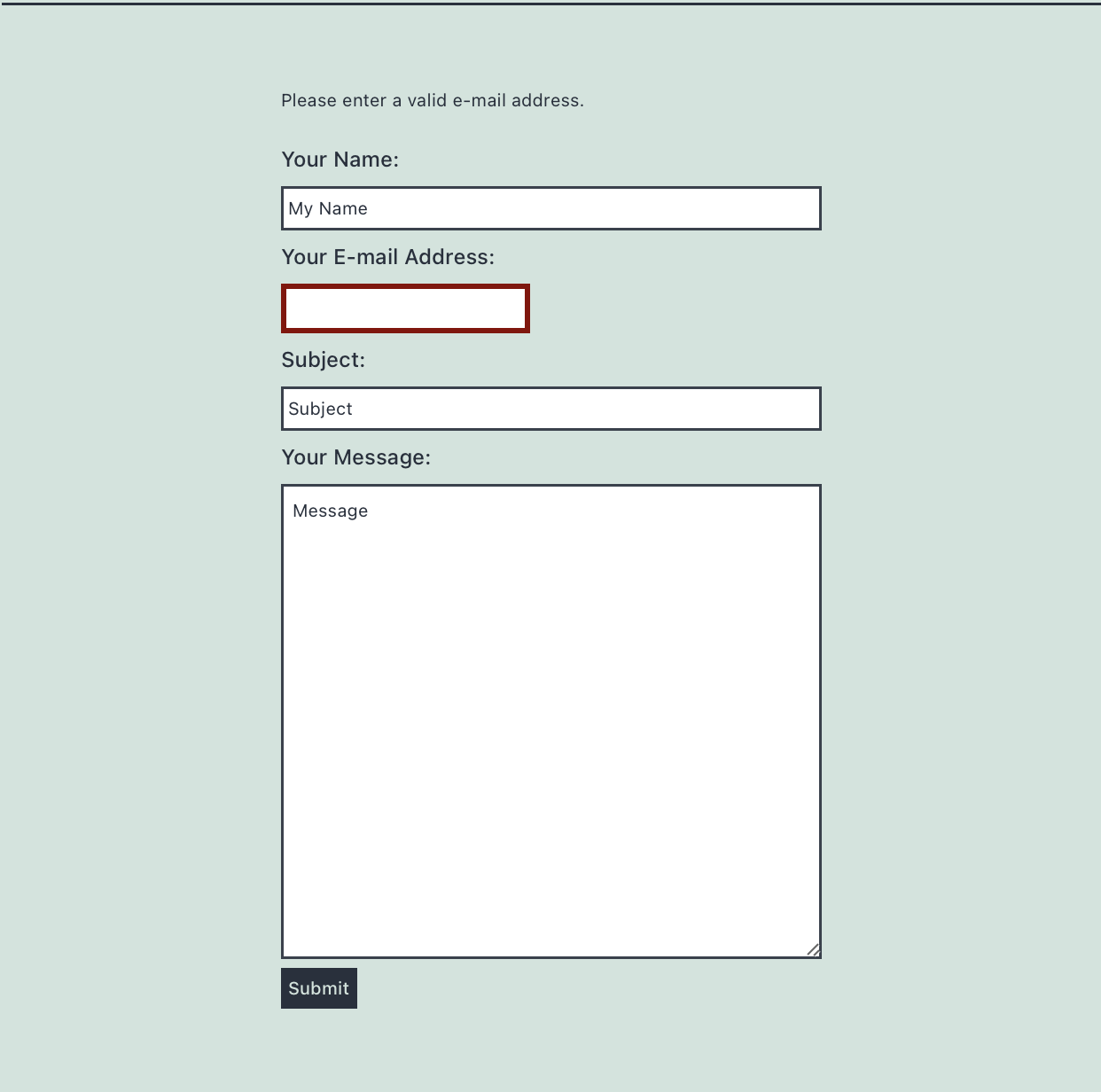
No Email Provided validation

Success Message