
Plugin info
Maintenance & Compatibility
Maintenance score
Possibly abandoned • Last updated 809 days ago • 1 reviews
Is Toolbar Links abandoned?
Possibly abandoned (last update 809 days ago).
Compatibility
Languages
Similar & Alternatives
Explore plugins with similar tags, and compare key metrics like downloads, ratings, updates, support, and WP/PHP compatibility.
Description
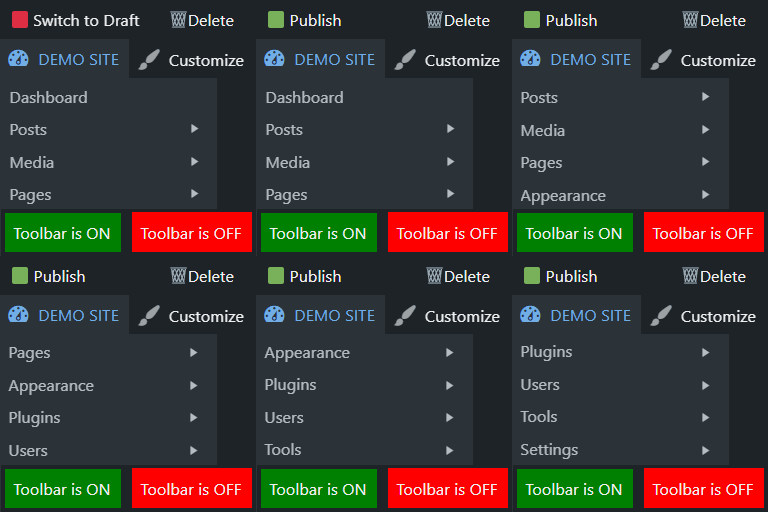
This plugin will add new usefulf links in the toolbar, making it simpler for Administrators to access the wp-admin dashboard.
- 🟩 Publish / 🟥 Switch to Draft links to publish/unpublish posts
- 🗑️ Delete link in toolbar to delete posts & pages
- 👍 Replace the toolbar dropdown menu with wp-admin menu
- ❌ Remove WP logo from top-left corner of the toolbar
- 📴 Enable/Disable button to toggle the toolbar
Each option can be enabled or disabled from Settings > Toolbar Links.
For more free WordPress plugins please visit ♣plugins.club.
Installation
- Upload the plugin file to the
/wp-content/plugins/directory. - Activate the plugin through the ‘Plugins’ menu in WordPress.
You will find new links added to the wp-admin toolbar: “Publish” / “Switch to Draft”, and “Delete”.
For basic usage, you can also have a look at the plugin web site.
Frequently Asked Questions
- Add 🟩 Publish / 🟥 Switch to Draft links to publish/unpublish posts
- Add 🗑️ Delete link in toolbar to delete posts & pages
- Replaces toolbar dropdown menu with the default wp-admin menu
- ❌ Remove WP logo from top-left corner of the toolbar
- Add a toggle to Enable/Disable toolbar
- Adds shortcuts in the toolbar of wp-admin menu
No, functionality is limited to Editors and Administrators. Other users will see the default wp-admin toggle instead.
This is a built-in WordPress functionality that is located under Profile > Show Toolbar when viewing site.
To reactivate the toolbar:
- Option 1. Click on the sticky button in the top right corner
- Option 2. In you website url add
?show_admin_bar=trueand click enter - Option 3. Go to Users > Edit Profile and enable Show Toolbar when viewing site –
/wp-admin/profile.php
PS. Purge cache from your caching plugin.
Review feed
Screenshots

Toolbar links

Plugin settings page
Changelog
1.4
- Compatible with WP 6.2
- UI changes
1.3
- Clarification of the settigns fields.
1.2
- Added an option to display toolbar shortcuts in the wp-admin section as well – special thanks to Walter Rock for the idea!
1.1
- Added a settings page under Tools menu
- dded option to disable toolbar dropdown menu and replace it with wp-admin menu
- Added option to hide WP logo in the toolbar
- Added option to Enable/Disable the toolbar on the front end
1.0
- Initial release