

Total Views
Count total page views on your WordPress site and display them with a simple shortcode. Customizable label, styles, and editable page views.
Plugin info
Maintenance & Compatibility
Maintenance score
Stale • Last updated 217 days ago
Is Total Views abandoned?
Likely maintained (last update 217 days ago).
Compatibility
Similar & Alternatives
Explore plugins with similar tags, and compare key metrics like downloads, ratings, updates, support, and WP/PHP compatibility.
Description
Total Views is a lightweight WordPress plugin that allows you to count total page views and display them anywhere using the [total_views] shortcode.
Features include:
- Counts total page views for your website.
- Display total views with a customizable label.
- Style options: bold, italic, underline, color.
- Editable total page views number in the settings to manually adjust.
- Front-end shortcode
[total_views]displays the counter exactly as in the admin preview. - CSS classes:
total-views-labelandtotal-views-countfor advanced styling. - Optional “Check tutorial” button linking to a video guide.
- Responsive admin settings page.
Ideal for bloggers, developers, and website owners who want quick traffic insight with minimal setup.
Keywords
page views, visitor counter, traffic analytics, shortcode counter, total views plugin, front-end page views, visitor statistics, WP plugin traffic, lightweight analytics
Installation
- Upload the
total-viewsfolder to/wp-content/plugins/. - Activate the plugin via the Plugins menu in WordPress.
- Navigate to Settings Total Views to configure label, color, and styles.
- Use the shortcode
[total_views]anywhere to display total views. - To reset the counter, set Total Page Views to
0and save changes.
Frequently Asked Questions
It counts total page views, including repeat visits from the same user. For unique visitor tracking, use Google Analytics.
Yes, you can update the Total Page Views value in the settings panel and save changes.
Yes! Use the classes total-views-label and total-views-count in your theme CSS. Add !important if needed to override plugin styles.
Yes, modern Android and iOS browsers support <input type="color"> natively.
Yes. The output is semantic HTML and does not negatively affect SEO.
Yes, [total_views] works in posts, pages, widgets, footer, and sidebar areas.
Yes, it is lightweight and compatible with all modern WordPress themes.
Review feed
Screenshots
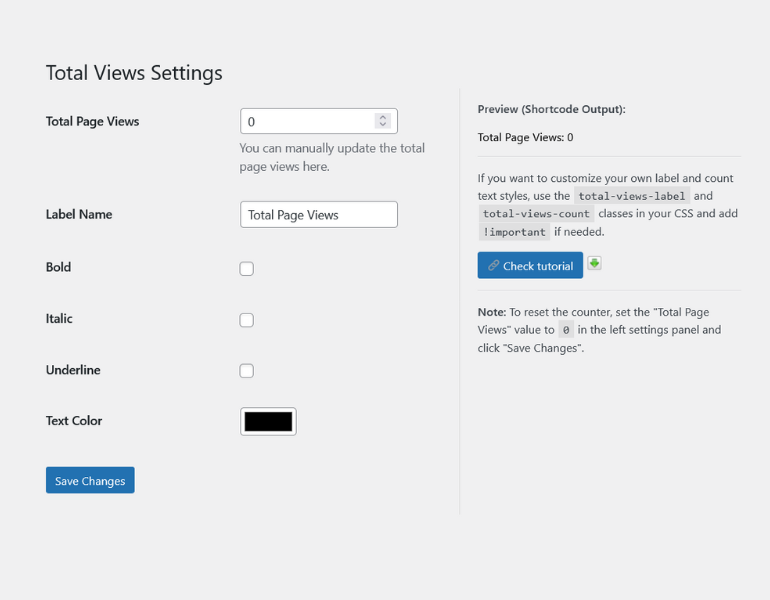
Admin settings page – left panel: settings, right panel: shortcode preview.
![Front-end display in footer using <code>[total_views]</code>.](https://ps.w.org/total-views/assets/screenshot-2.png?rev=3352013)
Front-end display in footer using
[total_views].![Front-end display in sidebar using <code>[total_views]</code>.](https://ps.w.org/total-views/assets/screenshot-3.png?rev=3352013)
Front-end display in sidebar using
[total_views].
Changelog
1.0
- Initial release.
- Counts total page views.
- Shortcode
[total_views]added. - Editable total page views in admin settings.
- Customizable label, color, and text styles.
- Admin preview using shortcode output.
- Responsive admin layout.
- “Check tutorial” button added.