
TP PieBuilder
Allow user to manipulate data on pie chart on your site with TP PieBuilder.
Plugin info
Maintenance & Compatibility
Maintenance score
Possibly abandoned • Last updated 1326 days ago • 1 reviews
Is TP PieBuilder abandoned?
Possibly abandoned (last update 1326 days ago).
Compatibility
Similar & Alternatives
Explore plugins with similar tags, and compare key metrics like downloads, ratings, updates, support, and WP/PHP compatibility.
Description
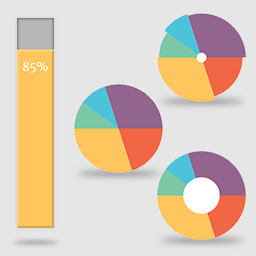
This Plugin provides you an elegent Bar Graph and Pie Charts with multiple designs and colors. ie. Default Pie Chart, Doughnut Pie Chart and Polar Pie Chart.
Customization and Flexibility
TP PieBuilder offers you a very easy customization of color from shortcode. This plugin allows you to customize title from css.
Shortcodes
= Defaults Atts :- =
* title = ”, // Optional
* values = ”, // * in percentage (%) ( should be seperated by comma (‘,’). ie: 60, 40 )
* labels = ”, // * ( should be seperated by comma (‘,’). ie: Design, Development )
* colors = ” // Optional till 10 elements else * ( should be seperated by ‘,’. ie: #E6E6FA, #E0FFFF )
Alt Atts for Pie Charts only:
* fontfamily = 'ariel', // Optional, you can change the defult font family
* fontstyle = 'italic', // Optional, you can change the defult font style to normal or bold
Default Piechart Shortcode:
[TP_PIEBUILDER title="Pie Chart" values="20, 30, 50" labels="Design, Development, Production" colors="#E6E6FA, #E0FFFF, #F8B4BC"]
Doughnut Piechart Shortcode:
[TP_PIEBUILDER_DOUGHNUT title="Pie Chart" values="20, 30, 50" labels="Design, Development, Production" colors="#E6E6FA, #E0FFFF, #F8B4BC"]
Polar Piechart Shortcode:
[TP_PIEBUILDER_POLAR title="Pie Chart" values="20, 30, 50" labels="Design, Development, Production" colors="#E6E6FA, #E0FFFF, #F8B4BC"]
Bar Graph Shortcode:
[TP_PIEBUILDER_BAR title="Pie Chart" values="20, 30, 50" labels="Design, Development, Production" colors="#E6E6FA, #E0FFFF, #F8B4BC"]
Horizontal Bar Graph Shortcode:
[TP_PIEBUILDER_HORIZONTAL_BAR title="Pie Chart" values="20, 30, 50" labels="Design, Development, Production" colors="#E6E6FA, #E0FFFF, #F8B4BC"]
Installation
Using The WordPress Dashboard
- Navigate to the ‘Add New’ in the plugins dashboard
- Search for TP PieBuilder
- Click Install Now
- Activate the plugin on the Plugin dashboard
Uploading in WordPress Dashboard
- Navigate to the ‘Add New’ in the plugins dashboard
- Navigate to the ‘Upload’ area
- Select tp-piebuilder.zip from your computer
- Click ‘Install Now’
- Activate the plugin in the Plugin dashboard
Using FTP
- Download tp-piebuilder.zip
- Extract the tp-piebuilder directory to your computer
- Upload the tp-piebuilder directory to the /wp-content/plugins/directory
- Activate the plugin in the Plugin dashboard
Frequently Asked Questions
Review feed
Great!
Screenshots

Normal Pie.

Doughnut Pie.

Polar Pie.

Bar Graph.

Horizontal Bar Graph.
Changelog
1.0
- Tested in WordPress 6.0
0.9
- Tested in WordPress 5.8.1
0.8
- Tested in WordPress 5.5
0.7
- Tested in WordPress 5.2
0.6
- Added link to pro version
- Updated setting page
0.5
- Added font styling in pie charts
0.4
- Tested in WordPress 4.9.4
0.3
- Tested in WordPress 4.8.1
- Added Horizontal Bar Graph
0.2
- Tested in WordPress 4.8
0.1
- Initial release.