

Track Global – Shipment Tracking
The Track.Global plugin is an easy-to-use tool that allows your users to quickly and easily check the status of their shipments.
Plugin info
Maintenance & Compatibility
Maintenance score
Possibly abandoned • Last updated 382 days ago • 1 reviews
Is Track Global – Shipment Tracking abandoned?
Possibly abandoned (last update 382 days ago).
Compatibility
Developers
Languages
Similar & Alternatives
Explore plugins with similar tags, and compare key metrics like downloads, ratings, updates, support, and WP/PHP compatibility.
Description
The Track.Global plugin is an easy-to-use tool that allows your users to quickly and easily check the status of their shipments without leaving your website.
Benefits:
* Increase user engagement: By offering a convenient tracking tool, you enhance the user experience, fostering loyalty and encouraging repeat visits.
* Improve behavioral metrics: Keep visitors on your site longer, positively impacting your website’s search engine rankings.
* Easy integration: Set up the plugin in just a few clicks. Customize the widget by selecting the language, width, height, and display type.
How to use:
* Install and activate the plugin.
* Configure the widget settings.
* Insert the generated shortcode into the desired location on your site (e.g., a post or page).
Installation
Installing “Track Global” can be done either by searching for “Track Global” via the “Plugins > Add New” screen in your WordPress dashboard, or by using the following steps:
- Download the plugin via WordPress.org
- Upload the ZIP file through the ‘Plugins > Add New > Upload’ screen in your WordPress dashboard
- Activate the plugin through the ‘Plugins’ menu in WordPress
Frequently Asked Questions
Review feed
Screenshots
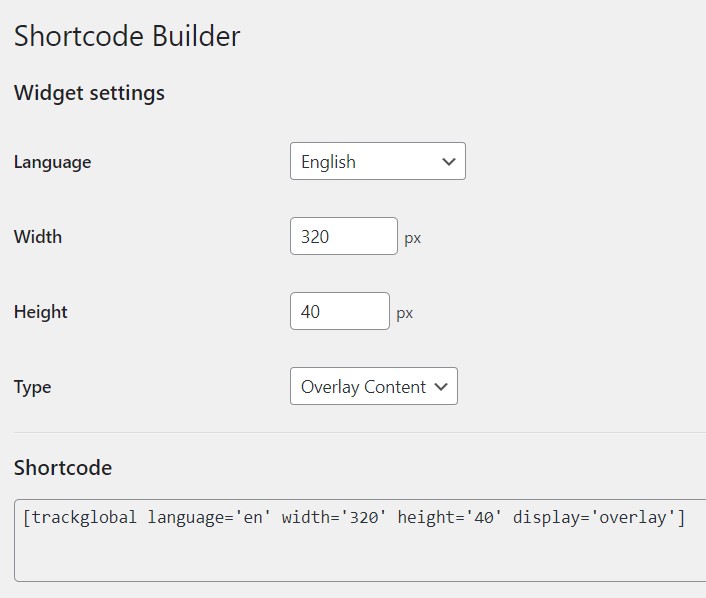
Plugin settings page.

Adding a shortcode to a page.

Tracking widget on the frontend.
Changelog
1.0.3
- 2025-03-17
- Added feedback form on deactivation.
1.0.2
- 2025-02-03
- The plugin name has been changed.
1.0.1
- 2025-01-15
- Code style fixes
1.0.0
- 2025-01-13
- Initial release