

Plugin info
Maintenance & Compatibility
Maintenance score
Possibly abandoned • Last updated 4766 days ago • 1 reviews
Is Travel Routes abandoned?
Possibly abandoned (last update 4766 days ago).
Compatibility
Similar & Alternatives
Explore plugins with similar tags, and compare key metrics like downloads, ratings, updates, support, and WP/PHP compatibility.
Description
Easily add geographical tags on a map when you write a post, and it will automatically create new countries and localities terms. You can also order those locations randomly or by date to define your routes.
Use the map as a widget, and pick your own colors to customize it. It is a SVG map that react to users actions (mouse over posts and terms links, click on route line…).
Ask your questions on the plugin page.
This plugin is open for contributions.
Known issues
An OVER_QUERY_LIMIT error from the Google Geocoding API is showing up way too often. If any contributor could take a look at the insert_term() function, that would be awesome.
Installation
- Upload “travel-routes” directory to your “/wp-content/plugins/” directory
- Activate the plugin through the “Plugins” menu in WordPress
- Start attaching locations to your posts
- Add the widget (the map) anywhere on your blog
- Tell me what you think about it
Frequently Asked Questions
No questions so far
No answer neither.
Review feed
Screenshots
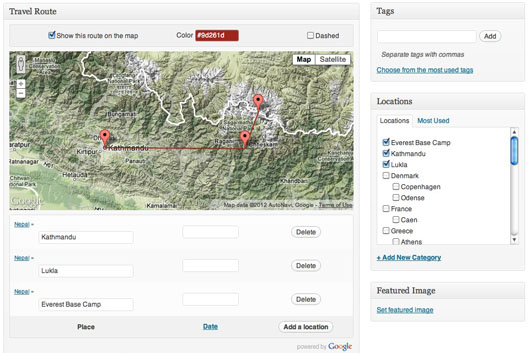
Easily add geographical tags on a map when you write a post, and it will automatically create new countries and localities terms. You can also order those locations randomly or by date to define your routes.

Use the map as a widget, and pick your own colors to customize it.

It is a SVG map that react to users actions (mouse over posts and terms links, click on route line...).
Changelog
1.1
- Only keep interesting components (avoid unwanted street addresses).
1.0
- Solved the main Query Limit issue.
- Attached location is now the lowest level address component.
- Stable enough for version 1.0 !
0.4
- Don’t call Google API if known location.
0.3
- Fixed the JS bug on empty maps.
0.2
- Wrapping it with nice paper.
- Sharing it with you guys, but still some bugs to fix !
0.1
- First draft.