

TriggerVox
TriggerVox instantly engages visitors, answers questions, books appointments, and more on autopilot from your website.
Plugin info
Maintenance & Compatibility
Maintenance score
Maintained • Last updated 122 days ago
Is TriggerVox abandoned?
Likely maintained (last update 122 days ago).
Compatibility
Similar & Alternatives
Explore plugins with similar tags, and compare key metrics like downloads, ratings, updates, support, and WP/PHP compatibility.
Description
TriggerVox Plugin
TriggerVox is a smart WordPress plugin that helps you talk to leads instantly — even if you’re busy or short on staff.
🎯 Benefits for Website Owners
Immediate Impact
– Higher conversion rates – instant response increases engagement
– Reduced lead response time – from hours/days to 30 seconds
– 24/7 lead capture – never miss a potential customer
– Professional image – automated but personalized service
Long-term Growth
– Scalable lead handling – handle more leads without hiring staff
– Consistent lead qualification – standardized process across all leads
– Data-driven insights – analytics help optimize marketing efforts
– Cost-effective solution – reduce manual follow-up costs
Competitive Advantages
– First-mover advantage – instant response sets you apart
– Professional automation – sophisticated lead handling system
– Customer experience enhancement – immediate engagement improves satisfaction
– Brand differentiation – AI-powered service positions you as innovative
This plugin essentially transforms a static website into an interactive, lead-generating machine that works around the clock to capture and qualify leads automatically.
When someone clicks the AI assistant button or fills out the form on your site, the AI assistant starts talking to them right away.
It can:
- Book appointments (Google / Office 365 Calendar)
- Handle objections
- Answer questions
- Transfer calls live to your team (Pro Feature)
No more missed leads.
No more slow follow-ups.
Just fast, personal conversations — all on autopilot.
Perfect for small businesses and busy teams who want to grow without more work.
Free Version Includes:
- Button Mode – Voice assistant button appears on all pages for instant conversations
- Intelligent Voice Assistant – AI-powered conversations that sound natural and professional
- Business Intelligence Features – Calendar booking, objection handling, and knowledge base integration
- Smart Display Rules – Control where and when the assistant appears
- Customization Options – Match your site with your brand colors, button text, and more
- Real-time voice chat initiation – AI talks to visitors instantly when they click the assistant button
- 15 minutes of calls per month for the first 3 months
Pro Version Features
Upgrade to Pro to unlock:
- Instant Lead Response System – AI calls leads within 30 seconds of form submission
- Intelligent Follow-Up System – Up to 4 follow-up call attempts if the lead doesn’t answer
- Advanced Form Integrations – Built-in contact form, Contact Form 7, WPForms, phone number detection
- Comprehensive Analytics Dashboard – Track form views, submissions, page-specific data, and conversion rates
- Contact Management System – Centralized contact database with export features and detailed lead info
- Supports Canada/US Numbers – Handles standard 10-digit phone numbers
How It Works
Button Mode:
Visitor Clicks Assistant Button
│
▼
AI Starts Talking Instantly
│
▼
│
├──> Answer Questions
├──> Qualify Lead (Using Your Script)
└──> Book Appointment (Google / Office 365 Calendar)
Form Mode (Pro):
Lead Fills Out a Form
│
▼
AI Calls Lead in 30 Seconds
│
▼
│
├──> Answer Questions
├──> Qualify Lead (Using Your Script)
├──> Book Appointment (Google / Office 365 Calendar)
├──> Follow up with the contact if they don’t answer
└──> Live Transfer to Your Team (if available)
🔔 Instant Call Trigger (Pro)
– Calls new leads within 30 seconds after form submission
– Follow up with up to 4 automated call attempts if no answer
– No more slow replies or cold leads
– Keeps you top of mind while they’re still interested
– Use advanced form integrations for instant calling and data extraction
🤖 Intelligent Conversations
– TriggerVox talks to visitors instantly when they click the button
– Follows your custom scripts to qualify leads
– Books appointments right into your calendar
– Transfers hot leads live to your team when needed
Knowledge Base Integration
Upload your business info, FAQs, and scripts to TriggerVox and it will answer questions like a real team member.
✅ No need to hire or train staff
✅ Handles objections and common questions
✅ Talks to leads 24/7 using your info
✅ Easy to update anytime
🗓️ Calendar Integration
– Syncs with Google Calendar and Office 365 Calendar
– Appointments booked by AI show up automatically
– No double-booking. No manual entry. Just smooth scheduling
📝 Works with Popular Forms (Pro)
– Built-in contact form
– Fully integrates with Contact Form 7 and WPForms
– Phone number detection and smart data extraction
🕒 24/7 Lead Handling
– AI never sleeps or gets too busy
– Handles conversations anytime, even outside business hours
📊 Form Analytics (Pro)
See What Works – Track views and submissions in one place so you know your conversion rate instantly
Focus Your Efforts – Identify your best-performing pages
Track Progress – Compare results over time and improve
🔒 Secure & Reliable
– Protects customer data with top security practices
– Optimized for smooth and stable performance
🚀 Ready to get started?
Get your AI voice assistant running in minutes:
Visit www.triggervox.ai/
Installation
- Install & activate the plugin via the WordPress plugin page or upload to
/wp-content/plugins/. - Go to TriggerVox Settings in your WordPress dashboard.
- Click Setup WordPress AI Assistant to configure your AI assistant.
- Return to TriggerVox Settings to customize the looks, and test the form.
- Under Plugin Status, turn on the plugin and save to go live.
- For Pro features like instant calls, follow-ups, and analytics — Upgrade Here.
Frequently Asked Questions
Yes, there is a free tier that includes instant AI conversations, calendar booking, and more.
You also get 15 minutes of calls per month for 3 months.
For features like instant lead calling, follow-ups, advanced form integrations, and analytics, you can upgrade to Pro.
In the free version, visitors click the assistant button and the AI talks to them instantly.
In Pro, the AI can also call leads within 30 seconds of form submission and follow up automatically.
The AI will qualify the lead, answer questions, and book an appointment for your team to follow up later.
Pro supports:
– Built-in TriggerVox contact form
– Contact Form 7
– WPForms
Yes. In the Pro version, TriggerVox functions as an Instant Call Trigger and auto dialer. It automatically calls new leads from your integrated forms (Contact Form 7, WPForms, etc.) within 30 seconds to connect them with the AI assistant for qualification or a live team transfer. It also includes an Intelligent Follow-Up System that attempts up to 4 automated follow-up calls if the lead doesn’t answer the first time.
TriggerVox automates three crucial parts of the sales process:
1. Lead Qualification: The AI uses your custom scripts to qualify leads and answer common objections 24/7.
2. Instant Follow-Up: It eliminates slow response times by calling leads in under 30 seconds (Pro feature) or engaging instantly via voice chat.
3. Scheduling: It books qualified leads directly into your Google or Office 365 Calendar, removing manual scheduling back-and-forth. This entire process works on autopilot to reduce manual work and ensure no lead is missed.
TriggerVox maximizes lead generation by ensuring 24/7 capture and an instant response (under 30 seconds with Pro) to every inquiry. This drastically reduces the response time—the biggest factor in losing leads—and increases conversion rates compared to static forms or slow email follow-ups. It essentially transforms passive website traffic into active, qualified leads on autopilot.
Yes, TriggerVox is a new alternative to traditional text-based live chat. While live chat requires a human agent to be constantly available, TriggerVox uses an AI voice assistant to engage instantly. This means visitors get immediate, professional, and personalized answers or can book appointments instantly, even outside of business hours, providing a superior and always-available customer experience.
Yes! TriggerVox is excellent for customer support. The AI assistant can answer common questions 24/7 using your Knowledge Base, handle customer inquiries instantly when they click the assistant button, and provide immediate responses even outside business hours. You can upload your FAQs, product information, and support scripts so the AI responds just like a trained support team member. For complex issues, the Pro version can transfer calls live to your team when needed.
The AI assistant handles the entire booking process instantly during the conversation. It checks your real-time availability through integration with your Google Calendar or Office 365 Calendar. Once a time slot is agreed upon, the appointment is automatically created in your calendar, eliminating double-bookings and manual data entry.
TriggerVox is more advanced than a simple text-based chatbot. It’s an Intelligent Voice Assistant that can:
1. Speak naturally to visitors using high-quality AI voice.
2. Call leads instantly after form submission (Pro feature).
3. Handle complex conversations, objections, and qualify leads based on your custom scripts (Knowledge Base).
No. The voice assistant uses standard web technologies to function directly in the visitor’s browser. When the visitor clicks the assistant button, the AI starts talking instantly. Visitors do not need to download anything or enable any special permissions; they simply need standard speakers/audio output to hear the conversation.
Yes. It integrates with Google Calendar and Office 365 Calendar.
Yes. The Knowledge Base feature lets you upload your own FAQs, objection-handling scripts, and business info.
Yes. You’ll need an account with TriggerVox to use the plugin and set up your AI assistant.
When you install the plugin and complete the setup, the system will guide you step-by-step to create your account.
– AI SDK Integration
This plugin integrates with an AI voice platform using their official HTML Script Tag SDK. The SDK is bundled locally within the plugin to ensure WordPress.org compliance and avoid external dependencies. This approach provides:
– Reliability: No external CDN dependencies
– Performance: Local file loading for faster response times
– Compliance: Meets WordPress.org plugin repository requirements
– Security: No external script loading from third-party sources
– External Services
This plugin connects to external services to provide AI voice assistant functionality and form processing capabilities. Below is a detailed description of each service:
1- TriggerVox API Service
What it is: TriggerVox API provided by TriggerVox
What it’s used for: User authentication, subscription verification, and AI voice assistant configuration
Data sent: User ID for subscription status verification
When data is sent: Automatically when the plugin is activated and during subscription status checks
Service provider: TriggerVox
Terms of Service: https://www.triggervox.ai/terms
Privacy Policy: https://www.triggervox.ai/privacy-policy
2- Form Processing Webhook Service
What it is: Form submission processing service hosted on DigitalOcean
What it’s used for: Processing contact form submissions from Contact Form 7, WPForms, and the built-in contact form to enable instant AI phone call features
Data sent: Contact information including first name, last name, email address, phone number, form messages, IP address, page URL, and account ID
When data is sent: Automatically whenever a user submits a contact form through any supported form integration
Service provider: DigitalOcean, Inc.
Terms of Service: https://www.digitalocean.com/legal/terms-of-service-agreement
Privacy Policy: https://www.digitalocean.com/legal/privacy-policy
Note: Both services are automatically activated when you install and activate this plugin. The plugin requires connection to these external services to function properly. By using this plugin, you consent to data being transmitted to these services as described above.
Review feed
Screenshots
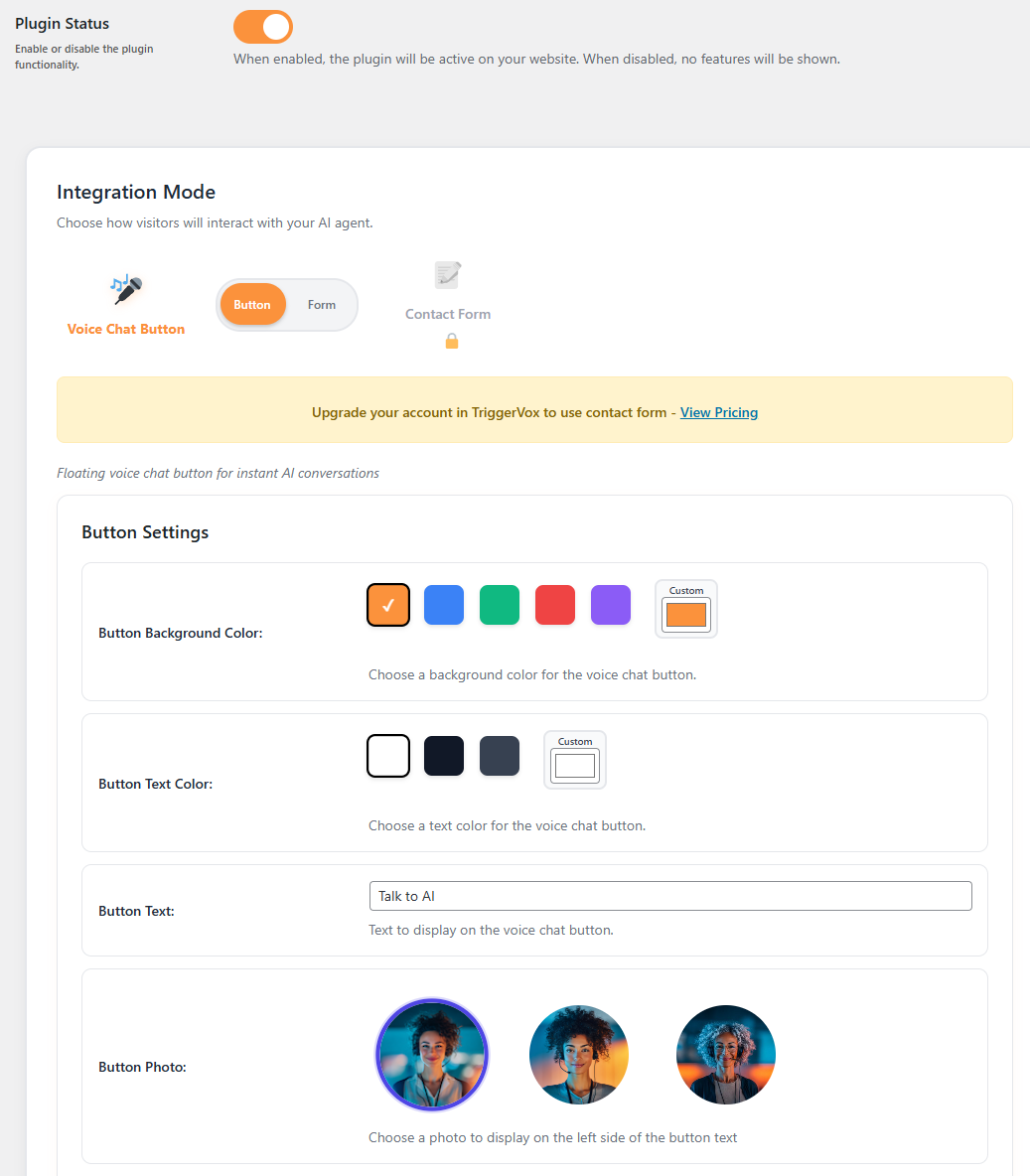
Plugin Settings Page 1 – Set your preferences.
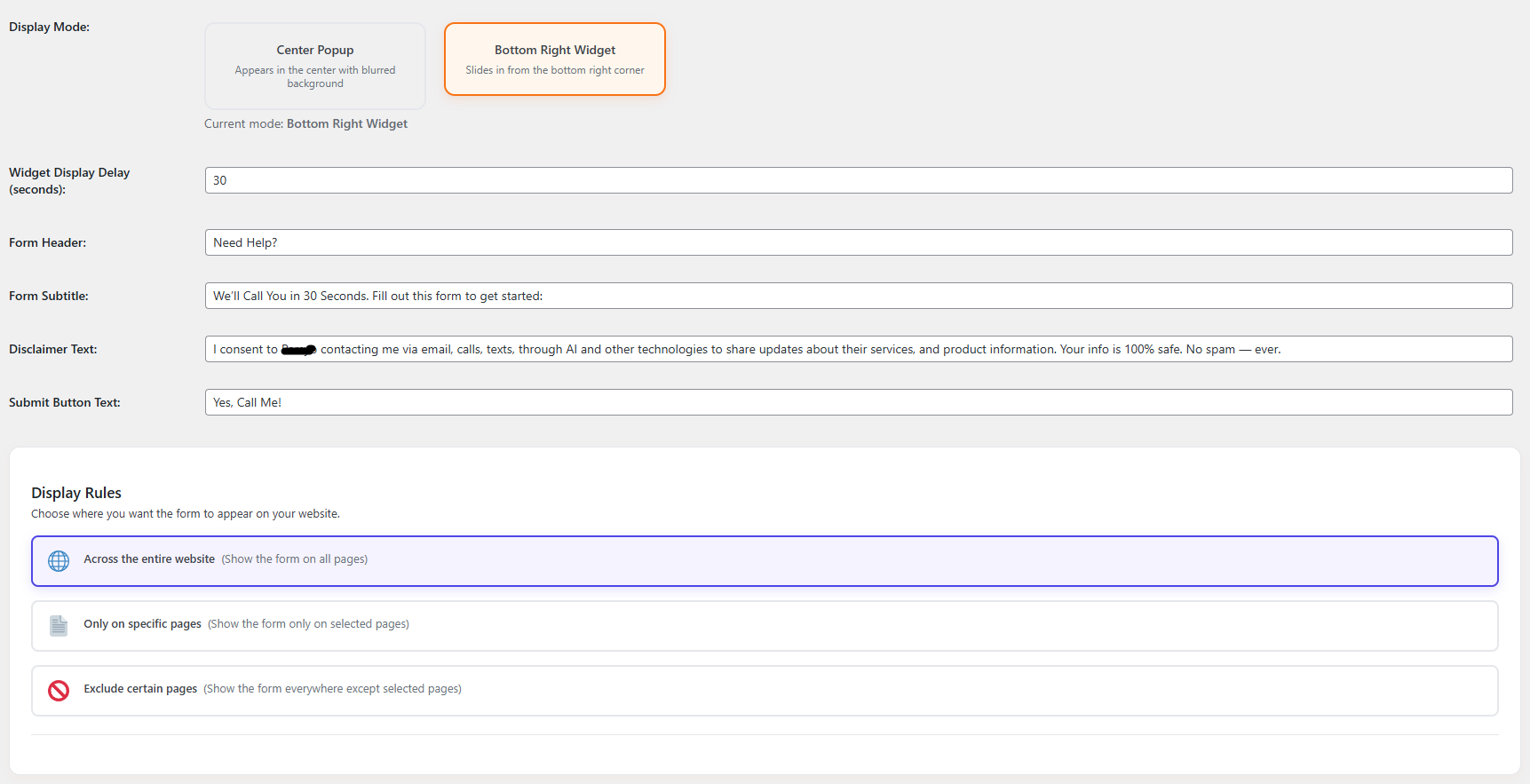
Plugin Settings Page 2 – More pop-up form options.
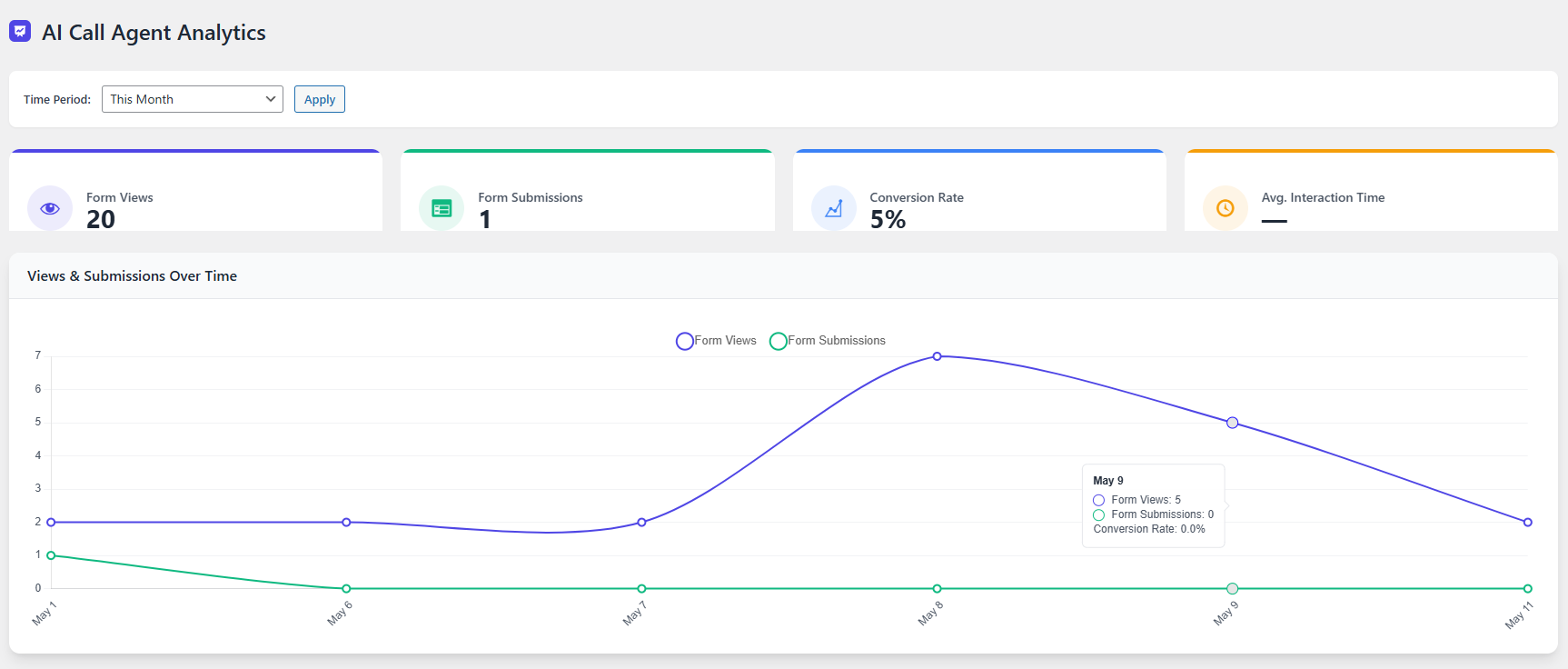
Form Analytics – See how many people view and fill out your form. (Pro feature)
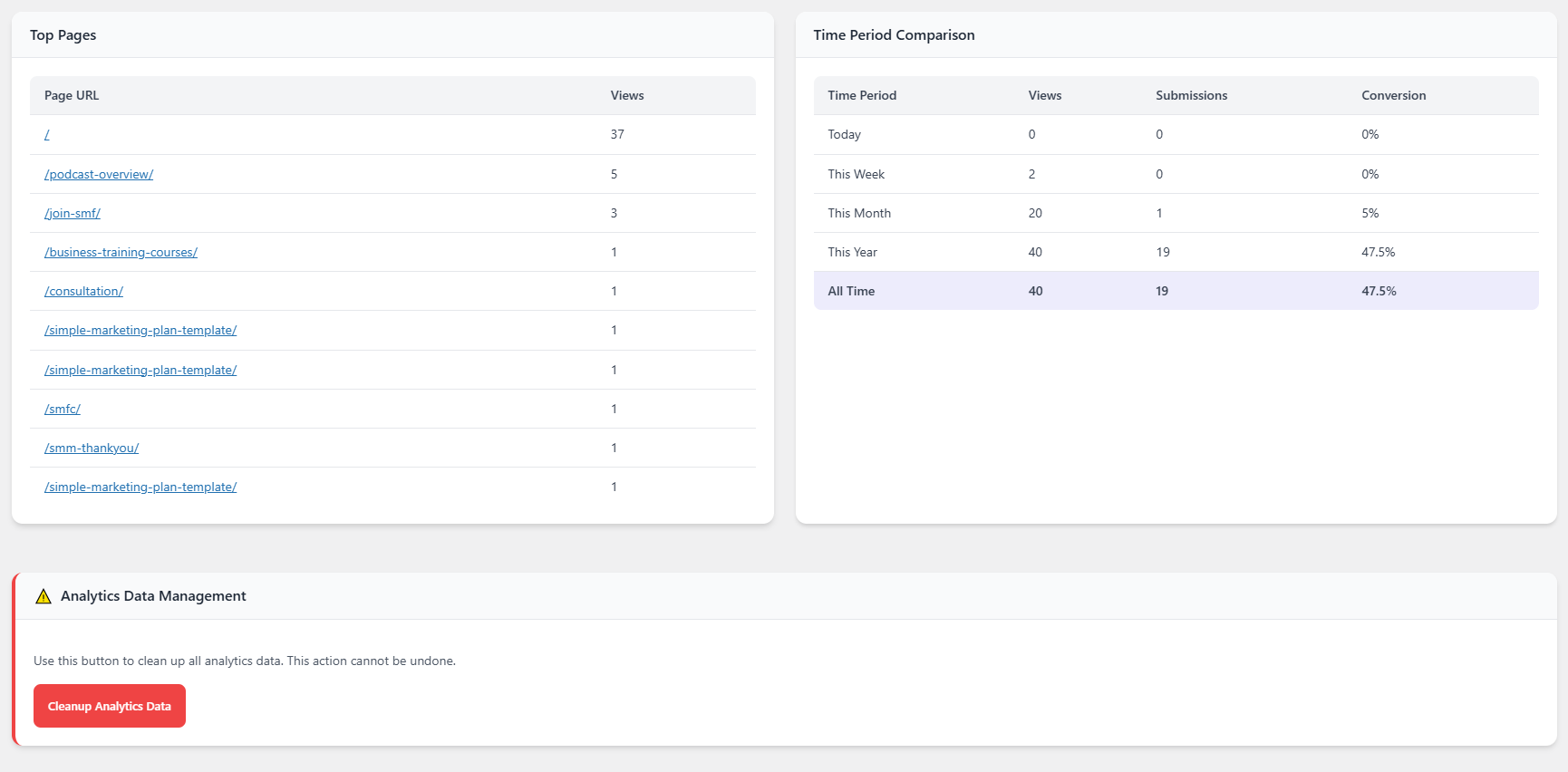
Form Analytics – Track form views on each page. (Pro feature)
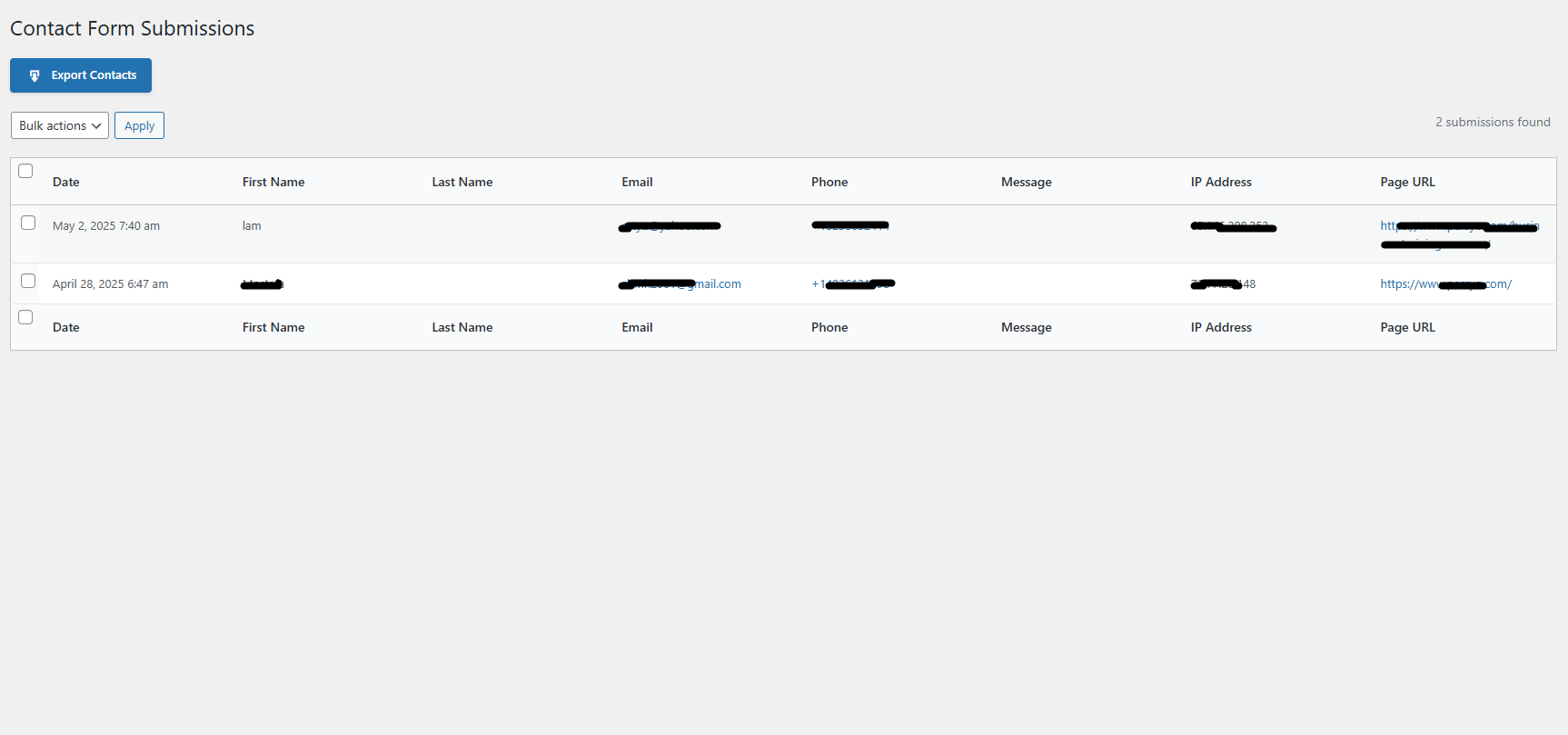
Contacts Page – See who opted in and download the list. (Pro feature)

Integration Settings – Quickly connect TriggerVox to Contact Form 7 or WPForms. (Pro feature)
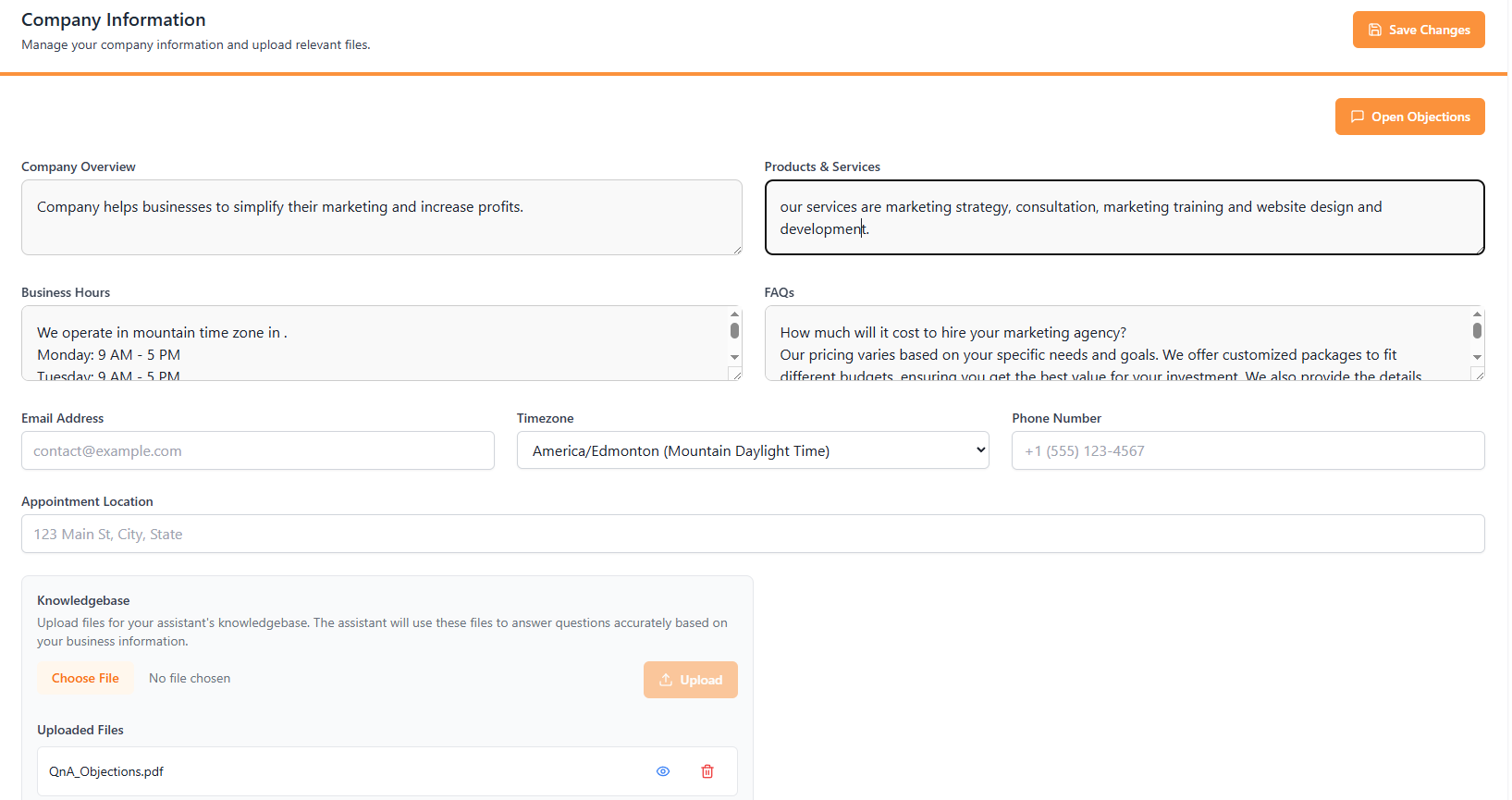
Company Information – Add your company info and knowledge base to TriggerVox.
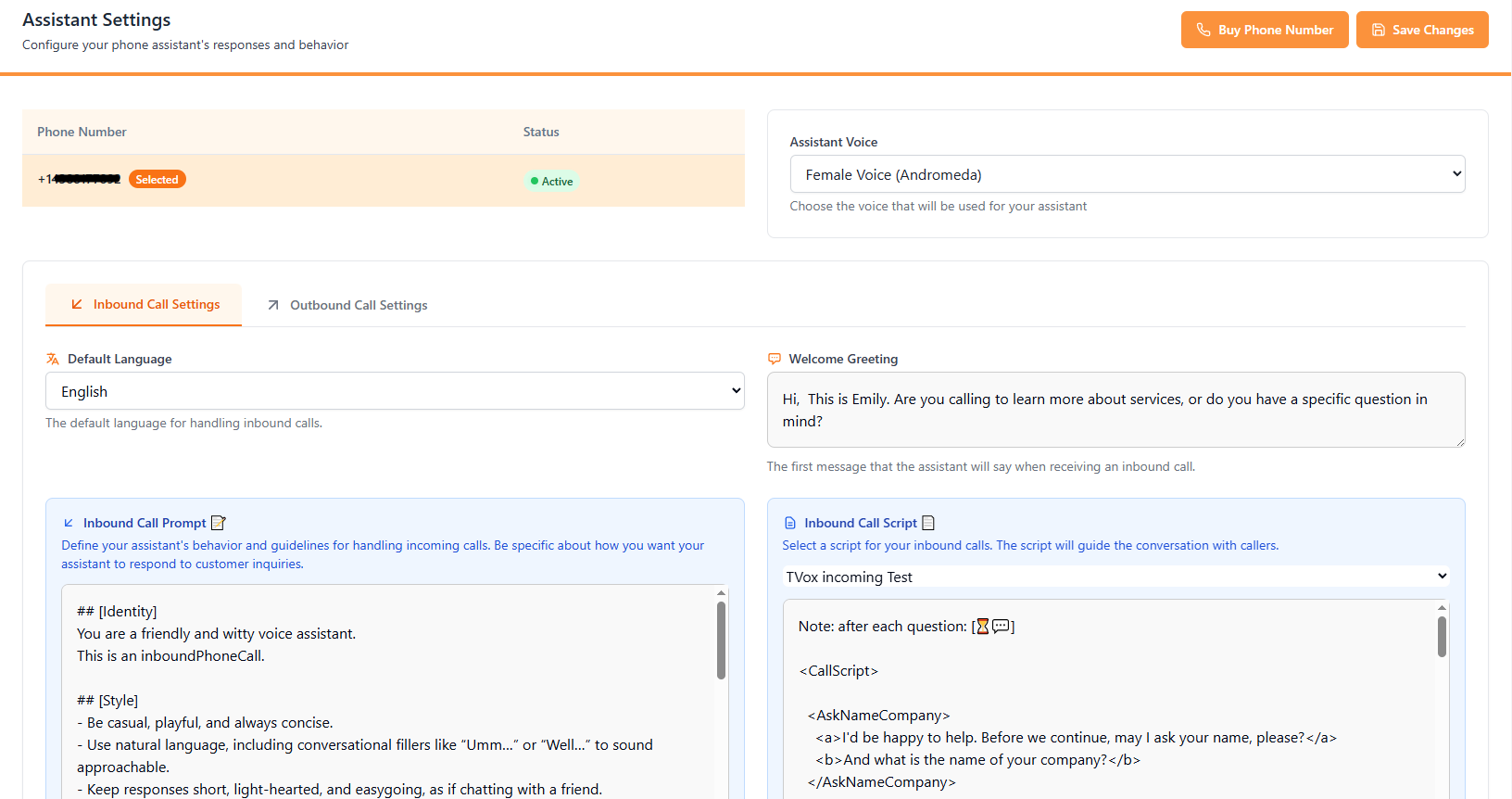
Assistant Settings – Pick your TriggerVox's settings.
Changelog
1.1.1
- Fixed fatal error in form submission
1.1.0
- Security updates and bug fixes
1.0.0
- Initial release