

Truncate Comments
The plugin uses Javascript to hide long comments (Amazon-style comments).
Plugin info
Maintenance & Compatibility
Maintenance score
Stale • Last updated 318 days ago • 6 reviews
Is Truncate Comments abandoned?
Likely maintained (last update 318 days ago).
Compatibility
Similar & Alternatives
Explore plugins with similar tags, and compare key metrics like downloads, ratings, updates, support, and WP/PHP compatibility.
Description
Truncate Comments is a plugin that hides a part of a long comment under a “Read more” link that, when clicked, reveals the hidden part of the comment. The plugin provides the functionality of Amazon.com comments.
If you liked my plugin, please rate it.
The plugin uses jQuery Collapser by Aakash Chakravarthy.
Installation
Frequently Asked Questions
- Visit «Plugins\Add New».
- Search for «Truncate Comments».
- Install and activate the plugin.
- That’s all.
Plugin settings are available in «Settings\Truncate Comments».
Add the following code to the style.css file of your theme.
.commentMoreLink {
   color:red!important;
}
The link will become red (just an example).
Yes, please use translate.wordpress.org.
Review feed
Screenshots
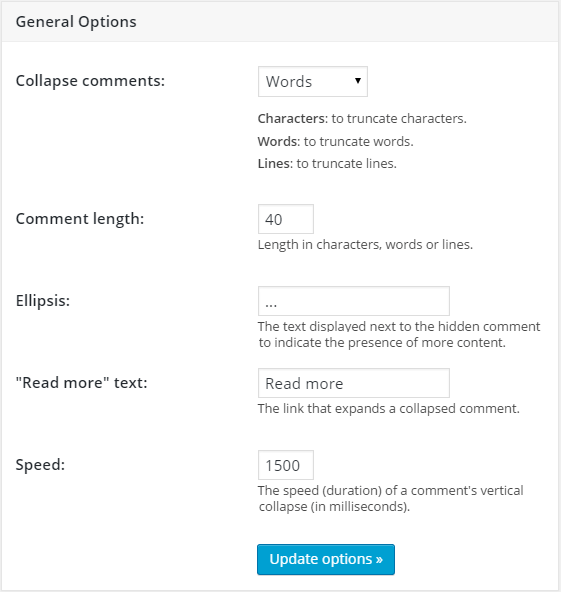
The plugin settings page.

Example of a hidden comment.
Changelog
2.00
- minor bug fixes
- added “Hide” button.
1.04
- minor bug fixes
1.03
- removed PHP notices.
1.02
- removed the bundled languages in favour of language packs from translate.wordpress.org.
1.01
- added German translation (thanks to ezkay).
1.00
- first public version.