

LAPDI Featured Posts
Featured Posts allows you to add featured posts to your blog's website via widgets, pages and/or posts.
Plugin info
Maintenance & Compatibility
Maintenance score
Possibly abandoned • Last updated 1879 days ago • 6 reviews
Is LAPDI Featured Posts abandoned?
Possibly abandoned (last update 1879 days ago).
Compatibility
Similar & Alternatives
Explore plugins with similar tags, and compare key metrics like downloads, ratings, updates, support, and WP/PHP compatibility.
Description
Let A Pro Do IT!’s (LAPDI) Featured Posts plugin allows you to add featured posts to your blog’s website via widget or on pages and posts using shortcodes. Featured Posts has five (5) layouts and can include thumbnails, post gallery and quotes.
Shortcodes
Add a Featured Posts to posts and pages by using a shortcode inside your text or evaluated from within your theme. You may override page/post Featured Posts options with shortcode attributes defined on the plugin’s settings page.
[tsp-featured-posts]– Will display posts with the default options defined in the plugin’s settings page.[tsp-featured-posts title="Title of Posts" keep_formatting="N" style="color: red;" max_words=10 show_quotes="N" show_thumb="Y" show_event_data="N" show_author="Y" show_date"N" show_private="N" show_text_posts="N" number_posts="5" excerpt_max=100 excerpt_min=60 post_class="" fpost_type="post" post_ids="5,3,4" category="0" slider_width="865" slider_height="365 layout="0" order_by="DESC" thumb_width="80" thumb_height="80" read_more_text="more..." before_title="" after_title=""]– Will override all attributes defined on the plugin’s settings page.
Installation
BEFORE YOU BEGIN: Requires the installation and activation of LAPDI Easy Dev Latest Version
- Upload
tsp-featured-poststo the/wp-content/plugins/directory - Activate the plugin through the
Pluginsmenu in WordPress - After installation, refer to the
LAPDI Featured Postssettings page for more detailed instructions on setting up your shortcodes. Featured Postswidgets can be added to the sidemenu bar by visitingAppearance > Widgetsand dragging theLAPDI Featured Postswidget to your sidebar menu.- Add some widgets to the sidemenu bar, Add shortcodes to pages and posts (see Instructions)
- View your site
- Adjust your CSS for your theme by visiting
Appearance > Edit CSS - Adjust the
Sliding Gallerysettings, if necessary, by visitingPlugins > Editor, SelectLAPDI Featured Postsand edit thetsp-featured-posts.cssandjs/slider-scripts.jsfiles - Manipulating the CSS for
#postSliderand#tspfp_articleentries changes the gallery and article styles respectfully
Frequently Asked Questions
- We sincerely apologize this was a bug introduced in versions 1.2.4 – 1.2.6 and fixed in 1.2.7+
- A quick fix would be to set “Post Type” to an empty string on the settings page to get past the error
- The best solution would be to download version 1.2.7 and follow the instructions in the next steps.
- Navigate to the plugins page and click “Update Now” under “LAPDI Featured Posts” to get version 1.2.7 (or newer versions)
- Once activated go back to the LAPDI Plugins->Featured Posts settings page and set all “Post Type” fields to empty (There will be 2 fields)
- Save Changes & Refresh Page
- Again, Save Changes & Refresh Page
- You should only see one “Post Type” field now, set it to “post” or any post type you’d like, Save Changes
- Please update your shortcodes to use
fpost_typeinstead ofpost_type(Note:post_typeis a reserved WP keyword and was the cause of the issue) - Bug fixed. Apologies for the inconvenience.
- Make sure the folder
/wp-content/uploads/has recursive, 777 permissions - Make sure you are listing posts from all
categoriesthat exist and/orpost_idsis empty or the posts it refers to exists
Review feed
Screenshots
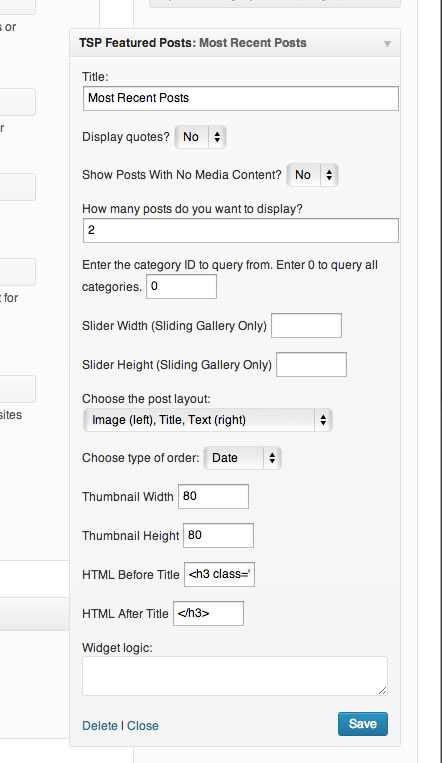
Admin area widget settings.
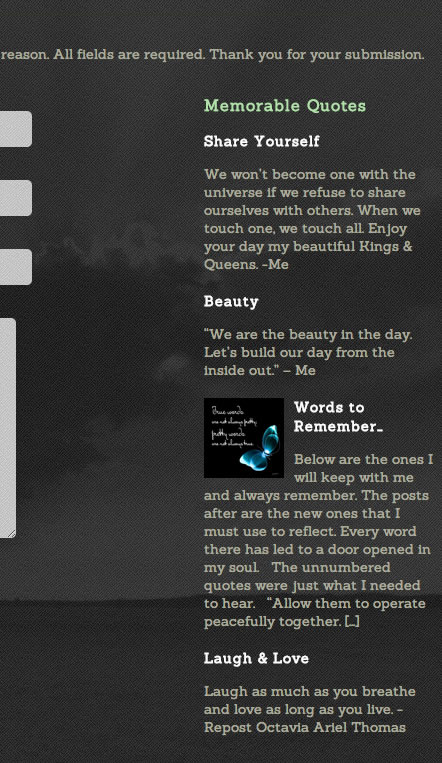
Featured Posts displayed on the front-end.
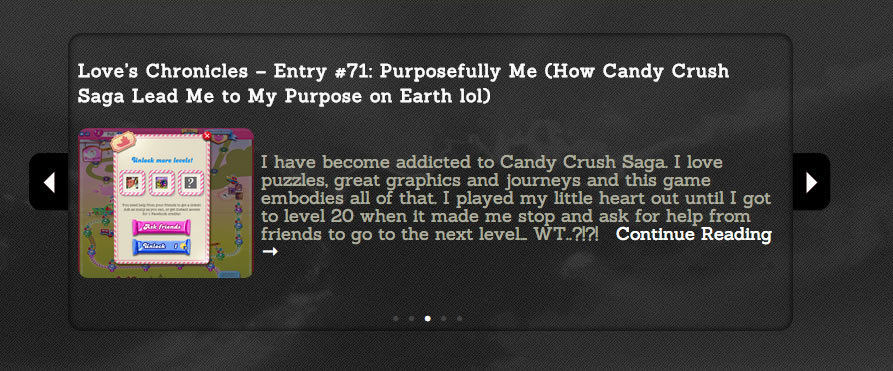
Featured Posts gallery.
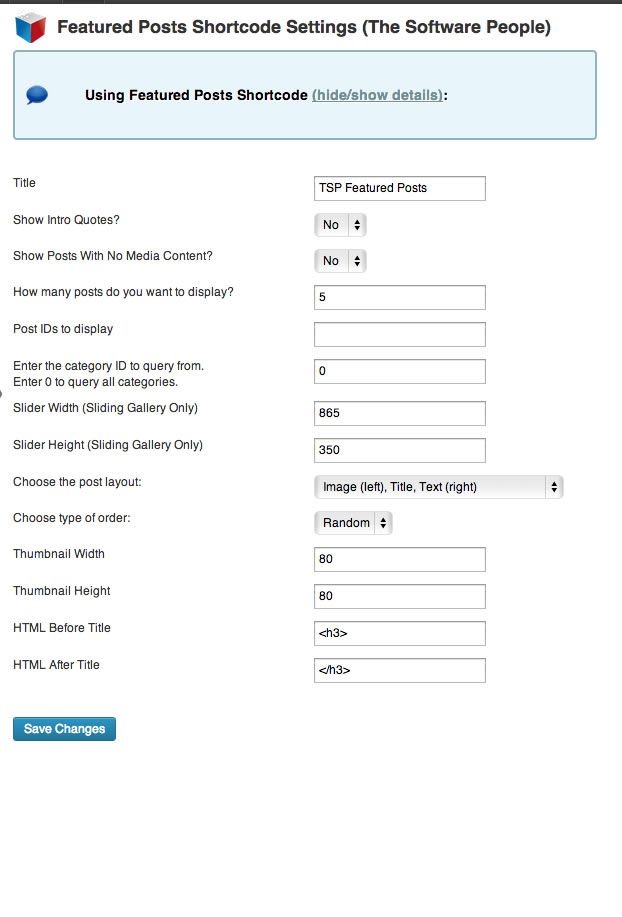
Admin area shortcode settings area.
Changelog
1.3.3
Bug fix. Fixed bug with posts not showing
1.3.2
- Maintenance
- Bug fix – Null exception fix
1.3.1
- Enhancement: Requires v2.0.0 of LAPDI Easy Dev
- Fixed Bug: Adding plugin to page changes page format
- Fixed Bug: Adding plugin to overrides current post title
1.3.0
- Enhancement: Improved settings UI
1.2.9
- Enhancement: Using only TSP Easy Dev (Pro version no longer available.)
1.2.8
- Fixed bug: Fixed bug to handle null options
1.2.7
- Fixed bug: Fixed issue FP-22 Unable to save settings in admin area (See: FIX INSTRUCTIONS)
1.2.6
- Enhancement: Allow user to add additional post classes
1.2.5
- Enhancement: Added support for viewing tribe event data (see The Events Calendar plugin)
1.2.4
- Enhancement: Added the option to display post types, to display events, appointments, etc. Anything with a post type you can now display
- Enhancement: Added new layout option, Top: Image, Title: Bottom, Excerpt: Last
1.2.3
- Enhancement: Added option to show private posts
1.2.2
- Enhancement: Added option to keep HTML formatting
- Enhancement: Added option to add style formatting to individual posts
1.2.1
- Enhancement (Blackley): Link thumbnails to articles
- Enhancement (Blackley): Link readmore text to article
- Enhancement (Blackley): Allow readmore text to be customized
- Enhancement (Blackley): Allow show/hide of post thumbnails
- Enhancement (Blackley): Allow user to control post info using CSS (author/date – #tspfp_article #article_about{})
1.2.0
- Enhancement: Allow spaces between commas when listing post IDs
1.1.9
- Fixed bug. Correctly locates TSP Easy Dev.
1.1.8
- Fixed bug. Prevent excerpts of protected posts from being displayed.
1.1.7
- Enhancement. Removed font size from moving boxes stylesheet
1.1.6
- Enhancement. Post images are now be pulled from featured thumbnail as well as content.
1.1.5
- Enhancement. Updated support link
1.1.4
- Removed inline function from widget_init hook to support older versions of PHP.
1.1.3
- Required fix to properly store new widget/shortcode attributes into database. (Update to Easy Dev 1.2.2).
- Added a
show_dateattribute to widget and shortcodes. - Make
show_authorNo by default
1.1.2
- Added back in assets folder
1.1.1
- Fixed issues with encrypted libraries.
1.1.0
- Now uses Easy Dev Pro for easy plugin development, #bringbackOOD
- Handled all PHP notices
- Added new attributes max_words (control post title lengths)
- Added new attributes excerpt_min, excerpt_max (control post content lengths)
- Added new attributes show_author (choose to show/hide the author of a post)
- Renamed attributes to prevent red spell checks when editing (old attributes still supported)
- Decreased plugin size by using Easy Dev
1.0.1
- Checks for existence of parent settings menu before overwriting it
1.0.0
- Launch