

Twitter SP2
A Wordpress plugin that posts on Twitter a link to your post shorten via sp2.ro when you publish a blog post.
Plugin info
Maintenance & Compatibility
Maintenance score
Possibly abandoned • Last updated 6044 days ago
Is Twitter SP2 abandoned?
Possibly abandoned (last update 6044 days ago).
Compatibility
Similar & Alternatives
Explore plugins with similar tags, and compare key metrics like downloads, ratings, updates, support, and WP/PHP compatibility.
Description
Twitter SP2 is a simple WordPress plugin developed for bloggers who have Twitter accounts. The plugin posts on Twitter a link to your post shorten via a romanian service sp2.ro when you publish a new blog post.
When a post is published the plugin makes a shorter link for the permalink using sp2.ro API, stores it in a custom field called sp2_link, then sends it on Twitter in a way chosen in Options.
Features
- the shorter link is stored in a custom field
- predefined and custom formats of text to send
- twitter notificantion can be turned off for individual posts
- errors are messages stored in custom fields
- NEW! readers can now send the posts on Twitter
- NEW! the plugins tries for 5 time to send the text on Twitter before giving up, if Twitter gives a timeout response
Changelog
- v0.6 – fixed minor error
- v0.5 – added the “send on twitter” link on older posts too
- v0.4 – fixed a bug with future posts
- v0.4 – added posibility to add a “send on twitter” link on the page to be used by the blog readers
- v0.4 – tries for 5 times to send the text on twitter before giving up, if timeout response
- v0.4 – added error and succes messages
- v0.3 – trimmed out shortcodes and bad chars from post excerpt
- v0.3 – switched on a new 2.8 action hook
- v0.2 – changed old posts twitter notificantion option to off by default
- v0.2 – added
%titlu%,%fragment%, and%link%as tags for custom texts to send - v0.1.1 – fixed minor input error in Options
- v0.1 – initial release
Installation
Instructions for installing the Twitter SP2 plugin.
- Download the plugin and unzip it to a folder on your computer.
- Upload
twitter-sp2folder to the/wp-content/plugins/directory - Activate
Twitter SP2plugin through thePluginsmenu in WordPress - Go to
wp-Admin => Settings => Twitter SP2to enter your twitter account info and modify other settings.
Frequently Asked Questions
If I edit an old post it will be sent on Twitter?
Yes, if the updates are not turn off for that post.
How does the plugin knows if a notification was sent?
After a tweet was sent, the plugin makes a custom field called sp2_tweet_sent with a value of ‘1’
Review feed
Screenshots
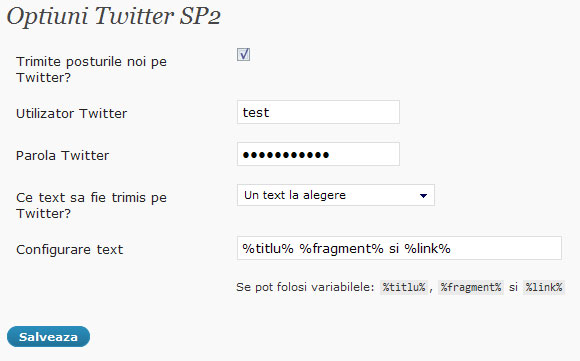
the Options in WP 2.7