

Uber Direct Integration
Offer instant or scheduled delivery from your WooCommerce store with real-time quotes and Uber Direct integration
Plugin info
Maintenance & Compatibility
Maintenance score
Maintained • Last updated 144 days ago • Support resolved 40% • 1 reviews
Is Uber Direct Integration abandoned?
Likely maintained (last update 144 days ago).
Compatibility
Similar & Alternatives
Explore plugins with similar tags, and compare key metrics like downloads, ratings, updates, support, and WP/PHP compatibility.
Description
Uber Direct Integration enables real-time delivery via Uber Direct directly from your WooCommerce store. Offer customers instant or scheduled delivery options with dynamic quotes, delivery tracking, and automated dispatching.
Built and maintained by a team at Uber.
Features
- 🔄 Fetch real-time delivery quotes from Uber Direct at checkout.
- 🏬 Let customers select a nearby store based on their shipping address.
- 🚚 Automatically create Uber Direct deliveries when orders are placed.
- 🕐 Supports both ASAP and Scheduled delivery options.
- 🧾 Automatically calculate and display delivery fees in the cart/checkout.
- 🔒 Enable PIN or picture verification for dropoff or pickup.
- 📍 Display live delivery tracking status to customers post-purchase.
- 🌐 Webhook support to keep order status and ETA in sync in real-time.
- 📦 Supports centralized multi-store models.
- 🚶 Additionally Supports pickup option.
- 🕐 Ability to configure store hours
External Services
This plugin connects to the Uber Direct API in order to provide real-time delivery capabilities for WooCommerce orders.
The following external API endpoints are accessed:
https://api.uber.com/v1/customers/{org_id}/delivery_quotes– fetches delivery quotes based on address and store.https://api.uber.com/v1/customers/{org_id}/deliveries– creates delivery orders with Uber Direct.https://api.uber.com/v1/direct/organizations– retrieves configured Uber organizations.https://api.uber.com/v1/direct/organizations/{org_id}/stores?address=...– fetches nearby store locations for a given customer address.
These requests are made securely using WordPress’s native HTTP functions.
Data Sent to Uber
The plugin transmits only the information required to fulfill delivery operations, including:
- Customer billing/shipping address
- Order contents and metadata
- Contact phone number (used for delivery coordination)
- Delivery type (ASAP or scheduled), and scheduled date/time
- Store and organization identifiers
- WooCommerce order ID (used for webhook mapping and tracking)
No payment or sensitive account information is transmitted beyond what’s necessary for delivery dispatch.
Webhooks & Delivery Status
This plugin also uses Uber’s webhook system to receive live updates on delivery status and estimated arrival time.
Uber Direct API Documentation
To learn more about the API endpoints used by this plugin:
Service Provider
All external delivery services are provided by:
- Uber Technologies, Inc.
- Terms of Use
- Privacy Policy
Installation
- In your WordPress admin dashboard, go to Plugins -> Add New.
- Search for Uber Direct Integration in the plugin directory.
- Click Install Now, then Activate the plugin.
- Navigate to WooCommerce ->Uber Direct in the dashboard menu.
- Enter your API credentials (Client ID and Secret).
- Add your store pickup locations.
- Choose whether to enable ASAP, Scheduled, or both delivery types.
- For webhook setup, please set your webhook URL in the Uber Direct dashboard as:
YOUR_WEBSITE_URL/wp-json/uber-direct/v1/webhook` and use the same webhook URL in wordpress admin - Save your settings
- Enable Uber Direct Shipping (Woocommerce -> settings -> Shipping->Add zone-> Add Shipping method->Uber Direct)
- Done!
Frequently Asked Questions
Yes. You must sign up for Uber Direct and obtain your API Client ID and Secret.
Fees are returned dynamically from Uber’s Delivery API based on the pickup and dropoff addresses.
Yes! You can enable ASAP, Scheduled, or both in settings. Scheduled deliveries support time windows and custom dropoff ranges.
Yes. This plugin is developed and maintained by engineers at Uber. It uses the official Uber Direct API and was created to support WooCommerce stores with Uber-powered delivery options.
Review feed
Screenshots

Uber Direct settings screen / Admin panel to manage organizations and stores

Customer selects a store from nearby options

Quote fetched from Uber and delivery created on order

Tracking Page
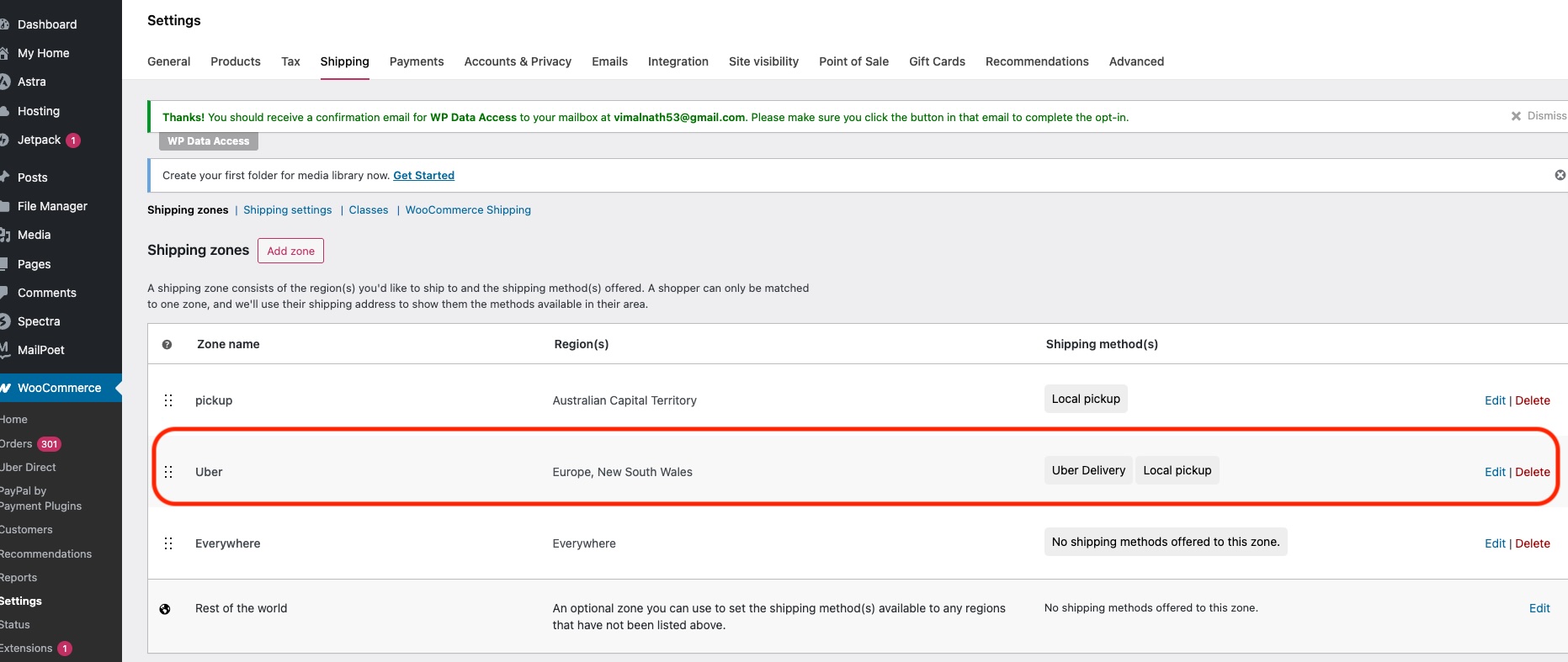
Enable Uber Direct Shipping
Changelog
1.8
- Minor bug fixes on notes
1.7
- Minor bug fixes on screenshots
1.6
- Minor bug fixes on time slot selection
1.5
- Enhanced store naming in checkout page
1.4
- Disable/Enable shipping options based on admin setting
1.3
- Made store pickup/delivery time slots configurable
- Adjustments to tax/currency displayed
1.2
- Minor enhancements to tax calculation
1.1
- Added
class-uber-direct-shipping-method.php - Updated tax display logic
- Other enhancements and fixes
1.0
- Initial release.
- Core delivery flow with quote + create + webhook support
- Admin config panel
- Store selection
- ASAP + Scheduled delivery
- Tracking and status bar on order page