

Uber reCaptcha
This plugin adds the reCaptcha form to the WordPress login form, recover password form, register form and comment form.
Maintenance 40/100266d since update
Active installs
1,000
Downloads
78,331
Reviews
9
Age
11.1y
Plugin info
Total downloads: 78,331
Active installs: 1,000
Total reviews: 9
Average rating: 3.7
Support threads opened: 0
Support threads resolved: 0 (0%)
Available in: 1 language(s)
Contributors: 5
Last updated: 7/10/2025 (266 days ago)
Added to WordPress: 3/3/2015 (11 years old)
Minimum WordPress version: 3.9
Tested up to WordPress version: 6.8.3
Minimum PHP version: f
Maintenance & Compatibility
Maintenance score
Stale • Last updated 266 days ago • 9 reviews
40/100
Is Uber reCaptcha abandoned?
Likely maintained (last update 266 days ago).
Compatibility
Requires WordPress: 3.9
Tested up to: 6.8.3
Requires PHP: f
Languages
Similar & Alternatives
Explore plugins with similar tags, and compare key metrics like downloads, ratings, updates, support, and WP/PHP compatibility.
Combat Comments Bot
Rating 0.0/5 (0 reviews) • Active installs 10
Turnstile Pro – Cloudflare CAPTCHA Protection
Rating 0.0/5 (0 reviews) • Active installs 10
Javascript Comment Form Protection
Rating 0.0/5 (0 reviews) • Active installs 0
Description
A very useful plugin for everyone using WordPress. Adds reCaptcha security to the WordPress login form, register form and comment form. This plugin could help your blog get rid of a lot of spam comments or brute-force attacks.
Nothing gets passed it if the reCaptcha doesn’t validate.
A few notes about the plugin:
- Supports audio or image captcha types
- Can generate the reCaptcha image / audio type in a number of predefined languages
- Adds reCaptcha protection to the WordPress login form
- Adds reCaptcha protection to the WordPress register form
- Adds reCaptcha protection to the WordPress comment form
- Adds reCaptcha protection to the WordPress recover password form
Installation
This section describes how to install the plugin and get it working.
- Upload the whole contents of the folder
uber-recaptchato the/wp-content/plugins/directory - Activate the plugin through the ‘Plugins’ menu in WordPress
- Fill in your Site & Secret key, which you can get here: https://www.google.com/recaptcha/
- Select the type of captcha you want: audio / image
- Select where you’d want the reCaptcha form to be rendered: login, register or comment form
- Enjoy a spam free blog & extra security for your back-end panel 🙂
Frequently Asked Questions
No FAQ available
Review feed
No reviews available
Screenshots
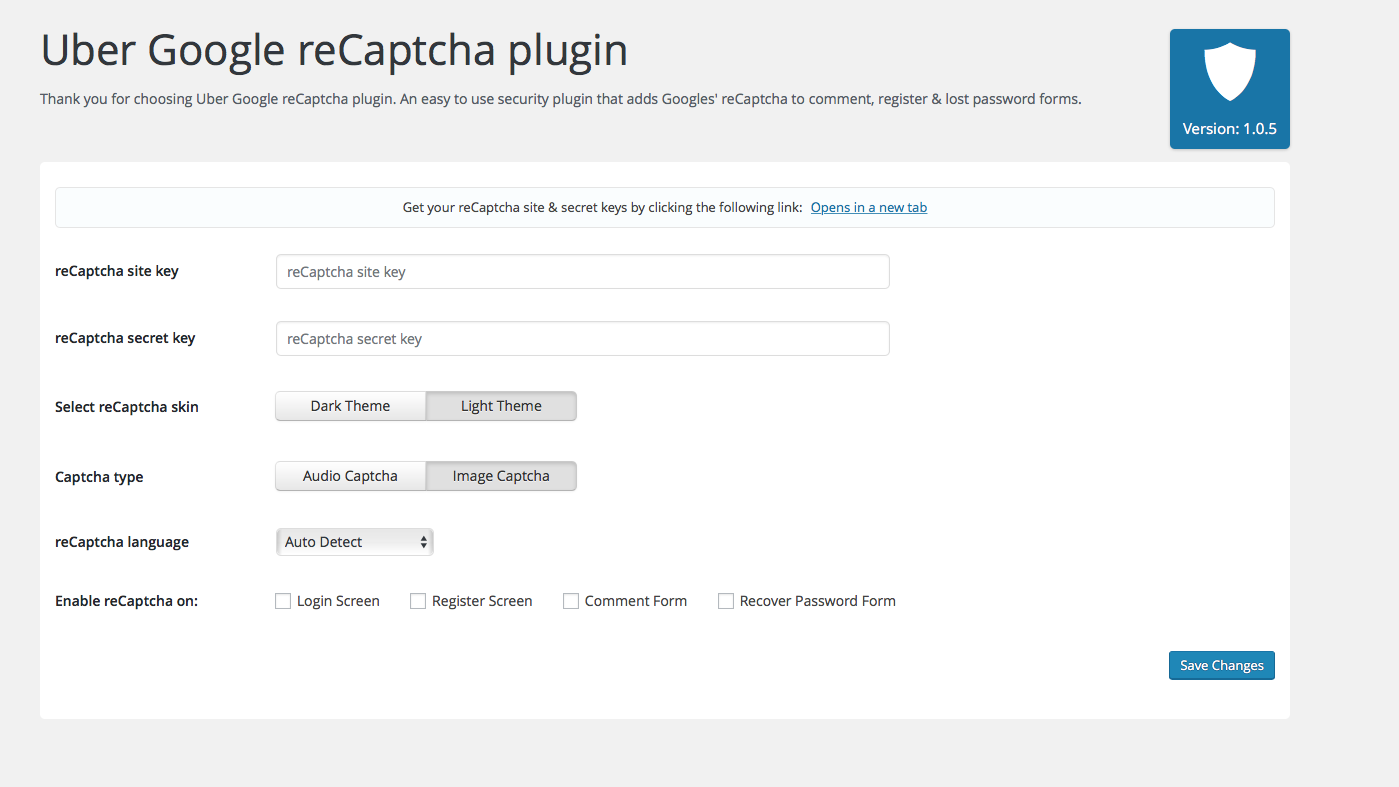
Back-end UI
Changelog
1.1.5 – 10.07.2025
- Changed: Update tested up to
1.1.4 – 29.10.2023
1.1.3 – 10.01.2022
- Update texts to remove confusion about reCaptcha
- Update translation file
- Update texts to remove confusion about reCaptcha
- Update translation file
1.1.2
- Fix translation issues
- Update translation file
1.1.1
- Don’t show recaptcha errors if no public and private key.
1.1.0
- Added option to show reCaptcha to logged in users
- Actualize Google reCaptcha languages
- Added option to disable submit button before reCaptcha is validated
- Added invisible reCaptcha support
- Fixed reCaptcha on register and forgot password screen
1.0.6
- Made sure Uber Recaptcha works with https:// sites as well
1.0.5
- Re-worked the UI
- Fixed a bunch of notices
- Added branding
- Added more visible notice where you can get your reCaptcha keys
- Removed /admin/view and moved the content into settings.php
- Removed readme.md
1.0.4
- Fixed the reamde.md to display properly on the plugin page.
1.0.3
- Made sure plugin works with WP 4.5 and upwards.
- Removed UTF-8 incomptabile strings from the plugin name. This made the plugin name show up quirky on the wordpress.org plugin landing page.
- Centered the reCaptcha form on the login screen & recover/register password screens
- Changed the hook the reCaptcha form was using for being displayed on the comment form.
- Slightly re-worked the CSS so that the reCaptcha form is being nicely displayed/aligned with more themes.
1.0.2
- Fixed captcha comment not showing up on comment form where a hook was missing (only affected a couple of themes)
1.0.1
- Added reCaptcha on recover password form
- PHP 5.3.29 compatibility fix
- Minor other fixes
1.0.0
- Initial release