

Free Responsive Post/Article Author Section Plugin for WordPress – Ultimate Author Box Lite
Ultimate Author Box Lite is a plugin that allows you to add additional information about the author in your Post, Page and Custom Post Type as a defau …
Plugin info
Maintenance & Compatibility
Maintenance score
Possibly abandoned • Last updated 1388 days ago • Support resolved 0% • 8 reviews
Is Free Responsive Post/Article Author Section Plugin for WordPress – Ultimate Author Box Lite abandoned?
Possibly abandoned (last update 1388 days ago).
Compatibility
Similar & Alternatives
Explore plugins with similar tags, and compare key metrics like downloads, ratings, updates, support, and WP/PHP compatibility.
Description
Demo | Documentation | Support
Ultimate Author Box Lite is a FREE WordPress Plugin that allows you to add additional information about the author in your Post, Page and Custom Post Type as a default option or through use of shortcode.
Free Features:
- Ultimate Author Box Lite
- Additional fields for user profile.
- 5 Beautifully designed templates pack.
- Custom color scheme for templates.
- Support Display images from Facebook, Twitter, Instagram and custom images.
- Add Unlimited Tabs to your Author Box for extra content.
- Inbuilt Author Post Tab
- Custom WYSIWYG Editor Tab
- Show/hide Author Box per post.
- Can be used in Posts/Pages or registered Custom Post Type.
- Add Author Box before/after posts or anywhere you like with convenient shortcode.
- Disable Author Box for Authors lacking Biographical Info.
- Set a default message for Author with no Biographical Info.
- Diable Author Box for certain user roles.
- 10 Social Icons for Authors Social Profile.
- Use form with
- Shortcode
- Fully Responsive – compatible with mobile devices
- User friendly and very interactive user interface
- Anyone can use it.
- Support
- Dedicated email, forum support
- Free updates
- Get free updates for lifetime.
Premium Features:
- 15+ Pre designed beautiful Author Box templates.
- Additional tabs
- In-built Contact form or External Contact form using Shortcodes
- Company Description Tab
- Twitter Feeds
- Facebook Feeds
- RSS Feeds
- Widgets Support in Tabs
- Shortcode Support in Tabs
- 20+ Social Media Profiles
- Author Summary in Pop-up Display
- Two in-built widgets
- Author Box Widget with auto detect Author
- Author Box List Widget with Slider, Grid and List view
- and many more…
PREMIUM UPGRADES
- For Premium upgrades please go here.
Installation
- Upload the plugin files to the
/wp-content/plugins/ultimate-author-box-litedirectory, or install the plugin through the WordPress plugins screen directly. - Activate the plugin through the ‘Plugins’ screen in WordPress
- Use the Dashboard->Ultimate Author Box Lite screen to configure the plugin.
- Go to Dashboard-> Users-> Profile to set up your user profile.
Frequently Asked Questions
Ultimate Author Box lite is a free WordPress plugin that creates an Author Box for your Posts. It allows you to present your Content Writers/ authors in the most eligate and resectly way in neat, clean profressional templates.
Ultimate Author Box lite enables to better emphasize your Content Writer/ Authors. It allows you to add unlimited tab with a WYSIWYG editor to add contents related to the Author.
- English
- Support Email: [email protected]
- Support Forum Link: http://accesspressthemes.com/support/
- Youtube channel link: https://www.youtube.com/watch?v=TjZNcVG3fDE
- Facebook link: https://www.facebook.com/AccessPressThemes
For a easy installation guide checkout the Installation tab above.
For complete information and documentation regarding plugin,please visit below links.
Review feed
Screenshots

Template 5

Template 5 with Author Posts

Template 4

Template 4 with WYSIWYG editor

Template 1

Template 2

Template 3

General Settings

Permission Settings

Layout Settings

Custom Template options
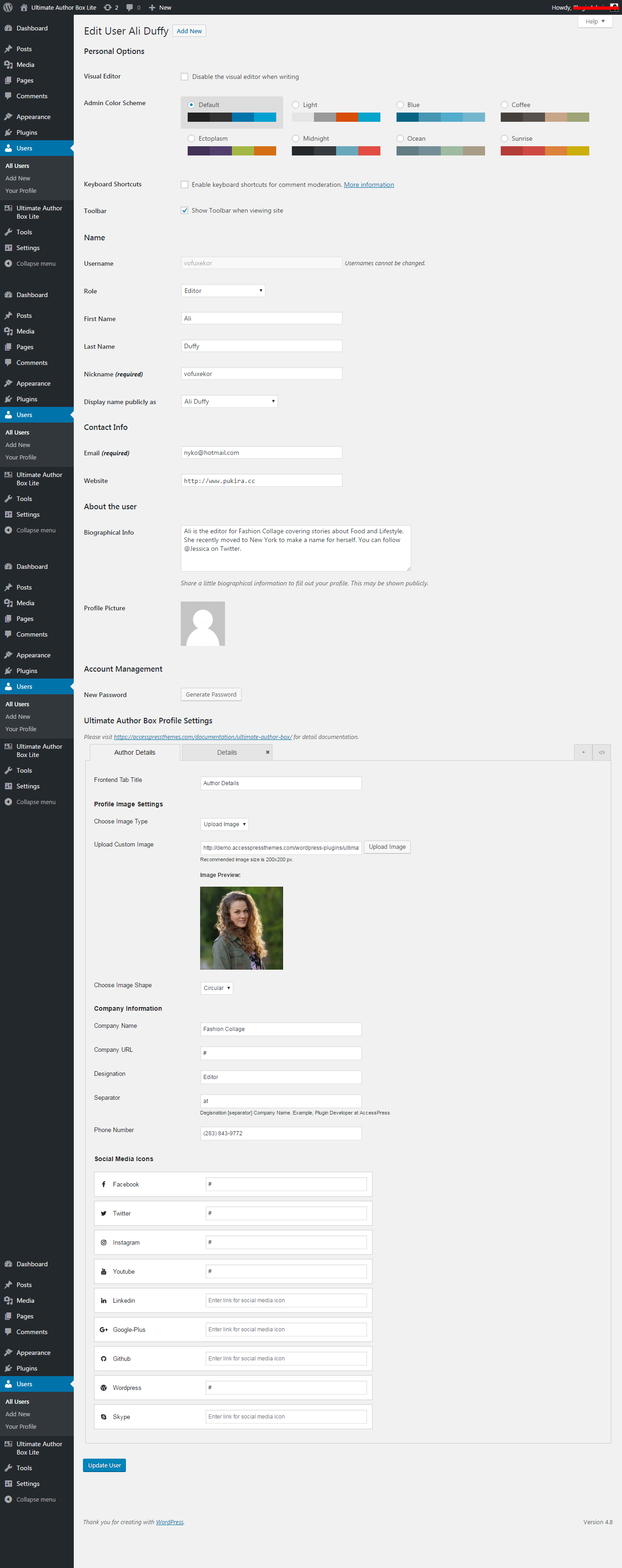
User profile edit page

Adding New tab

WYSIWYG editor

Custom Profile Settings

Author Posts Tab
Changelog
1.1.4
- Checked compatibility with the WordPress version 6.0 .
1.1.3
- Fixed issue regarding saved changes in UAB Profile Settings not showing.
- Updated Fontawesome to v 5.15.4.
- Checked compatibility with the WordPress version 5.8.
1.1.2
- Checked compatibility with the latest version of Word Press.
1.1.1
- Checked compatibility with new version of WP
- Changed some css in the backend
1.1.0
- Replacement for Ck Editor and Customizable biographical information
1.0.7
- Cross Promotions and conditional flaws changed
1.0.6
- Minor issues and bugs resolved for empty fields in user edit screen
1.0.5
- New Fontawesome v 5.0.8 Library added
1.0.4
- stripslashes added to Custom CSS Section
1.0.3
- Alpha Color Picker fix for WordPress 4.9
1.0.2
- Author Name link to Author Archive option added.
1.0.1
- RSS Icon Added.
1.0.0
- Initial Upload.