

Ultimate Conversion Tracking Code
Add Adwords, Facebook pixel or any Conversion Tracking scripts using variables like product ID, post id, title or custom ones.
Plugin info
Maintenance & Compatibility
Maintenance score
Possibly abandoned • Last updated 3789 days ago • 1 reviews
Is Ultimate Conversion Tracking Code abandoned?
Possibly abandoned (last update 3789 days ago).
Compatibility
Similar & Alternatives
Explore plugins with similar tags, and compare key metrics like downloads, ratings, updates, support, and WP/PHP compatibility.
Description
Add Adwords, Facebook pixel or any Conversion Tracking scripts using variables like product ID, post id, title or custom ones.
This plugin lets you insert any marketing script anywhere you want, before the head element closes, after the body or even before the body tag closes.
Also you can use custom variables to share between scripts like conversion id or Facebook pixel id. as well as dynamic ones like product id.
Also you can set your scripts to show in specific pages or events like right when somebody completes an order or when they are in a product page in case you are using Woocomerce.
Premium version
With the premium version you have no limits in variables or scripts and you get much more options, you can check out here if you want more power to your marketing scripts:
http://www.ultimateconversiontrackingcode.com/
Installation
- Download
- Upload to your /wp-contents/plugins/ directory.
- Activate the plugin through the ‘Plugins’ menu in WordPress.
- Start managing your scripts or iframes by going to Ultimate Conv-Track Code menu in the back end of your wordpress installation
Frequently Asked Questions
Will this plugin work with adWords?
Yes! it works with any marketing scripts.
Will it conflict with other plugins?
It uses jQuery to insert the scripts so as long as jquery is included in your theme you should not have any problem, remember that
if your script has javascript errors, the plugin put the scripts as is so check your code in case you see javascript errors. or try removing it and see if that is the problem, or you can drop me en email and I will help you get it right.
Can I use unlimited variables and scripts?
you can insert as many scripts a you want but if you want more variables and functionality I would go for the premium.
Review feed
Screenshots

Here you can see how you can manage all your scripts and custom variables.
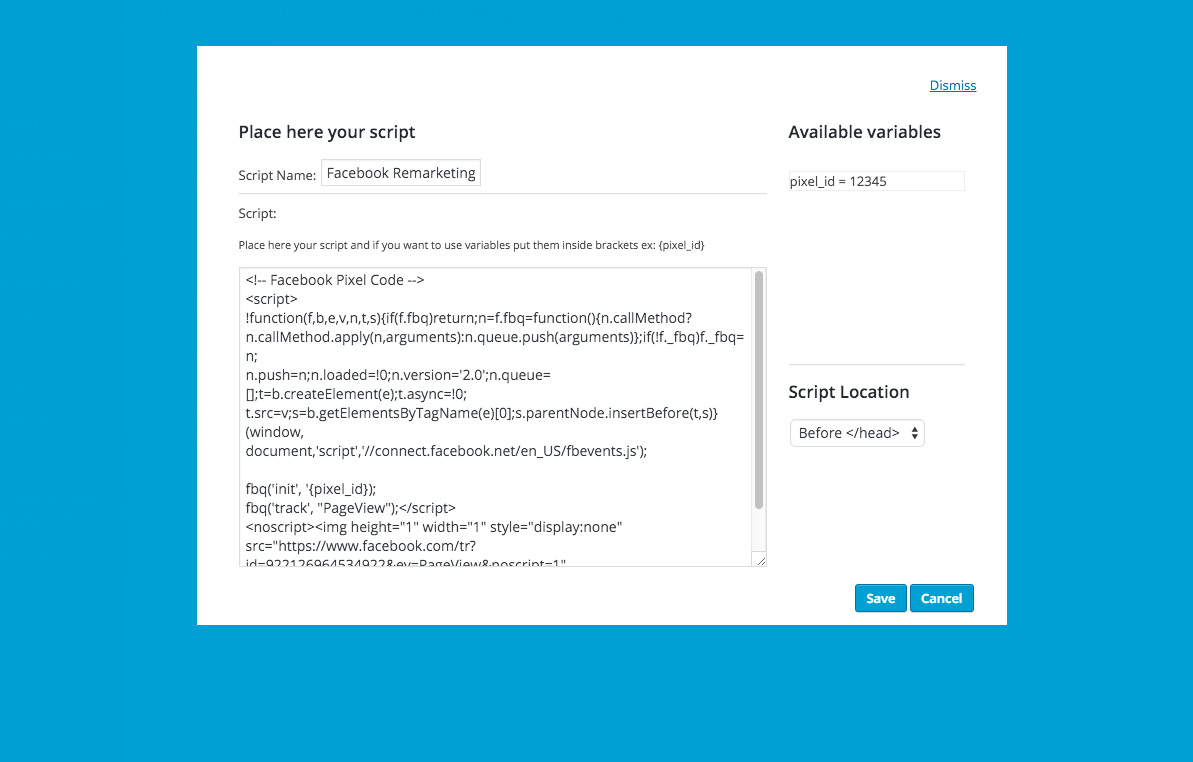
here is how you set each script with custom variables, remember to wrap the variable in curly brackets {variable_name}
Changelog
1.0
Stable Version