

Plugin info
Maintenance & Compatibility
Maintenance score
Possibly abandoned • Last updated 3270 days ago
Is Unfurl – One Click To Post abandoned?
Possibly abandoned (last update 3270 days ago).
Compatibility
Similar & Alternatives
Explore plugins with similar tags, and compare key metrics like downloads, ratings, updates, support, and WP/PHP compatibility.
Description
Make new post from a link in one click, like on Twitter
Post content from an external publication with one click: Insert link to the input field in WordPress dashboard and a new post will be created.
It is similar to twitter cards – title, description and featured image is taken from metadata if there are any. The featured image gets downloaded into your own media library and set as a regular featured image.
Demo: https://wp.tomatohunter.com/unfurl/
Author
Installation
This section describes how to install the plugin and get it working.
- Upload the plugin files to the
/wp-content/plugins/plugin-namedirectory, or install the plugin through the WordPress plugins screen directly. - Activate the plugin through the ‘Plugins’ screen in WordPress
- Go to your WordPress dashboard to see the Unfurl input field, drag it to a more convenient place if necessary.
Frequently Asked Questions
- The image/title from the site does not render, I get a default one.
This happens currently mainly for medium.com articles. This plugin is still under development – the internets are wild and the metatags aren’t perfect.
Review feed
Screenshots
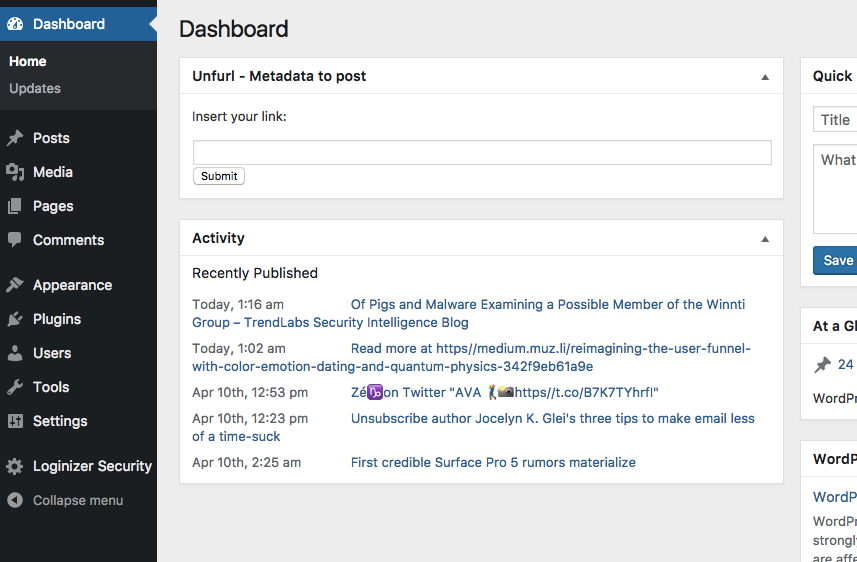
Wordpress Dashboard - Interface to paste links into
Changelog
Version
0.2.1 Added workaround for sharing LinkedIn Pulse, preliminary treatment for medium.com Cloudflare block.
0.1.2 Changed to WordPress API for curl, added nonce for POST.
0.1.1 Added fix for badly formatted strings that are encoded into random chars.
Version (Preliminary)
20170407 All default functionality for test.
Missing WordPress backend messages when somethings wrong
Image either twitter image src or <meta property=”twitter:image”
20170406 Upload without featured image
20170405 Basic draft / prototype