

Universal Clocks
Elegant and easy to use plugin to add a wide range of clocks on your website!
Plugin info
Maintenance & Compatibility
Maintenance score
Possibly abandoned • Last updated 830 days ago
Is Universal Clocks abandoned?
Possibly abandoned (last update 830 days ago).
Compatibility
Similar & Alternatives
Explore plugins with similar tags, and compare key metrics like downloads, ratings, updates, support, and WP/PHP compatibility.
Description
The Universal Clocks is your one stop plugin when it comes to displaying clocks of different time zones on your website. It’s a great plugin which lets you chose a clock face from multiple available options. You can add a clock on the sidebars, posts, pages, and widgets. It’s a simple to use plugin, all you have to do is to place a shortcode where you want a clock to be displayed. Two standard types of clocks are available i.e. Digital and Analog clocks. A wide range of customization features for the clocks is also available.
Shortcode
For a single clock.
[universal-clocks slugs='Insert here slug-of-clock-post']
For more than one clock.
[universal-clocks slugs='slug-of-clock-post, slug-of-other-clock-post']
Live Demo
Please click here for Universal Clocks Demo.
Plugin Features
- Add as many clocks as desired.
- Shows clocks in various locations with Shortcode.
- Choose a distinct face with different background colors for each analog clock.
- Display digital clock with distinctive color, font-family, font-size, and font-weight.
- Play with the border options for each clock for a stunning look.
Can you contribute?
If you are an awesome contributor for translations or plugin development, please contact us at [email protected]
Installation
Install Universal Clock like you would install any other WordPress plugin.
Dashboard Method:
- Login to your WordPress admin and go to Plugins -> Add New
- Type “Universal Clock” in the search bar and select this plugin
- Click “Install”, and then “Activate Plugin”
Upload Method:
- Download plugin.
- Upload ‘universal-clocks.zip’ to the ‘/wp-content/plugins/’ directory to your web server.
- Activate the plugin through the ‘Plugins’ menu in WordPress.
Frequently Asked Questions
After installing the plugin you will see a new menu of name “Clocks” will be created in the dashboard. Tap on “Add New” and create the clock and then paste the [universal-clocks slugs=’Insert here slug-of-clock-post’] shortcode anywhere.
There are many options
- Wide range of appealing faces.
- Background color for transparent dials.
- Border options with color and different styles.
There are many options
- Color option for the clock.
- Font-family option of the clock.
- Font-size option of the clock.
- Font-Weight option of the clock.
- Border options with color and different styles.
Just place this [universal-clocks slugs=’slug-of-clock-post’] shortcode with the clock slug to display the clock in the widget.
By using this [universal-clocks slugs=’slug-of-clock-post, slug-of-other-clock-post’] shortcode You can display as many clocks as you want
Review feed
Screenshots

Live Clock in Header - show clock in the header using the shortcode.

Analog Clock - show live and running analog clock with beautiful dial and colors.

Digital Clock - show live and running digital clock with beautiful fonts and colors.
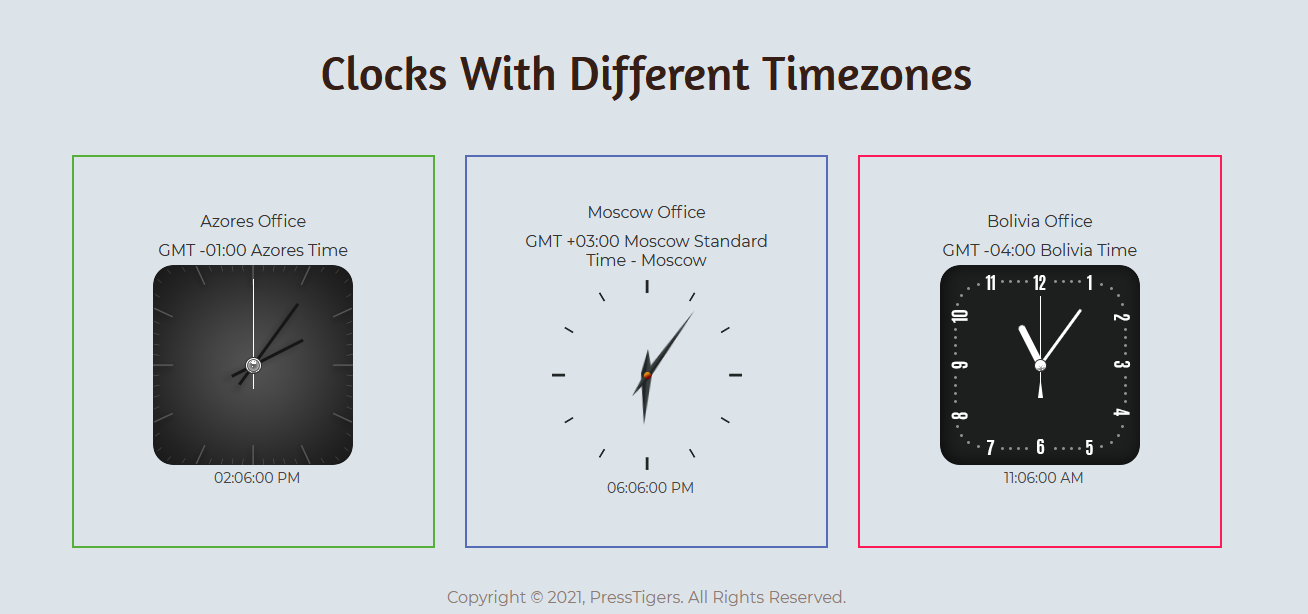
Clocks with Different Time Zones - show clocks with time zones using the easy shortcode.

Clocks List - list of all clocks in WP admin.

Analog Clock Options - analog clock options in WP admin.

Digital Clock Options - digital clock options in WP admin.
Changelog
1.2.0
- Feature – Added settings for Google Fonts API key.
- Fix – Fixed Google Fonts API key issue and added notices for missing or invalid API key.
- Fix – Resolved the warnings issues.
1.1.0
- Feature – Add daylight time saving support to timezones
1.0.1
- Fix – General settings merged with clock’s settings
- Fix – Made slug editable
1.0.0
- First release