
User Access Shortcodes
The simplest way of controlling who sees what in your posts/pages. Restrict content to logged in users only (or guests, or by roles) with simple short …
Plugin info
Maintenance & Compatibility
Maintenance score
Stale • Last updated 194 days ago • 13 reviews
Is User Access Shortcodes abandoned?
Likely maintained (last update 194 days ago).
Compatibility
Similar & Alternatives
Explore plugins with similar tags, and compare key metrics like downloads, ratings, updates, support, and WP/PHP compatibility.
Description
This is the simplest way of controlling who sees what in your posts/pages. This plugin allows you to restrict content to logged in users only (or guests, or by roles) with simple shortcodes. What you see is what you get, and it’s totally free.
Usage
Show content only for Guests
[UAS_guest]
This content can only be seen by guests.
[/UAS_guest]
Show content only for Registered/Logged in users
[UAS_loggedin]
This content can only be seen by logged in users.
[/UAS_loggedin]
Show content ony for specific roles
[UAS_role roles="administrator, editor"]
This content can only be seen by administrators and editors.
[/UAS_role]
Show content ony for specific users
[UAS_specific ids="23, 127"]
This content can only be seen by users with IDs 23 and 127.
[/UAS_specific]
Several extra parameters are available, please go to the plugin’s documentation if you need more information on how to use this plugin.
Support
Find help on our support platform for this plugin (we’ll answer you fast, promise).
Installation
Installation
- In your WordPress admin panel, go to Plugins > New Plugin
- Find our Responsive Tabs plugin by WP Darko and click Install now
- Alternatively, download the plugin and upload the contents of user-access-shortcodes.zip to your plugins directory, which usually is /wp-content/plugins/
- Activate the plugin
Usage
Show content only for Guests
[UAS_guest]
This content can only be seen by guests.
[/UAS_guest]
Show content only for Registered/Logged in users
[UAS_loggedin]
This content can only be seen by logged in users.
[/UAS_loggedin]
Show content ony for specific roles
[UAS_role roles="administrator, editor"]
This content can only be seen by administrators and editors.
[/UAS_role]
Show content ony for specific users
[UAS_specific ids="23, 127"]
This content can only be seen by users with IDs 23 and 127.
[/UAS_specific]
Several extra parameters are available, please go to the plugin’s documentation for information on how to use it.
Frequently Asked Questions
If you are using the Classic Editor you should see a new icon added to your toolbar, you can use it to insert shortcodes in your post/pages.
If you are using a page builder, please use the shortcodes above in your content directly.
Several extra parameters are available, please go to the plugin’s documentation if you need more information on how to use this plugin.
Find help on our support platform for this plugin (we’ll answer you fast, promise).
Review feed
Screenshots
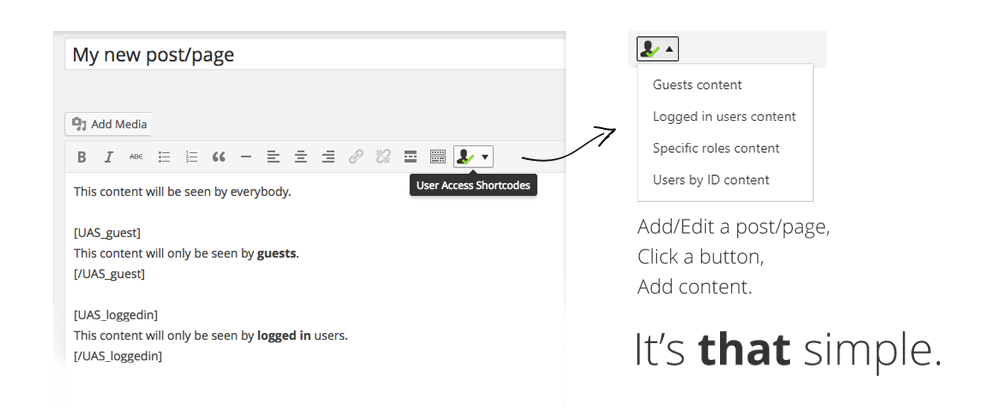
Simple, hassle-free content restrictions
Changelog
2.3
- Added inverse parameter to allow hide the content in specific cases
2.2
- Added show/hide content for specific roles
- Simplified usage
2.1.1
- Fixed nested shortcode issue
2.1
- Better shortcode support (nested)
2.0
- Added new minor features
- Can show/hide content for users by ID
1.3
- Nested shortcodes support
1.2
- Minor fixes
1.1
- Minor bug fix
1.0
- Initial release (yay!)