

User Menu Customizer for HivePress
Easily customize or hide the user menu for HivePress in the header navigation using the WordPress Customizer.
Plugin info
Maintenance & Compatibility
Maintenance score
Stale • Last updated 307 days ago
Is User Menu Customizer for HivePress abandoned?
Likely maintained (last update 307 days ago).
Compatibility
Similar & Alternatives
Explore plugins with similar tags, and compare key metrics like downloads, ratings, updates, support, and WP/PHP compatibility.
Description
User Menu Customizer for HivePress allows you to personalize the HivePress user account menu in the header navigation without coding. This plugin addresses the lack of native customization options in HivePress, offering a user-friendly interface to:
– Toggle visibility of the user menu and its submenu (Listings, Settings, Sign Out).
– Customize text/icon color and background color.
– Adjust padding inside the menu button.
All settings are managed via Appearance > Customize > HivePress User Menu. This plugin requires the HivePress plugin to be installed and active.
Installation
- Upload the
user-menu-customizer-for-hivepressfolder to the/wp-content/plugins/directory. - Activate the plugin through the ‘Plugins’ menu in WordPress.
- Go to Appearance > Customize > HivePress User Menu to configure settings.
Frequently Asked Questions
Yes, this plugin requires the HivePress plugin to be installed and active.
Absolutely! All customizations are done via the WordPress Customizer, no coding required.
Review feed
Screenshots
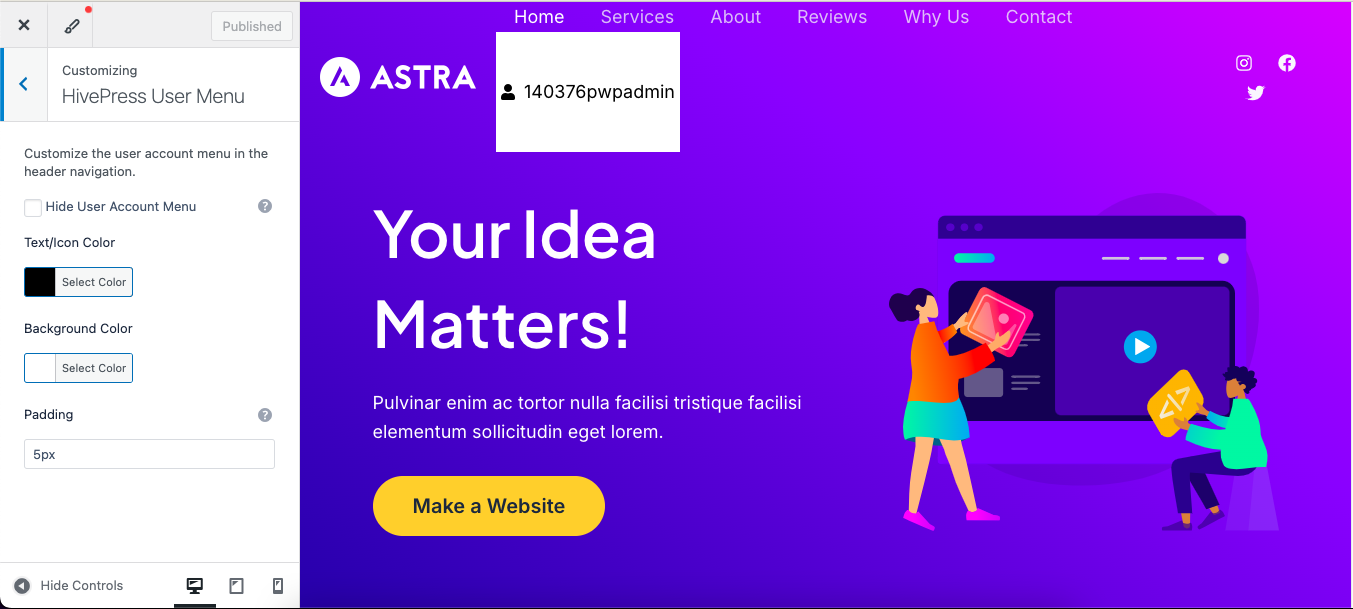
Customizer settings for hiding and styling the user menu.

User menu with customized colors and padding.
Changelog
1.0.1
- Added support for hiding and customizing the “Sign In” button for visitors (class: menu-item–user-login) using the same Customizer settings.
- Updated Customizer descriptions for clarity.
1.0.0
- Initial release.