
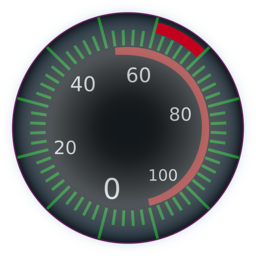
Maintenance 42/100329d since update
Active installs
4,000
Downloads
23,735
Reviews
13
Age
6.0y
Plugin info
Total downloads: 23,735
Active installs: 4,000
Total reviews: 13
Average rating: 5
Support threads opened: 0
Support threads resolved: 0 (0%)
Available in: 1 language(s)
Contributors: 1
Last updated: 5/8/2025 (329 days ago)
Added to WordPress: 4/22/2020 (5 years old)
Minimum WordPress version: 5.2
Tested up to WordPress version: 6.8.3
Minimum PHP version: 7.0
Maintenance & Compatibility
Maintenance score
Stale • Last updated 329 days ago • 13 reviews
42/100
Is User Posts Limit abandoned?
Likely maintained (last update 329 days ago).
Compatibility
Requires WordPress: 5.2
Tested up to: 6.8.3
Requires PHP: 7.0
Similar & Alternatives
Explore plugins with similar tags, and compare key metrics like downloads, ratings, updates, support, and WP/PHP compatibility.
Role Based Storage Limiter
Rating 5.0/5 (1 reviews) • Active installs 10
Loggedin – Limit Concurrent Sessions
Rating 4.9/5 (108 reviews) • Active installs 8,000
GD bbPress Attachments
Rating 4.3/5 (26 reviews) • Active installs 7,000
Title Limit for WooCommerce
Rating 4.7/5 (20 reviews) • Active installs 5,000
Custom Post Limits
Rating 4.3/5 (6 reviews) • Active installs 2,000
Limit Revisions
Rating 5.0/5 (5 reviews) • Active installs 2,000
Description
Limit the number of posts user can create. Any post type.
How To Use
- Plugin Settings: Select role, post type, limit, and cycle.
How It Works
- On post creation the number of posts from this post type belong to this user for the specified cycle will be counted and if applicable the post creation will be prevented.
Features
- Post Creation Limits: Limit the number of posts each user role can create daily/weekly/monthly/yearly/ever.
- Hide Content: In order to make some content hidden when posts limit exceeded wrap it with the shortcodes (replace "post" with the post type of the relevant rules): [upl_hide type="post"][/upl_hide]
- Display Limits: Display the limits to the user anywhere with the [upl_limits] shortcode.
- Users Stats: Track how many posts each user used from his quota.
- Multisite: Network-wide rules can be applied via the Network Admin Dashboard (doesn’t support the Hide Content, Display Limits and Users Stats features).
- Integrations: WooCommerce, Paid Memberships Pro, MyListing theme, Restrict Content Pro, PeepSo, WordPress REST API.
- Limits per User: Set limits per user (see instructions in docs).
Installation
Minimum Requirements
WordPress 5.2 or greater
PHP 7.0 or greater
Automatic installation
- Go to your Dashboard => Plugins => Add new
- In the search form write: Condless
- When the search return the result, click on the Install Now button
Manual Installation
- Download the plugin from this page clicking on the Download button
- Go to your Dashboard => Plugins => Add new
- Now select Upload Plugin button
- Click on Select file button and select the file you just download
- Click on Install Now button and the Activate Plugin
Frequently Asked Questions
- The counts include posts in trash/draft/pending status
- Limits will not be applied on users with the Plugin Management Capability or (in multisite) the create_users capability
- The post creation date and not the post published date is taken into account when using the cycle option
Insert shortcode widget with [upl_hide type="post"][/upl_start] before your content and another shortcode widget with [/upl_hide] after your content.
Review feed
babylonix
Отличный плагин
То что надо!
Ludovic S. Clain
Possibilities are really interesting for a multisite installation
With a little elbow grease, the possibilities are really interesting for a multisite installation, such as limiting the total number of WooCommerce products per site (regardless of the author). The plugin is not easy to learn, not very intuitive and would surely deserve to be more explicit on certain settings, however, it does the job and the author is responsive and attentive… so I recommend it 👍
Screenshots
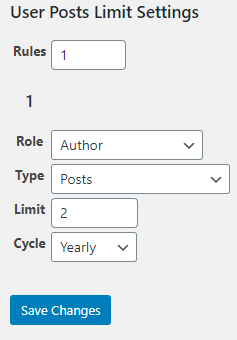
User Posts Limit Plugin Settings

Post creation limit notification
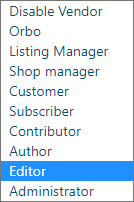
Role option

Post type option

Users Screen stats
Changelog
1.2.3 – May 8, 2025
- Enhancement – WordPress version compatibility
1.2.2 – November 12, 2024
- Dev – WP compatibility
1.2.1 – May 22, 2024
- Dev – WP compatibility
1.2 – March 1, 2024
- Dev – WP compatibility
1.1.9 – October 12, 2023
- Dev – WP compatibility
1.1.8 – June 30, 2023
- Dev – WP compatibility
1.1.7 – March 18, 2023
- Dev – WP compatibility
1.1.6 – December 22, 2022
- Dev – WP compatibility
1.1.5 – August 19, 2022
- Dev – WP compatibility
1.1.4 – June 1, 2022
- Dev – User’s stats enabled by default
1.1.3 – April 10, 2022
- Dev – WP compatibility
1.1.2 – February 27, 2022
- Dev – Query speed improvement
1.1.1 – January 5, 2022
- Dev – Current post type filter and Messages filter
1.1 – July 28, 2021
- Dev – WP compatibility
1.0.9 – June 30, 2021
- Dev – WP compatibility
1.0.8 – April 7, 2021
- Dev – Date filter
1.0.7 – February 13, 2021
- Dev – Cycle limit by GMT time
1.0.6 – October 12, 2020
- Feature – Rules Filters
1.0.5 – September 22, 2020
- Feature – WPMU support
1.0.4 – September 16, 2020
- Feature – Rules priority
1.0.3 – September 08, 2020
- Feature – Hide content shortcode
1.0.2 – August 25, 2020
- Feature – Users stats
1.0.1 – April 20, 2020
- Feature – Timing rule
1.0 – April 10, 2020
- Initial release