
User Registration & Last Login Time
Display registration date and last login time for users.
Plugin info
Maintenance & Compatibility
Maintenance score
Possibly abandoned • Last updated 810 days ago
Is User Registration & Last Login Time abandoned?
Possibly abandoned (last update 810 days ago).
Compatibility
Languages
Similar & Alternatives
Explore plugins with similar tags, and compare key metrics like downloads, ratings, updates, support, and WP/PHP compatibility.
Description
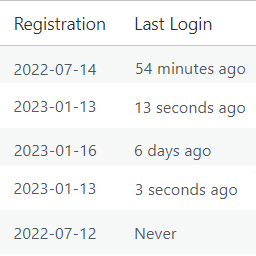
This plugin will add new columns in the WordPress user list table, one column is for Registration Date and the other column is for Last Login. The last login column will display the time ago format or “Never” if the user has never logged in.
For more free WordPress plugins please visit ♣️ plugins.club.
Installation
- Upload the plugin file to the
/wp-content/plugins/directory. - Activate the plugin through the ‘Plugins’ menu in WordPress.
Under the Users list table you will notice two new columns: Registration Date and Last Login
For basic usage, you can also have a look at the plugin web site.
Frequently Asked Questions
WordPress doesn’t keep track of login times at all, so the plugin adds this functionality and thus it can only keep track of logins that have occurred after the plugin has been activated.
This plugin should work for a multisite installation as long as it is network activated and the proper hooks and filters are used. However, it’s worth noting that the last_login time will only be saved for the site where the user last logged in, and not across the entire network.
No.
Review feed
Screenshots

Users page showing Registration and Last login time
Changelog
1.0
- Initial release