

User Spam Remover
Automatically removes spam user registrations and other old, unused user accounts. Blocks annoying e-mail to administrator after new registrations.
Plugin info
Maintenance & Compatibility
Maintenance score
Possibly abandoned • Last updated 761 days ago • 18 reviews
Is User Spam Remover abandoned?
Possibly abandoned (last update 761 days ago).
Compatibility
Similar & Alternatives
Explore plugins with similar tags, and compare key metrics like downloads, ratings, updates, support, and WP/PHP compatibility.
Description
User Spam Remover is a plugin for WordPress that automatically removes spam user registrations and other old, never-used user accounts. It also blocks the notification e-mail that WordPress normally sends to the administrator whenever a new user registers (annoying when that registration is spam!) and logs it instead.
The plugin adds a configuration panel so that all of these options can be turned on or off, and it logs and fully backs up all user accounts that it deletes, so that you can restore them if you need to.
Features:
-
Automatically deletes user registration spam and other orphaned, never-used accounts.
-
Very simple, enable and go! Doesn’t interfere with the normal user registration process in any way. So, it doesn’t add captchas or activation or anything else — you’re free to use it alongside a plugin that does, if you like.
-
Blocks notification e-mail that WordPress normally sends to the administrator every time a new user registers (instead, logs this event).
-
Fully configurable, with grace period for new accounts and optional username whitelist.
-
Fully logs all actions and backs up all user accounts that it deletes so that you can seamlessly restore them if you ever need to.
Please see requirements and installation instructions below, or online in the WordPress support forum.
For more information, please go to: https://lyncd.com/user-spam-remover/
Installation
Requirements:
-
PHP 5.1+ (tested with PHP 5.2-8.2)
-
MySQL using PHP mysqli extension (read on for details)
-
WordPress 3.9+
If you are strictly assigning MySQL privileges, note that the plugin adds two column indexes, so your database account must be assigned the ALTER and CREATE privileges (if you don’t know what this means, don’t worry, you probably already have this).
-
Download, unzip and upload into your plugins directory. (Or, install through the plugins menu in WordPress.)
-
Go to the Plugins configuration screen in WordPress and activate. Look for the settings link to go to the User Spam Remover settings page (User Spam Remover also gets added to the left menu under “Users”).
Note: if you see mysqli errors at the top of the activation or settings page, you need to tell WordPress use use the
mysqliextension instead of the oldermysqlone. Add this line to yourwp-config.php(insert it next to all the other DB settings, near the top):define('WP_USE_EXT_MYSQL', FALSE); -
On the settings page, you’ll need to click the “Enable” checkbox to turn the plugin on. Scroll down and change any options you like. Click “Save Changes.”
One note on logging: By default, all logging is enabled (good!), but the log directory is set to a filesystem location that may not be writable by the webserver, or where you may not want it. I recommend you change this directory to someplace else (i.e., if the root of your site is
/www/mysite/html, you could make a directory like/www/mysite/log). Be sure to usechmodor your FTP program to make this directory webserver-writable (User Spam Remover will warn you if it’s not). -
Once you’re done, that’s it! Feel free to use the blue “Remove spam/unused accounts now” button to test it out. User Spam Remover will run once a day automatically from now on.
Frequently Asked Questions
Please see the updated FAQ online at: https://lyncd.com/user-spam-remover/faq/
Review feed
Effective
Fatal PHP error about mysqli on activation
It works!
Screenshots
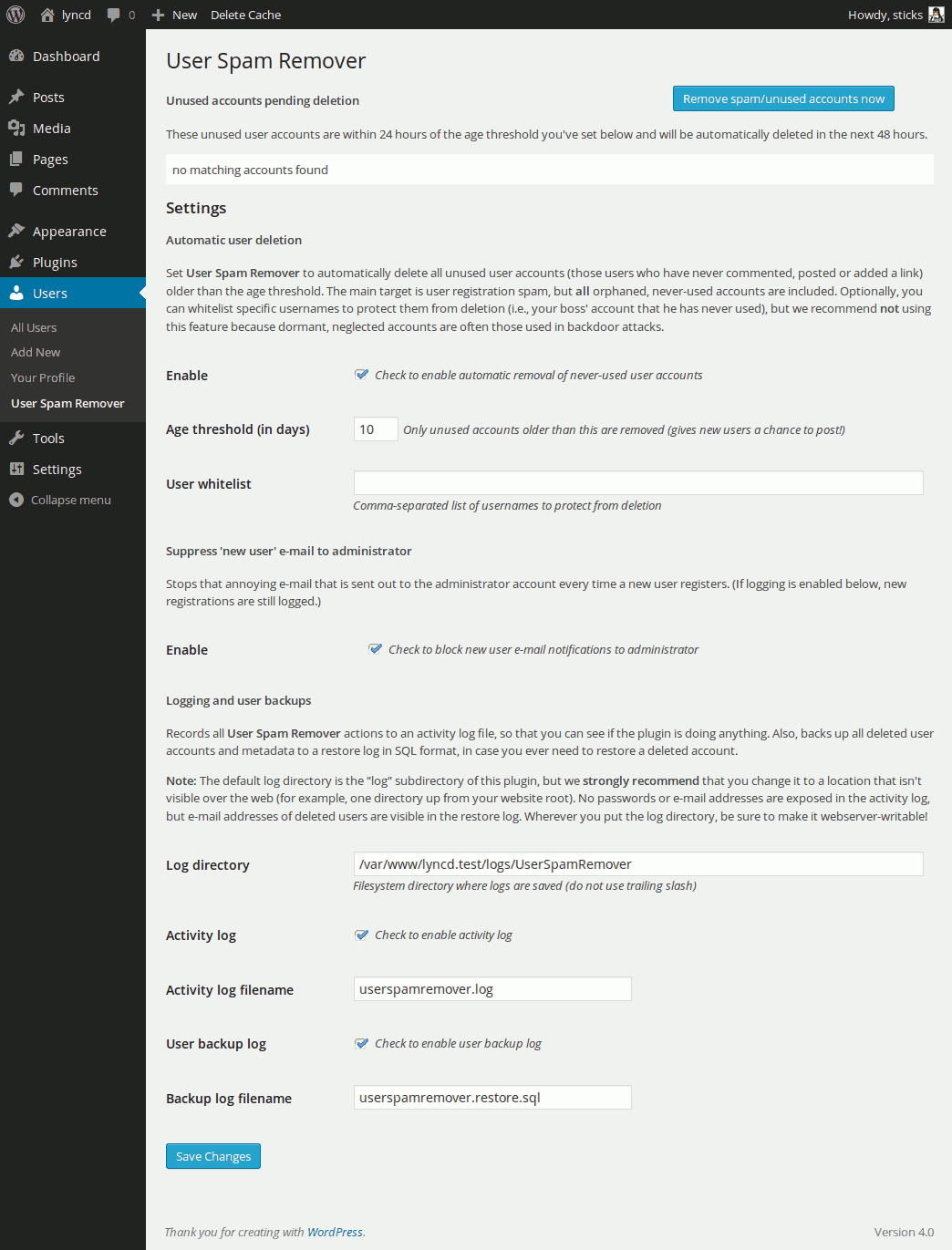
The plugin's exciting configuration screen (added under WordPress' Users menu).
Changelog
1.1
- Changed default filesystem log location to not be inside the plugin directory. This means the default is no longer www-visible, but new users really should set the Log Directory after installing the plugin because the default may not be webserver-writable.
1.0
- Bump to 1.0. No changes to core functionality. For existing users there is no urgent reason to upgrade to this version.
- Improved error message when
mysqliis not enabled. - Reformat of readme.txt due to wordpress.org redesign of their plugin directory.
0.9.9
- Update to code that suppresses new user registration notification email. WordPress core made a change to the API starting with version 4.3.0 of WordPress, so this update to User Spam Remover fixes the problem where the user gets a bogus registration notification email and is unable to complete site registration. Props to Oliver @ www.webmandesign.eu for the report.
0.9.8
-
Now requires mysqli. If your PHP version is < 5.5 you may need to force WordPress to use
mysqliinstead of the oldermysqlextension. Just add this line towp-config.php, near the top by the other DB settings:define('WP_USE_EXT_MYSQL', FALSE);
0.9.1
- Now detects and adds absent MySQL indexes to wp_comments.user_id and wp_links.link_owner columns. Greatly speeds performance and enables use on much larger databases. Big props to Raph Koster for help debugging!
- Enables MySQL sql_big_selects config var at runtime for use on shared hosts and other installations where this is disabled by default.
- MySQL SELECT errors now logged/shown to the user as appropriate.
- Hard limit of 1000 users per deletion to prevent long-running operations. Upped limit to 10000 records per SELECT, thanks to improved SQL and indexes.
- No longer deletes users with only comments marked as “spam.” This is a small functional regression, but it speeds SQL performance. Once the spam is permanently removed these users will be deleted anyway.
- Minor bug fix affecting settings page user list display w/ bbPress users.
- Changes to method visibility. Many previously public methods now protected.
- Code refactoring.
0.9
- Version/compatibility bump so that wordpress.org plugin repository info is accurate.
- Added check for wp_usermeta ‘last_posted’ record so that users of database-integrated bbPress installations are not deleted if they have ever posted anything.
- Added hard limit of 5000 records to prevent long-running operations.
- Added a list of user accounts pending deletion to the settings page.
- Style fix to inline error messages per r16205 changes to WordPress core file wp-admin/css/colors-fresh.dev.css.
- Miscellaneous minor style fixes.
0.3
- Added standard WordPress Users section icon and printing of status message on options update.
- Updated deprecated PHP syntax for string access by character in lcfirst().
- Very minor refactoring and tweak of message text.
0.2
- Fixed weird edge case where no usermeta records exist for a given user.
Before: this caused user removal to abort and an error message to be logged.
Now: any such users are deleted. - Added nonce checking to “Remove now” button on admin page.
- Slight code refactor to remove buried strings.
- Cosmetic change to log strings so plural “s” not added to singular words.
0.1
- Initial public release.
- Tested using WordPress 3.0.1 and PHP 5.2.6 and 5.2.14.