

Variable Product Swatches for WooCommerce
Color, Image, Button and Radio Swatches For WooCommerce Variable Product Attributes
Plugin info
Maintenance & Compatibility
Maintenance score
Possibly abandoned • Last updated 1280 days ago
Is Variable Product Swatches for WooCommerce abandoned?
Possibly abandoned (last update 1280 days ago).
Compatibility
Similar & Alternatives
Explore plugins with similar tags, and compare key metrics like downloads, ratings, updates, support, and WP/PHP compatibility.
Description
Variable Product Swatches for WooCommerce is altimate solution for Color, Image, Button and Radio Swatches For WooCommerce Variable Product Attributes
Features
- 4 Custome attributes, Color, Image, Button and Radio.
- Details settings page to customize design and functions.
- Quick support.
Contribute
This may have bugs and lack of many features. If you want to contribute on this project, you are more than welcome. Please fork the repository from Github.
Documentation
Getting Started with Variable Product Swatches for WooCommerce is only a matter of moments.
Check out the detailed documentation created by us to help you out to run Variable Product Swatches for WooCommerce in the best way.
LINKS
Installation
Automatic Install From WordPress Dashboard
- Login to your the admin panel
- Navigate to Plugins -> Add New
- Search Variable Product Swatches for WooCommerce
- Click install and activate respectively.
Manual Install From WordPress Dashboard
If your server is not connected to the Internet, then you can use this method-
- Download the plugin by clicking on this Link. A ZIP file will be downloaded.
- Login to your site’s admin panel and navigate to Plugins -> Add New -> Upload.
- Click choose file, select the plugin file and click install
Install Using FTP
If you are unable to use any of the methods due to internet connectivity and file permission issues, then you can use this method-
- Download the plugin by clicking on the red button above. A ZIP file will be downloaded.
- Unzip the file.
- Launch your favorite FTP client. Such as FileZilla, FireFTP, CyberDuck etc. If you are a more advanced user, then you can use SSH too.
- Upload the folder to
wp-content/plugins/ - Log in to your WordPress dashboard.
- Navigate to Plugins -> Installed
- Activate the plugin
Frequently Asked Questions
Even this plugin has been installed and activated on your site, variable products will still show dropdowns if you’ve not configured product attributes.
- Log in to your WordPress dashboard, navigate to the Products menu and click Attributes.
- Click attribute name to edit an exists attribute or in the Add New Attribute form you will see the default Type selector.
- Click that Type selector to change attribute’s type. Besides default options Select and Text, there are more 4 options Color, Image, Button/Label, Radio to choose.
- Select the suitable type for your attribute and click Save Change/Add attribute
- Go back to manage attributes screen. Click the cog icon on the right side of attribute to start editing terms.
- Start adding new terms or editing exists terms. There will be a new option at the end of the form that allows you choose color from colorpicker, upload image or choose as a button for those terms.
Yes, it’s compatible with any WooCommerce theme. If any issue with you theme you can contact us, we will fix that.
Yes, it supports any kinds of product quick view.
Yes, it is.
Review feed
Screenshots

Attributes Type

Color Attribute Type
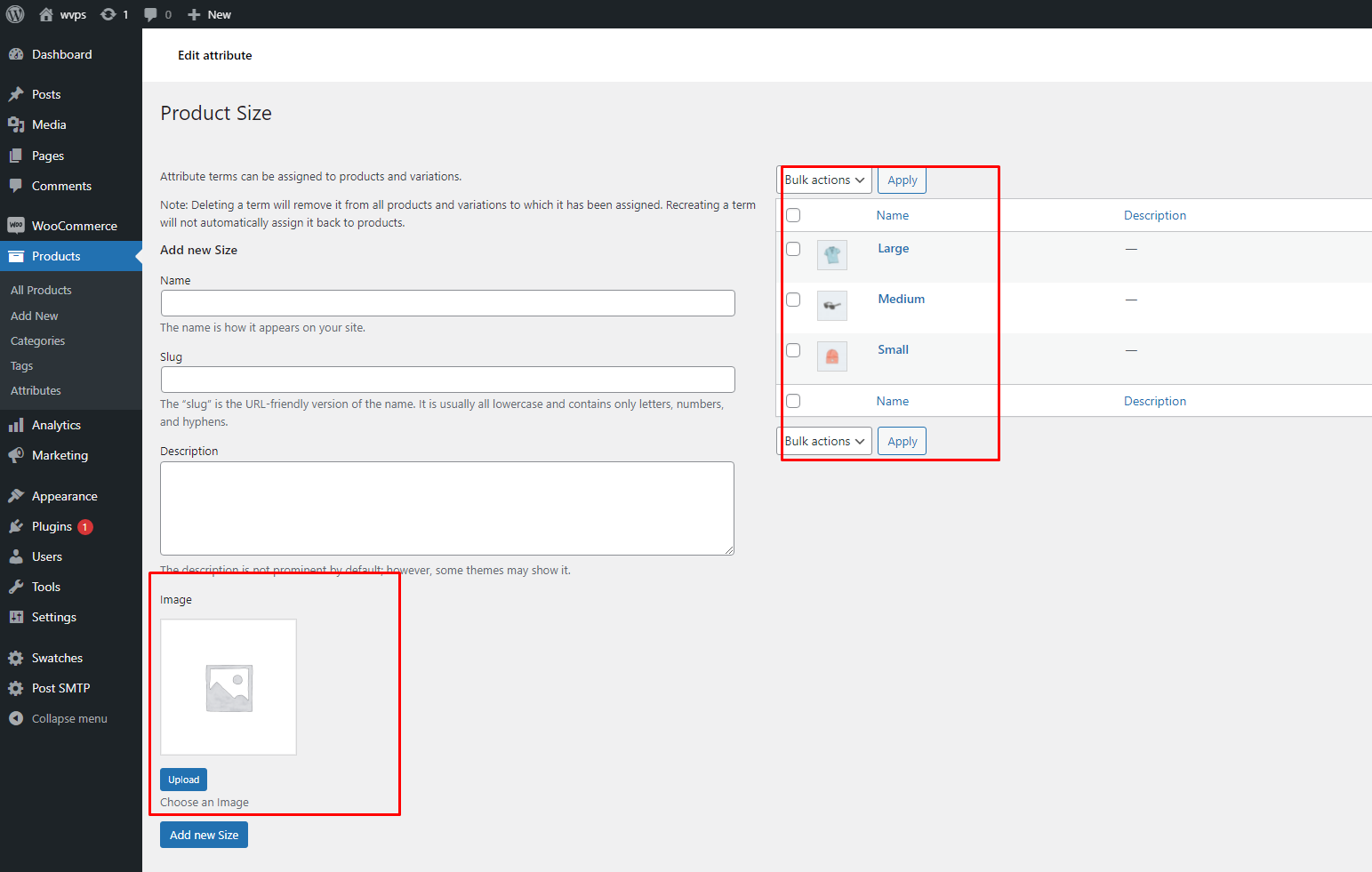
Image Attribute Type
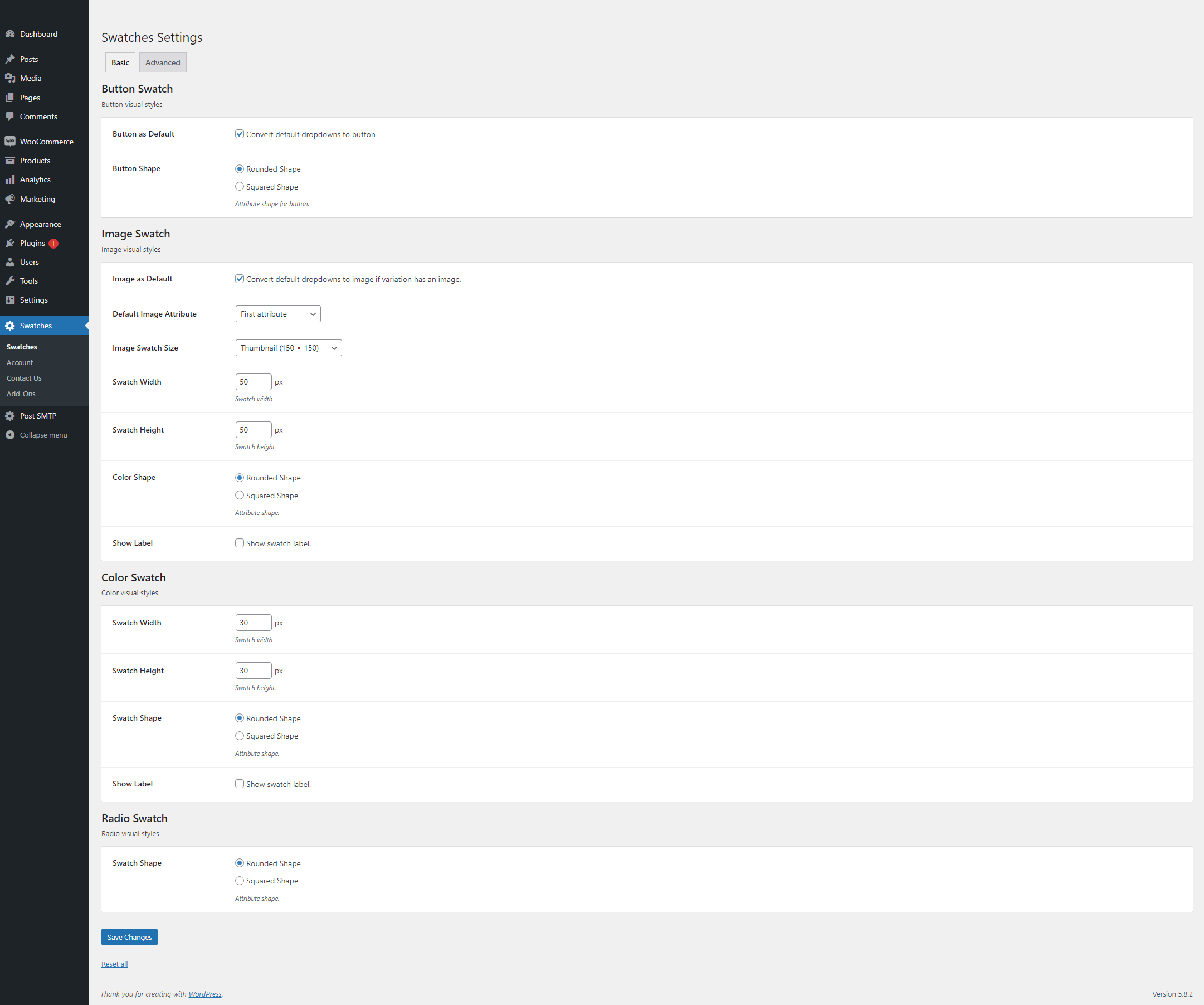
Settings Basic

Settings Advanced

Front View
Changelog
1.0.4
- bug fix
1.0.1
- Media upload bug fix
= 1.0.0 – 20 January 2022=
* Initial release