

Velocity – Video Lazy Loading for YouTube, Twitch and Vimeo
Improve website performance by lazy loading and customizing your YouTube, Vimeo, Twitch and SoundCloud media embeds.
Plugin info
Maintenance & Compatibility
Maintenance score
Possibly abandoned • Last updated 2283 days ago • 6 reviews
Is Velocity – Video Lazy Loading for YouTube, Twitch and Vimeo abandoned?
Possibly abandoned (last update 2283 days ago).
Compatibility
Similar & Alternatives
Explore plugins with similar tags, and compare key metrics like downloads, ratings, updates, support, and WP/PHP compatibility.
Description
Velocity is an alternative loading method to the standard to YouTube, Vimeo, Twitch and Soundcloud iframe embeds.
With Velocity you will decrease the loading time and increase overall performance of your website by lazy loading media on-demand instead of on initial page load.
To add Velocity to your site, simply create a Velocity shortcode by selecting a preview image and media type using the intuitive shortcode builder then add the generated snippet to your page.
Shortcode Parameters
- type – Choose a media type [youtube, vimeo, twitch, soundcloud].
- id – The ID of the media item.
- options – Add optional styling and display parameters for the embedded media – e.g. rel=0&controls=0&showinfo=0.
- playlist – Is this a Soundcloud playlist [true/false].
- img – The path to the preview image.
- alt – The alternative text to be attached to the preview image.
- color – Play button arrow color.
- bkg_color – Play button background color.
Example Shortcode
[velocity type="youtube" id="239793212" img="http://yourwebsite.com/wp-content/uploads/2016/01/image-1263626715.jpg" alt="Play Video"]
Tested Browsers
- Firefox (Mac, PC)
- Chrome (Mac, PC, iOS, Android)
- Safari (Mac, iOS)
- IE10+
- Android (Native)
- BB10 (Native)
Website
https://connekthq.com/plugins/velocity/
Installation
How to install Velocity.
Using The WordPress Dashboard
- Navigate to the ‘Add New’ in the plugins dashboard
- Search for ‘Velocity’
- Click ‘Install Now’
- Activate the plugin on the Plugin dashboard
Uploading in WordPress Dashboard
- Navigate to the ‘Add New’ in the plugins dashboard
- Navigate to the ‘Upload’ area
- Select
velocity.zipfrom your computer - Click ‘Install Now’
- Activate the plugin in the Plugin dashboard
Using FTP
- Download
velocity.zip - Extract the
velocitydirectory to your computer - Upload the
velocitydirectory to the/wp-content/plugins/directory - Activate the plugin in the Plugin dashboard
Frequently Asked Questions
What are the steps to getting Velocity integrated on my website
- Create your Velocity shortcode.
- Add the shortcode to your page, by adding it through the content editor or placing it directly within one of your template files.
- Load a page with Velocity in place, click the preview image and load your media.
Review feed
works great, missing some key features
Screenshots

Settings.
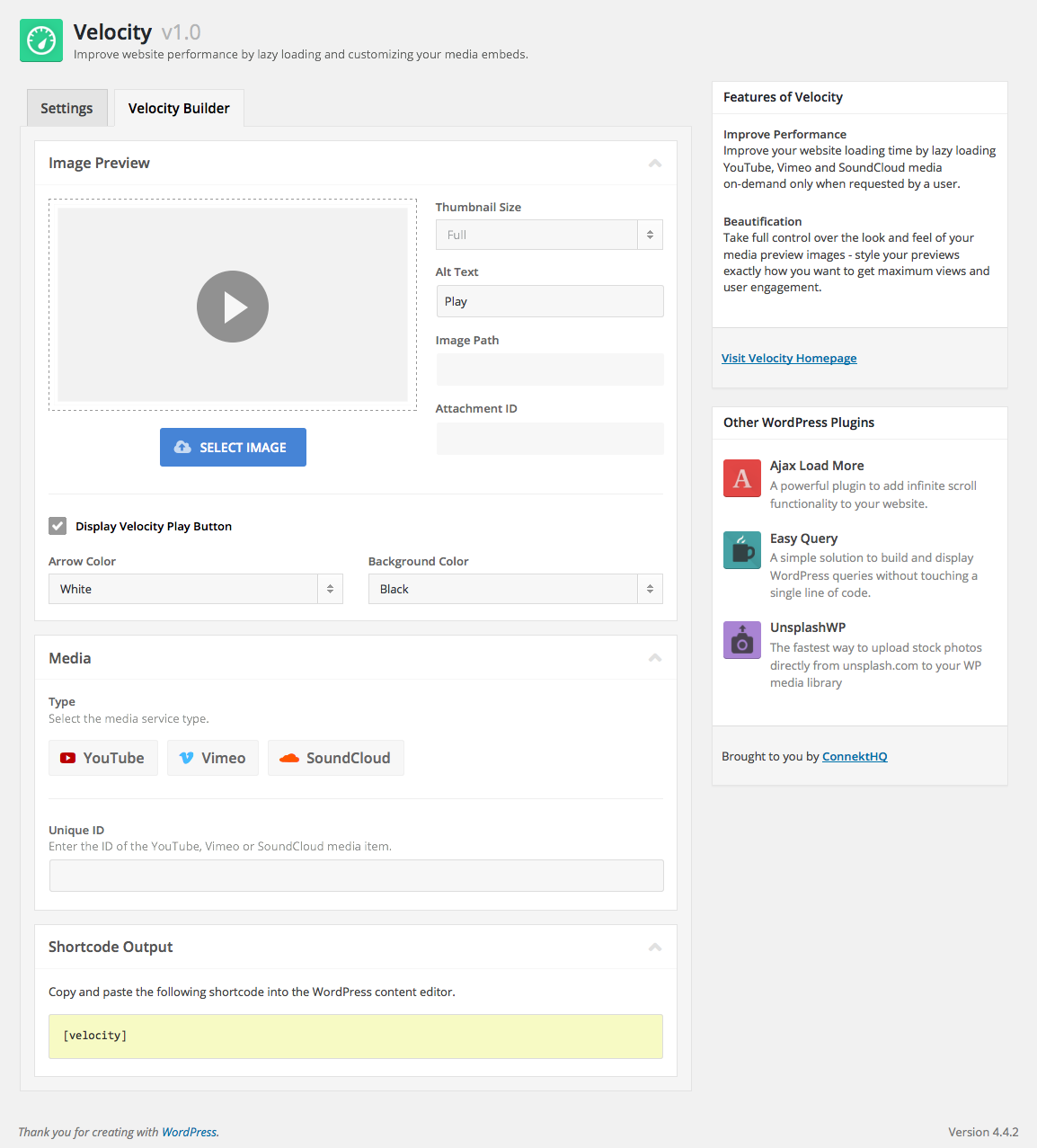
Velocity shortcode builder.

Add Velocity (page/post edit screen).

Velocity lightbox (page/post edit screen).
Changelog
1.2.1 – January 4, 2020
- UPDATE – Update admin CSS styling for issues with new WordPress 5.3 accessibility styles.
- UPDATE – Improved meta data classes.
1.2.0 – July 23, 2019
- NEW – Added Twitch support.
- NEW – Added responsive styling for play button.
- NEW – Added focus state for accessibility.
- NEW – Add SEO Metadata to YouTube, Vimeo and Twitch embeds. YouTube and Twitch metadata is still a work in progress and will be evolving.
- FIX – Removed issue with
.clearfixclass causing issue with page builders
1.1.1 – March 17, 2017
- FIX – Patch for PHP warning regarding $soundcloud_type variable.
1.1 – March 14, 2017
- Added fade out transition from preview image to media embed.
- Added new
optionsshortcode parameter to pass various options to embed video – e.g. autoplay=1&loop=1&title=0 - Added support for Soundcloud playlists – e.g. [velocity type=”soundcloud” playlist=”true” id=”1659224″ alt=”Play” color=”#FFFFFF” bkg_color=”#000000″]).
- UI Updates and enhancements.
1.0.1 – May 10, 2016
- Adding .min js file
- Adding support for loading Velocity media with Ajax
1.0 – March 3, 2016
- Initial Plugin Release