

Maintenance 22/1001347d since update
Active installs
100
Downloads
7,735
Reviews
3
Age
10.7y
Plugin info
Total downloads: 7,735
Active installs: 100
Total reviews: 3
Average rating: 4
Support threads opened: 0
Support threads resolved: 0 (0%)
Available in: 1 language(s)
Contributors: 1
Last updated: 7/25/2022 (1347 days ago)
Added to WordPress: 8/10/2015 (10 years old)
Minimum WordPress version: 3.5.0
Tested up to WordPress version: 6.0.11
Minimum PHP version: f
Maintenance & Compatibility
Maintenance score
Possibly abandoned • Last updated 1347 days ago • 3 reviews
22/100
Is Vertical Carousel abandoned?
Possibly abandoned (last update 1347 days ago).
Compatibility
Requires WordPress: 3.5.0
Tested up to: 6.0.11
Requires PHP: f
Similar & Alternatives
Explore plugins with similar tags, and compare key metrics like downloads, ratings, updates, support, and WP/PHP compatibility.
Client Logo Carousel
Rating 4.5/5 (40 reviews) • Active installs 8,000
WE – Client Logo Carousel
Rating 0.0/5 (0 reviews) • Active installs 30
Description
Display vertical carousel slider with the help of a shortcode.
Using shortcode [vertical-carousel-slider] , we can show carousel slider on page.
Plugin Features
- Simple and light weight
- Shortcode based
- Ability to add links to each image
- Easy to customize
- Looks cool :).
Installation
- Upload the folder “wp-vertical-carousel-slider” to “/wp-content/plugins/” ‘
- Activate the plugin through the “Plugins” menu in WordPress .
- Add carousel image going to wp-admin->Vertical Carousel->Add New Image.
-
Call shortcode to your wordpress editor directly , by using
[vertical-carousel-slider]
Call shortcode to your php template file ,using
<?php echo do_shortcode('[vertical-carousel-slider]'); ?>
Frequently Asked Questions
- No technical skills needed.
Review feed
No reviews available
Screenshots

Back end add carousel image(go to wp-admin->Vertical Carousel->Add New Image.)

Back end vertical carousel image listing page(go to wp-admin->Vertical Carousel)
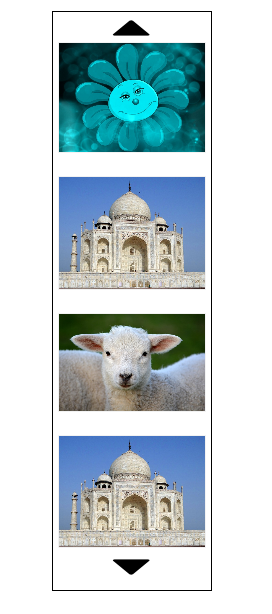
Front end look of vertical carousel slider.
Changelog
1.0.2
- Bug fixes
- Update readme.txt
1.0.1
- Bug fixes
- Update readme.txt
1.0.0
- Initial release